


To download a Company Registration Certificate online, log in to the MCA V3 portal, open Get Certified Copies under Document Related Services, search by CIN or company name, and pay the prescribed fee. Under Section 399(1)(b) of the Companies Act, 2013, you can also obtain a certified copy of a company’s Certificate of Incorporation or other ROC-filed documents by paying the prescribed fee (starting from ₹100).
The Company Registration Certificate, also known as a Certificate of Incorporation (COI), issued by ROC serves as legal proof of the company’s existence and separate legal identity. Businesses often need it to open a bank account, apply for GST registration, sign vendor agreements, participate in tenders, and complete investor or lender due diligence.
Key Takeaways
- The MCA issues the Company Registration Certificate, also called the Certificate of Incorporation (COI), digitally through the MCA V3 portal.
- Access the certificate through MCA Services → Document Related Services → Get Certified Copies.
- The digitally signed COI emailed by the MCA after incorporation is legally valid for most official purposes, so you may not need to request another copy.
- Request a certified copy when the original COI is unavailable or an authority specifically requires one. The request attracts the applicable MCA fee and stamp duty.
- Keep your CIN, company name, incorporation year, MCA login credentials, and a valid payment method ready before starting the request.
- The MCA provides the Certificate of Incorporation only in digital format. No physical certificate is issued.
When Do You Need to Download the Company Incorporation Certificate?
Businesses need a COI in the following situations:
- Opening a current bank account for business banking and KYC verification.
- Applying for GST registration to prove your company’s legal existence.
- Registering under MSME (Udyam) or Startup India (DPIIT).
- Raising funds or completing investor and lender due diligence.
- Applying for government tenders, business licences, or regulatory registrations.
- Completing vendor or client onboarding and signing commercial agreements.
- Applying for business loans or credit facilities from banks and NBFCs.
- Filing annual income tax returns and ROC, whenever required.
What Do You Need Before You Begin to Download the Certificate of Incorporation?
Before you begin the process to download the Company Incorporation Certificate, keep the following information ready:
- Corporate Identification Number (CIN) or the exact registered company name as on MCA records
- MCA user account credentials. If you don’t have an account, you can create one free of charge on the MCA portal using PAN, mobile, email, and OTP.
- A valid payment method via credit card, debit card, UPI, NEFT, or net banking for the government fee.
- The financial year in which the company was incorporated.
Tip: If you do not remember your CIN, search for your company by name directly on the MCA portal’s company search feature.
How to Download Company Registration Certificate from the MCA Portal?
Follow these steps to successfully download the Company Registration Certificate:
Step 1: Log in to the MCA Portal

- Visit mca.gov.in and sign in with your registered user ID and password.
- If you don’t have an MCA account, click on Register and complete the signup using your PAN, email address, and mobile number.
Account creation is free and takes under two minutes.
Note: A Registered User account is sufficient to download certified copies of your company’s COI through the Get Certified Copies service. You only need a Business User account if you plan to file company forms or carry out professional filings on the MCA portal.
Account creation is free and takes under two minutes.
Step 2: Go to MCA Services
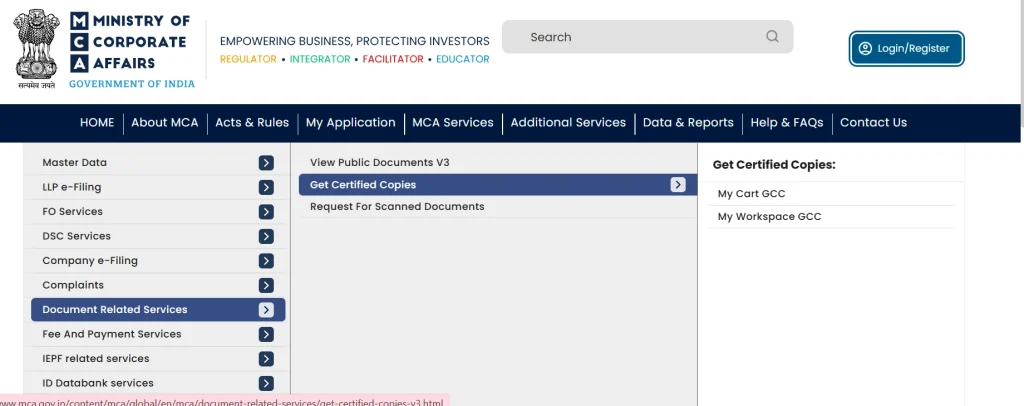
- From the top navigation menu, click on MCA Services.
- A dropdown appears with several options. From this, select Document Related Services and then Get Certified Copies.
- The service expands into two sub-links, My Cart GCC and My Workspace GCC.
This is the official pathway to access certified documents filed with the Registrar of Companies, including the Certificate of Incorporation.
Step 3: Search for Your Company
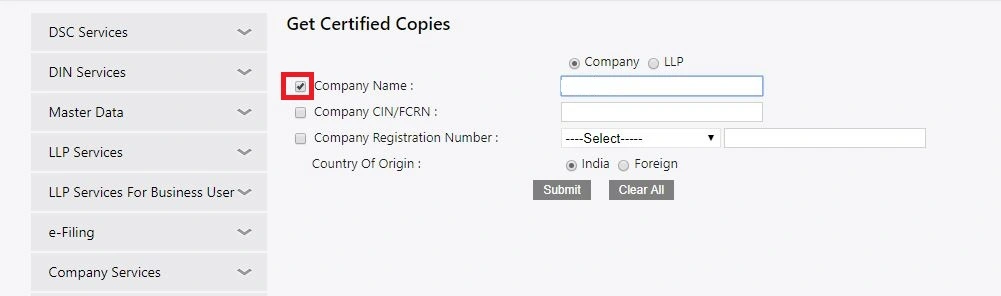
- Enter your CIN or the exact registered name of your company in the search field. The portal displays matching results.
- Select the correct company from the list.
Tip: Double-check the company name and state before proceeding, as similar company names exist across different states.
Step 4: Select the Certificate of Incorporation
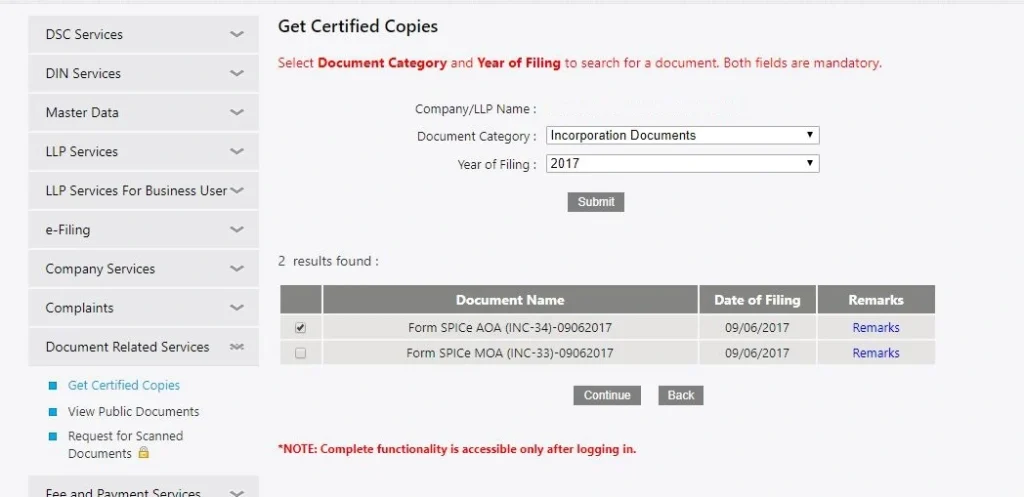
- From the list of documents associated with your company, select the Certificate of Incorporation.
- Choose the relevant year of filing, after which the portal will display the available documents for that period.
Step 5: Enter Page Range and Number of Copies
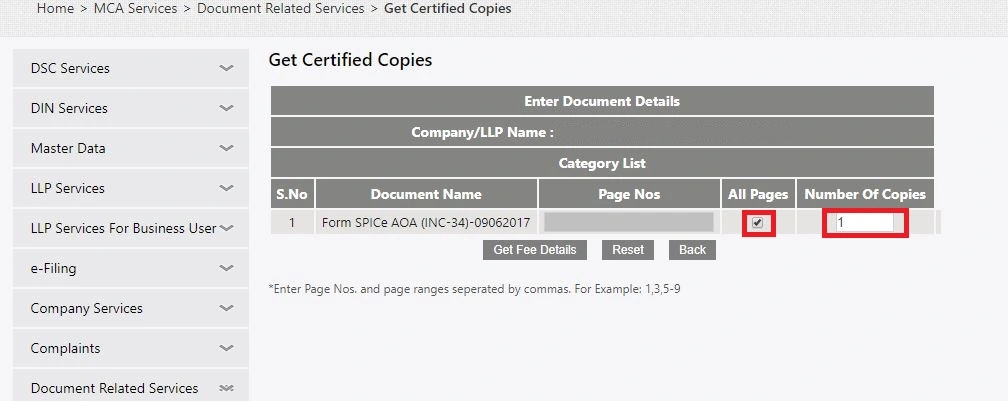
Enter the page numbers and the number of certified copies you need.
Note: Even if the certificate is a single page, the portal requires you to enter a page range.
Step 6: Add Attachments Separately
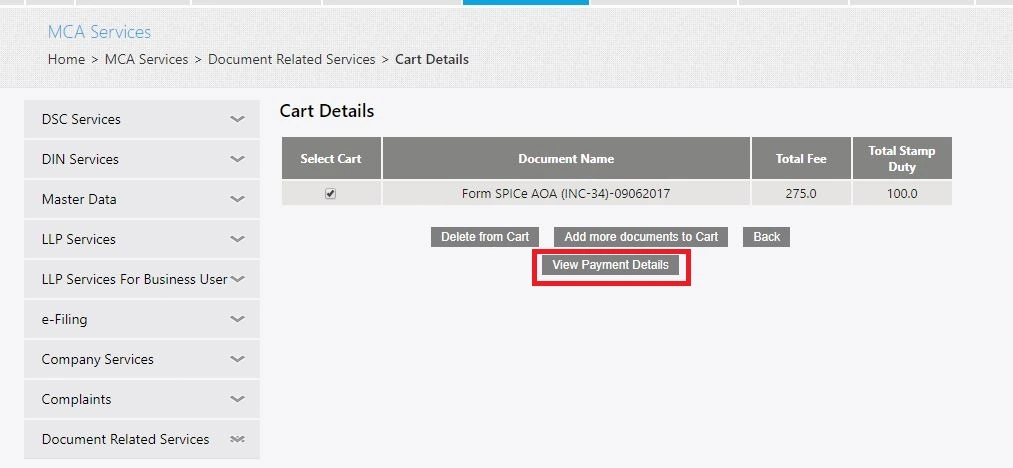
Selecting the Certificate of Incorporation does not automatically include the incorporation documents filed with the MCA. The portal treats the certificate and its supporting documents as separate records.
If you need a complete set of incorporation documents, manually select each attachment before adding the request to your cart. These commonly include:
- SPICe+ (Form INC-32): The main incorporation application filed with the MCA.
- e-MOA (Form INC-33): The Memorandum of Association, which defines the company’s objectives and scope of business.
- e-AOA (Form INC-34): The Articles of Association, which contain the company’s internal management and governance rules.
- Other incorporation attachments, such as declarations or supporting documents, were filed during incorporation.
Download these documents separately if you need them for legal due diligence, investor verification, bank requirements, regulatory approvals, or corporate record-keeping. If you select only the Certificate of Incorporation, your download will not include these supporting incorporation documents.
Step 7: Add to Cart and Review Payment
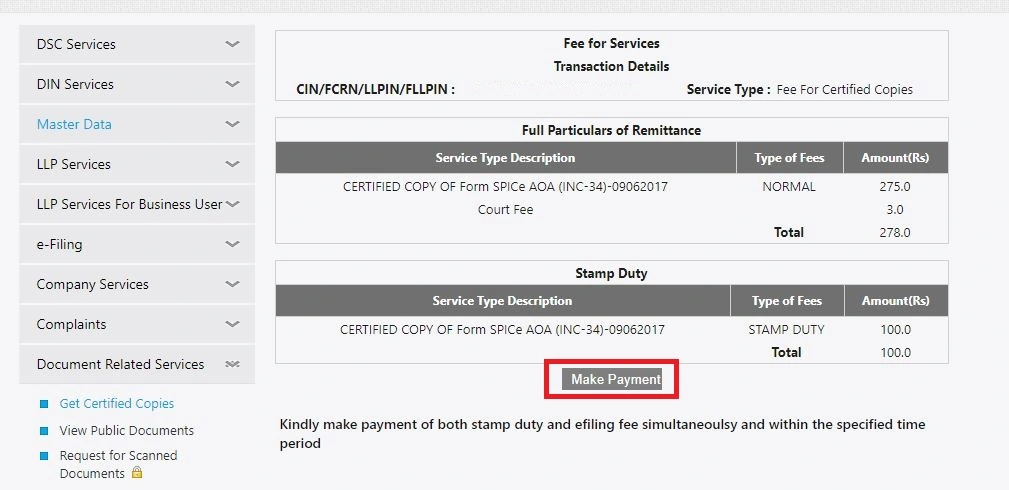
- Click Add to Cart, then View Payment Details.
- The portal automatically calculates the government fee and applicable stamp duty based on the number of pages and copies you selected.
Click Make Payment and pay through credit card, debit card, or net banking.
Step 8: Download the Certificate
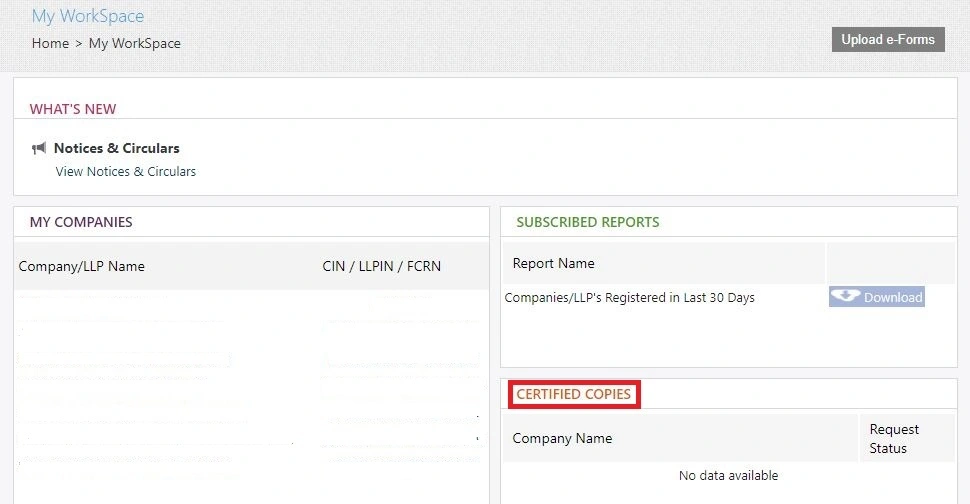
After successful payment, the ROC generates the SRN and processes the certified copy request. Once processed, open My Workspace GCC to download the digitally signed Certificate of Incorporation in PDF format. The certificate may take a few hours to a few working days to appear, so submit the request well before any deadline.
Can You Download the Certificate of Incorporation for Free?
The COI that the MCA emails after incorporation is free, digitally signed by the ROC, and valid for most purposes.
You only need to pay if you need a fresh certified copy of the Certificate. This usually happens when you lose the original or an authority specifically asks for a certified copy. Request the copy through Get Certified Copies on the MCA portal.
Under Section 399 of the Companies Act, 2013, the MCA generally charges ₹100 for a certified copy of the COI, along with any applicable convenience charges or state stamp duty, where applicable. Meanwhile, copies or extracts of other documents cost ₹25 per page.
Note: The View Company/LLP Master Data service is free, but it only shows basic company details, such as the CIN and incorporation date. It does not provide the Certificate of Incorporation PDF.
How to Download an Incorporation Certificate If You’ve Lost Your CIN?
If you’ve forgotten your CIN, you can still download your Certificate of Incorporation by retrieving the CIN first. Use:
- The MCA’s View Company/LLP Master Data service. Search using your registered company name to find the CIN, incorporation date, company status, and other basic details.
- RegisterKaro’s Company Name Search tool. You can also search for your company name to quickly locate the CIN before visiting the MCA portal.
Note: The View Company/LLP Master Data service only displays your company’s registration details. It does not provide the Certificate of Incorporation PDF. Once you have the CIN, go to MCA Services → Document Related Services → Get Certified Copies to request and download the certificate.
