


The Master Data is the official public record of every Limited Liability Partnership registered in India, maintained by the MCA. It is accessible to all, free of cost on the MCA’s V3 portal. It displays the LLP’s LLPIN, name, incorporation date, registered office address, designated partners, partner details, signatory information, current status (Active/Strike Off/Under Liquidation), index of charges, and filing history. You can search using the LLP name or the LLP Identification Number (LLPIN).
Verifying MCA LLP Master Data is now a standard step in vendor onboarding, KYC, due diligence, loan processing, partnership agreements, and legal background checks. It is the fastest way to confirm whether an LLP is legally registered, currently active, and compliant with statutory filings under the LLP Act, 2008.
This guide walks you through exactly how to view LLP Master Data on the MCA V3 portal in 2026, what each data field means, how to interpret signatory and charge details, and the best practices to avoid common search errors.
MCA LLP Master Data at a Glance
| Detail | Information |
|---|---|
| Maintained by | Ministry of Corporate Affairs (MCA), via Registrar of Companies (ROC) |
| Governing Act | LLP Act, 2008 |
| Access portal | MCA V3 portal — mca.gov.in |
| Cost | ₹0 (completely free) |
| Login required | No, for the basic master data view |
| Search options | LLP Name or LLPIN (LLP Identification Number) |
| Data shown | LLPIN, name, status, registered office, partners, designated partners, signatory details, index of charges, filing history |
| Real-time updates | No; updates after ROC processes statutory filings (typically a few working days) |
What is LLP Master Data by MCA? Content & Importance
Master data is the core and permanent information that identifies an entity, like an LLP, in an official system. This data remains consistent over time and changes only after a formal update.
MCA LLP Master Data specifically provides the official and legally recognized records of an LLP. It focuses on partners, designated partners, and LLP-specific compliance information.
This structured official data plays a critical role in business transparency and compliance. It allows stakeholders to verify LLP legitimacy, review filing history, and assess regulatory status.
Who Maintains MCA’s Master Data?
The Ministry of Corporate Affairs (MCA) acts as the central authority that governs and manages corporate records in India. It sets the rules, systems, and compliance framework for maintaining master data.
The Registrar of Companies (ROC) works under the MCA. It records, verifies, and updates company and LLP data based on statutory filings. The ROC reflects every LLP incorporation and compliance filing in the master data.
Note: The legal authority for maintaining MCA data differs for companies and LLPs. The master data of LLPs is governed by the LLP Act, 2008, while the company master data falls under the Companies Act, 2013.
What Details are Included in LLP Master Data? (Field-by-Field)
The MCA V3 portal displays the following 18 fields when you view LLP master data:
LLP Identification & Status
- LLPIN — unique 7-character LLP Identification Number (format: AAA-NNNN, e.g., AAB-1234)
- LLP Name — full registered name ending with “LLP”
- ROC Code — the regional Registrar of Companies under which the LLP is registered
- Registration Number
- Date of Incorporation
- Status — Active, Dormant, Strike Off, Under Liquidation, or Amalgamated
- Email ID — registered email of the LLP
LLP Details
- Total Obligation of Contribution (capital contribution)
- Total Number of Designated Partners
- Total Number of Partners
- Date of Last Filed Form 8 (Statement of Account & Solvency)
- Date of Last Filed Form 11 (Annual Return)
- Registered Office Address
Partners & Signatory Information
- Names of Designated Partners with DPIN
- Names of Partners with appointment dates
- Authorized Signatories with active DSC status (V3 only)
Charges
- Index of Charges — all loans, mortgages, or secured interests registered against the LLP, with charge IDs and creation dates
Why Do Businesses Check the Master Data?
LLP firms check the MCA master data to verify the legal identity and confirm whether the entity exists and operates lawfully. Many industries use it as a standard check before the following tasks:
- Vendor onboarding and KYC: Confirms the LLP’s legal name and status and lets KYC teams verify partner details, preventing fraud and fake entities.
- Due diligence before partnerships: Confirms the LLP’s active status and its designated partners, so companies avoid agreements with struck-off LLPs and reduce legal and financial risk.
- Loan processing and financial checks: Banks and lenders validate the borrower’s identity and structure before disbursal to reduce default and compliance risk.
- Legal disputes and background verification: Lawyers confirm LLP status during disputes; courts and arbitrators rely on it for reference.
- Compliance tracking for professionals: Chartered Accountants and Company Secretaries use MCA data to track LLP compliance accurately. The data helps them monitor status changes, partner updates, and statutory filings. This information supports timely regulatory reporting. It also allows professionals to advise clients with confidence.
- Name availability checks: Founders confirm a proposed name isn’t already taken before applying for LLP incorporation, reducing the risk of application rejection.
How to View LLP Master Data on the V3 Portal: Step-by-Step Guide
The MCA V3 portal replaced the legacy V2 system in 2022, and as of 2026, it is the only active portal for company and LLP data services. Follow these steps:
Step 1: Visit the MCA V3 Portal
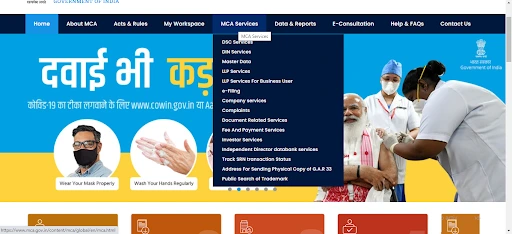
Open mca.gov.in in your browser. The V3 portal is the unified front-end for all MCA services, including incorporation, master data, and statutory filings.
Step 2: Navigate to Master Data Service
Hover over MCA Services in the top navigation menu, then click Master Data → View Company / LLP Master Data. This opens the public master data search page — no login is needed for basic access.
Step 3: Enter the LLP Name or LLPIN
In the search field, type either:
- The LLPIN (e.g., AAB-1234) — the most accurate way to find the right entity, or
- The LLP Name — system auto-suggests matching entities as you type
Step 4: Select the Correct Entity from the Dropdown
If multiple entities appear, select the exact one based on the LLPIN and incorporation date displayed in the suggestion list.
Step 5: Enter the Captcha and Submit
Type the CAPTCHA code shown on the page and click Submit. The portal fetches and displays the master data instantly.
Step 6: Review the Master Data Page
The V3 master data page displays five sections:
- LLP Master Data: LLPIN, name, ROC code, registration number, date of incorporation, email ID, and status (Active, Struck Off, Under Liquidation, Dissolved, and Converted to LLP)
- LLP Details — total obligation of contribution (capital contribution), number of designated partners and partners, registered office address, and the dates of the last filed Form 8 (Statement of Account & Solvency) and Form 11 (Annual Return)
- Designated Partners / Partners Details — names, DPIN / DIN, designation, date of appointment, and email IDs
- Signatory Details (new in V3) — currently authorised signatories with active DSC mapping
- Charges — index of registered charges (loans, mortgages) against the LLP
Tip: The data displayed is read-only. To download official copies of LLP filings (LLP Agreement, Form 11, Form 8), use the Get Certified Copies / View Public Documents service on the same portal (paid, login required).
Master Data Search Tips (Avoid Common Errors)
- LLPINs are unique; LLP names can have multiple matches with similar spellings or punctuation. The LLPIN format is AAA-NNNN (3 alphabetic characters + 4 digits), e.g., AAB-1234.
- For partial-name searches, type at least the first 5–6 characters; the V3 portal auto-suggests matching entities in real time.
- Check the incorporation date when multiple LLPs share similar names — this is the quickest disambiguator.
- Watch the suffix: an LLP ends only with “LLP”, not “Private Limited” or “Pvt Ltd”. If your search returns Pvt Ltd entities, you’ve crossed into Company Master Data instead.
- Captcha errors: if the captcha repeatedly fails, try a different browser or clear cookies. The V3 portal occasionally has cache issues.
- For bulk verification of multiple LLPs, professionals use the MCA bulk facility (a paid service via the V3 portal under Get Certified Copies).
Alternate Ways to Access LLP Master Data
Besides the official MCA V3 portal, you can verify LLP details through:
- Direct MCA Master Data URL: Several Indian missions abroad and government portals link directly to the MCA Master Data search page.
- OpenCorporates and MCA aggregators: Third-party platforms mirror MCA records for global discoverability — useful for foreign investors and journalists, though always cross-verify with the official MCA portal.
- Professional services: Chartered Accountants, Company Secretaries, and third-party service provider platforms can pull MCA records on behalf of clients, including paid certified copies of LLP filings.
Related guide: For verifying registered companies (not LLPs), see our MCA Company Master Data guide.
What Are Signatory Details on MCA V3?
A new addition introduced with the V3 portal, Signatory Details, displays all currently authorised signatories of the LLP — i.e., the partners whose DSCs (Digital Signature Certificates) are mapped against the entity for MCA filings. This section shows:
- Name of the signatory
- DPIN / DIN (Designated Partner Identification Number / Director Identification Number)
- Designation (Designated Partner, Partner, or Authorised Signatory)
- DSC validity status (active or expired)
The Signatory Details section is critical for:
- Verifying who can legally sign filings on behalf of the LLP
- KYC and onboarding checks to confirm the authorised representative
- Identifying unauthorised signatory changes before high-value contracts
Note: If a designated partner has an expired DSC, they cannot sign MCA filings until the DSC is renewed via Class 3 DSC renewal. This impacts annual filings (Form 11, Form 8) and event-based filings (LLP-3, LLP-4).
How to Read & Interpret MCA LLP Master Data?
The master data page shows several fields that may look technical at first. Once you know what each section means, you can quickly assess an LLP’s legal status, management structure, and compliance position.
1. LLP Master Data Snapshot
- LLPIN: Unique identification number assigned at incorporation.
- Entity Type & ROC: Confirms the entity is registered as an LLP and shows the Registrar of Companies under which it falls.
2. Status & Compliance Info
- Active vs Dormant vs Struck Off: Indicates whether the entity is operational, inactive, or removed from the registry.
- Form 8 & Form 11 dates: The last-filed dates for the Statement of Account & Solvency (Form 8) and the Annual Return (Form 11) confirm whether statutory filings are up to date.
3. Directors & Partners Details
- DPINs and roles: Designated Partner Identification Numbers and the roles of partners and designated partners.
- Appointment & cessation history: Shows when partners joined or left the LLP, helping track management changes.
4. Charges & Financial Indicators
- Index of Charges: Shows all loans, mortgages, or secured interests registered against the LLP.
- Purpose: Helps track financial obligations tied to the entity’s assets.
How to Decode the LLPIN
The LLP Identification Number (LLPIN) follows a 7-character format: AAA-NNNN, e.g., AAB-1234. Unlike a CIN (which is 21 characters with rich metadata), an LLPIN is shorter and simpler:
- First 3 alphabets — internal MCA registry sequence (no geographic meaning)
- Last 4 digits — sequential number assigned at incorporation
The LLPIN does not encode the state, year, or business class. To get that information, you must view the master data record itself. Read more on the LLP Identification Number (LLPIN).
MCA Master Data vs Other ROC Records for LLP
While both LLP MCA master data and ROC records provide official information about LLPs, they differ in detail, cost, and intended use. Look at the table below to understand the difference:
| Feature | MCA LLP Master Data | Full ROC Filings (Certified Copies) |
|---|---|---|
| Cost | ₹0 (free) | ₹100 per document (Viewing) |
| Login | Not required | Required (with paid wallet on V3) |
| Content | Snapshot of LLP essentials | Form 11, Form 8, LLP Agreement, charges, board resolutions |
| Includes Financial Statements | No | Yes |
| Updates | After the ROC processes filing (a few days) | Same — but historical filings are always available |
| Best For | Quick verification, vendor KYC | Deep due diligence, M&A, litigation |
| Typical Users | Founders, vendors, compliance teams | Lawyers, auditors, investment bankers |
| How to Access | Public search on MCA V3 | “Get Certified Copies” service on V3 (paid) |
Challenges and Limitations of MCA LLP Master Data
While MCA Master Data is invaluable for quick verification, it has structural limitations to be aware of:
- Delay in updates: Master data updates only after the ROC processes statutory filings (Form 11, Form 8, change-of-partner forms). If an LLP misses or delays filings, the data may show outdated partner names or statuses for weeks.
- Multiple name matches: Common LLP names (e.g., those including “Solutions”, “Consultancy”, “Technologies”) often return 10+ matches. Always cross-verify with the LLPIN.
- No financial statements: Master data shows only the obligation of contribution and the last-filed Form 8 date; not actual revenue, profit, or asset details. For these, download the certified copy of Form 8 (paid).
- No DPIN-based reverse search on V3: Unlike Company Master Data (which lets you search by DIN to see all linked entities), the LLP master data section currently does not support DPIN-based reverse lookups.
- Portal performance issues: The V3 portal has known issues with session timeouts, CAPTCHA reloads, and dropdowns may lag during peak hours (typically 10 AM – 12 PM IST when CA/CS firms run bulk checks).
Best Practices for Using LLP Master Data
- Always Verify LLPIN: Use the correct identification number to avoid confusion caused by similar entity names.
- Use ROC Filings for Deep Due Diligence: Refer to detailed ROC filings for complete financial or legal information.
- Cross-Verify with Third-Party Platforms: Use trusted aggregators when you need summarized insights or easier navigation.
- Check Regularly for Updates: Review master data periodically to stay informed about compliance status and changes in partners or charges.
These practices help reduce errors and support better business, legal, and investment decisions.
MCA LLP Master Data on the V3 portal is the fastest, most authoritative way to verify a Limited Liability Partnership in India — covering LLPIN, status, partners, designated partners, signatory details, registered office, and charges. It’s free and is the standard first step in any vendor KYC, due diligence, or compliance review.
