


Applicants can check their design registration status online through the official IP India portal using the application number. The design application status shows the current stage of review after an applicant files the application.
The Office of the Controller General of Patents, Designs and Trade Marks maintains this official system for public tracking. Regular tracking lets applicants spot objections early, reply within the deadline, and avoid unnecessary delays that harm their rights. Each status stage carries a specific meaning and may require a particular action from the applicant.
This guide explains the process to check the design registration status through the correct government portal and interpret each stage.
Key Takeaways
- You can check your design registration status through the official IP India Design Application Status portal.
- Enter the complete application number with the correct suffix, such as “-001,” to view accurate results.
- The portal shows applicant details, the current application stage, and recent examination updates.
- Common design application status stages include Filed, Under Examination, FER Issued, Amended Case, Accepted and Published, and Registered.
- You must reply to FER objections within six months of the FER issue date.
- You can request one extension of up to three months through Form 4 before the original deadline expires.
- The online portal covers applications filed after April 1, 2009, starting from Application No. 222230.
- Regular status checks help you identify objections early, meet deadlines, and protect your design rights.
What Does Design Registration Status Mean?
Design registration status indicates the current stage of your application before the Design Office. It may show:
- Under examination
- Published
- Accepted
- Formally registered
The Designs Act, 2000, governs this process and protects the visual appearance of a product.
A registered design protects the shape, pattern, configuration, or ornamentation applied to an article. The status record shows how far your application has moved through the Design Registration process.
Why You Should Check Your Design Application Status?
Checking your Indian design application status regularly protects your rights and keeps your timeline on track. The registration process moves through examination, possible objections, publication, and final registration. Missing an update at any of these stages can delay processing or result in abandonment of the application.
Regular tracking helps you in the following ways:
- Identify objections early: The First Examination Report (FER) lists objections raised by the Controller. Early access helps you prepare a complete response.
- Meet the response deadline: You must reply to FER objections within six months of the FER issue date. If you need more time, file Form 4 before the original deadline expires. Form 4 allows one extension of up to three months.
- Prevent loss of rights: Timely action reduces avoidable delays and helps protect your design registration rights.
- Plan the next step: Regular checks help you track each status update and act before any deadline passes.
How to Check Design Registration Status Online? Step-by-Step Process
Follow the steps below to check your design registration status correctly:
Step 1: Visit the Official IP India Portal
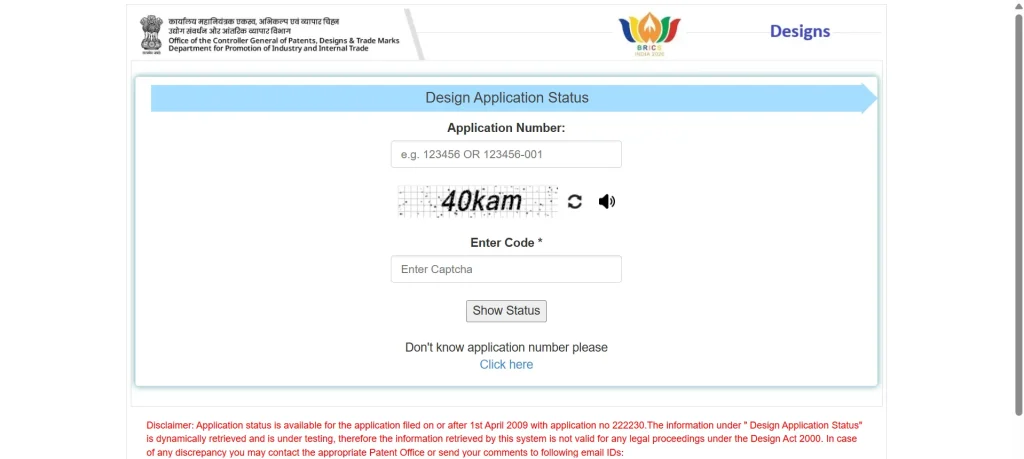
Open the official design status page at search.ipindia.gov.in/DesignApplicationStatus in your browser. You may also reach it through the main IP India website under the e-services section.
Step 2: Enter Your Application Number
Enter your design application number in the field provided on the page.
Ensure to include the correct suffix, such as “-001,” or the system may not display any result. For example, type the number in the format 326903-001, without any spaces.
Step 3: Complete the Captcha Verification
Enter the CAPTCHA code exactly as it appears on the screen. This step confirms that a genuine user, and not an automated program, is making the request.
Step 4: View Your Design Application Status
Click the “Show Status” button to view your application details. The portal displays:
- Applicant details
- Current application stage
- Recent examination updates
Record these details and check the portal regularly for new updates.
Stages of the Design Application Status
The official IP India Design Application Status portal shows different status labels during the registration process. The common stages appear below in their usual order:
- Filed: The Patent Office has received and recorded your application successfully. The system generates an application number that you use for all future tracking.
- Under Examination: The Controller is reviewing your application for compliance and originality. At this stage, no action is usually required from your side.
- Objection / FER Issued: The Controller has raised objections through the First Examination Report. You must reply within six months of the FER issue date. If needed, you may request one extension of up to three months through Form 4 before the original deadline expires.
- Amended Case: The applicant has submitted the required modifications or clarifications after examination. The Office is reviewing these changes before proceeding further.
- Accepted and Published: The Office has accepted the design and published it in the Patent and Design Journal. The record shows a Journal Number and a Journal Date at this stage.
- Registered / Certificate Generated: The Office has registered the design and issued the certificate of registration. Your design now holds legal protection under the Designs Act 2000.
Common Issues While Checking Design Status Online and How to Fix Them
Applicants often face small errors that prevent the portal from showing results. You can avoid most of these issues with careful data entry:
- Missing suffix: The portal needs the full number with its suffix, so always add the correct ending, such as “-001.”
- Extra spaces: A space within the number blocks the search, so remove every space before you submit the request.
- Wrong captcha: The captcha field is case-sensitive, so enter each character exactly as it appears on the screen.
- Old applications: The portal shows applications filed after April 1, 2009, starting from Application No. 222230. If you filed your application before this date, contact the concerned Design Office for status details.
- Portal maintenance: The Office sometimes suspends the service for updates, so wait a short while and try again later.
If the record still does not appear, you may contact the concerned Design Office for clarification. The Design Office in Kolkata handles most design registration matters in India.
Final Note
Tracking your design registration status online is a simple but essential part of brand protection. The official IP India portal gives you accurate, up-to-date information at every stage. You only need your application number and the correct suffix to view the current status.
By checking your design application status regularly, you can respond to objections and meet deadlines on time. This careful approach keeps your registration on schedule and protects your design rights. If you need professional assistance during this process, RegisterKaro can help you file, track, and manage your design application across India.
Contact us today for expert support with your design registration!
