

To get a Digital Signature Certificate (DSC) in India, apply through a Certifying Authority (CA) licensed by the Controller of Certifying Authorities (CCA). You submit the required identity, address, and PAN details, complete the prescribed verification, and receive the digital certificate through the CA’s approved delivery method. A DSC (issued as Class 3 certificates, with Class 2 discontinued in 2021) lets you digitally sign documents and online filings instead of using a handwritten signature.
DSCs are issued under the Information Technology Act, 2000, and are used for various MCA, GST, income-tax, e-tender, and other online submissions where digital signing is required. Company directors, professionals, and businesses commonly use them to authenticate regulatory filings and electronic transactions.
What is a Digital Signature Certificate (DSC), and When Do You Need One?
A Digital Signature Certificate (DSC) is a digital credential issued by a Certifying Authority (CA) that verifies the identity of the person signing documents or filings electronically. It allows you to sign and authenticate documents online instead of using a handwritten signature.
You need a DSC when a government portal or electronic filing requires a valid digital signature. Common uses include:
- Company incorporation and MCA filings: Directors and other authorized individuals use DSCs to digitally sign applicable incorporation documents and ROC filings.
- Income tax: Companies, LLPs, and taxpayers required to file electronically using a digital signature use DSCs for applicable returns, forms, and submissions.
- GST: Companies and LLPs may need a DSC for GST registration, return filing, and other authorized-signatory actions where digital signing is required.
- E-tenders and government procurement: Businesses use DSCs to submit bids and digitally sign documents on GeM and government tender portals.
- Import-export and DGFT filings: Businesses use DSCs for applicable IEC applications, amendments, and other foreign-trade submissions.
Which DSC Should You Choose? Different Types
What differs for a DSC is the certificate’s intended use and function, such as signing documents, encrypting data, or doing both.
| DSC type | What it does | Common use | Who needs it? |
| Sign-Only DSC | Digitally signs documents, forms, and filings | MCA, income tax, GST, and e-tenders where a DSC is required | Most company directors, LLP partners, and businesses |
| Encrypt-Only DSC | Encrypts information so only the intended recipient can access it | Systems or transactions that specifically require data encryption | Users with a specific encryption requirement |
| Sign + Encrypt (Combo) DSC | Signs documents and encrypts data | Regulatory signing plus secure exchange of confidential information | Users who need both capabilities |
| DGFT DSC | Meets the applicable DSC requirements for the DGFT portal | IEC applications and import-export filings | Businesses handling applicable DGFT submissions |
Classes of DSC: Class 1, Class 2, and Class 3
Digital Signature Certificates in India were historically issued in three classes based on the level of identity verification. Class 1 and Class 2 are no longer relevant for statutory filings:
| Class | Assurance Level | Status |
| Class 1 | Basic identity verification, primarily for name and email | Not used for official or statutory filings |
| Class 2 | Moderate verification using documents such as PAN and Aadhaar; previously used for MCA, income tax, and GST filings | Discontinued from 1 January 2021 and subsumed into Class 3 |
| Class 3 | Higher-assurance identity verification through prescribed verification methods | Current class used for regulatory and statutory filings |
Today, Class 3 is the relevant DSC class for official filings. Under the CCA’s revised framework, Class 2 was discontinued from 1 January 2021, and its use cases moved to Class 3. Class 1 is not used for company or government filings. Therefore, when applying for a DSC today, the relevant choice is Class 3, with the certificate’s purpose, such as signing or encryption, determined separately.
Why is DSC Important for a Company Director?
A company director may need a DSC for multiple activities such as:
- Signing MCA forms and company filings submitted to the Registrar of Companies (ROC).
- Incorporating a company and digitally signing applicable incorporation documents.
- Filing annual returns and financial statements where the director’s digital signature is required.
- Submitting changes in company details, including certain director-related and corporate filings.
- Completing income tax, GST, or other government filings when the director acts as an authorized signatory.
- Participating in government tenders and other online transactions that require digital authentication.
How to Obtain a DSC for Your Company Director?
Obtaining a Digital Signature Certificate (DSC) is a relatively simple process that follows a few key steps:

Step 1: Choose a Certifying Authority (CA)
Start by choosing a Certifying Authority (CA). These are government-recognized bodies responsible for issuing DSCs. Some of the well-known Certifying Authorities are:
- eMudhra
- Sify
- Capricorn
Ensure that the Certifying Authority is approved by the Controller of Certifying Authorities (CCA).
Step 2: Complete the DSC Application Form
Once you have chosen your Certifying Authority, you will need to fill out the DSC application form, also known as the Subscriber Application Form (SAF). The form will require you to provide:
- Full name
- Date of birth
- Address details
- Contact information (email and phone number)
- PAN Card (or another government-issued identity proof)
Step 3: Submit the Required Documents
Along with the application form, you will need to submit scanned copies of the following documents for verification:
- Proof of Identity: Passport, Aadhaar, Voter ID, or any other government-issued identity proof.
- Proof of Address: Bank statement, utility bill, or rental agreement (less than 3 months old).
Step 4: Make Payment
After filling out the application form and submitting the required documents, you will be asked to make a payment for the DSC. The fees vary based on the Certifying Authority and the type of DSC (₹2,500 per DSC).
Step 5: Verification and Approval
The Certifying Authority will verify your identity, usually through Aadhaar-based eKYC and a quick mobile or video verification. This is often completed the same day.
Step 6: Receive the DSC
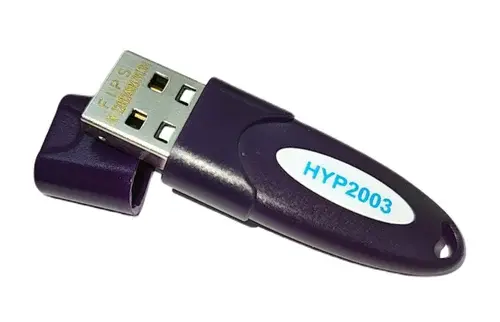
Once your application is approved, your Digital Signature Certificate will be issued. You will receive the DSC in a secure USB token, which must be plugged into your computer to sign documents electronically.
Note: DSC for NRIs and foreign nationals follows a similar process but requires additional documentation. Since they generally do not have Aadhaar, verification is completed through video KYC. A passport is required as identity proof, while overseas address proof may need to be notarized, apostilled, or attested by an Indian embassy. Processing may take slightly longer due to the additional verification.
How to Check the Status of Your DSC?
You can check the status of your DSC to confirm whether it is active, valid, expired, revoked, or otherwise unavailable for use by following these steps:
- Check the DSC details to identify the CA that issued your certificate.
- Use the certificate-status or verification facility provided by the issuing CA.
- Depending on the CA, you may need the certificate number, holder’s name, email ID, or other identification details.
- Complete any authentication or verification step requested by the CA.
- Review whether the DSC is active, expired, revoked, or suspended, along with its validity period.
Common Issues Directors Face and Their Solutions
Be aware of these problems you might face while applying for a DSC:
- Inconsistent personal details across PAN, Aadhaar, and other submitted documents can cause the application or identity verification to fail.
- An incorrect or inaccessible email address or mobile number can prevent the director from receiving OTP, verification requests, or other authentication messages required during DSC issuance.
- Poor connectivity, unclear documents, incorrect information, or failure to complete the verification within the prescribed process can delay issuance.
- Directors may discover that their certificate has expired or been revoked when attempting to sign an MCA or other government filing. The certificate must be renewed or replaced as applicable.
- A valid DSC may not work for an MCA filing if it has not been properly registered or associated with the director’s profile. Directors should verify the registration status before submitting a form.
- A traditional DSC stored on a USB cryptographic token may not work if the required drivers or signing utility are missing, outdated, or incompatible. Cloud-based and remote-signing DSCs are also available, which can reduce dependence on a physical USB token where supported by the relevant platform.
- A director may obtain a certificate that does not meet the requirements of the intended filing or portal. Before purchasing a DSC, check whether the relevant portal requires a signing certificate, encryption capability, or a specific certificate configuration.
- If a director’s legal name or other relevant particulars change after the DSC is issued, the existing certificate may not reflect the updated information. The director should check with the issuing Certifying Authority whether the DSC needs to be reissued.
Note: The exact verification process, documents & requirements can vary between Certifying Authorities and government portals. Always follow the current instructions issued by the relevant Certifying Authority or government portal to save time and ensure successful issuance.
Prefer to have it handled end-to-end? Get your Class 3 DSC through our DSC service.
