


To check DIN status, use the “Enquire DIN Status” service on the official MCA portal, enter the eight-digit DIN, complete the CAPTCHA, and view the current status. This information is available to the public free of cost and does not require registration or login to access.
A DIN status check helps confirm whether the DIN remains approved and active for MCA filings. It also helps users identify deactivated DINs, confirm KYC compliance, avoid form rejection, and take timely action when the MCA records show an issue.
Directors, company secretaries, and compliance officers usually check DIN status before appointments, ROC filings, company incorporation, or DIR-3 KYC filing. Investors, lenders, and auditors may also check DIN status during due diligence.
This guide explains how to check DIN status on the MCA portal, understand each DIN status, verify DIN active status, and resolve common search-related issues.
Key Takeaways
- A person can check DIN status on the MCA portal free of cost by entering the eight-digit DIN and completing CAPTCHA verification.
- The MCA DIN status check does not require account registration, portal login, or payment of any government fee.
- An approved DIN status shows that the DIN is active in MCA records and can be used for director appointments and MCA filings.
- A deactivated DIN usually indicates non-compliance with annual DIR-3 KYC requirements and blocks related MCA filings.
- A director can reactivate a DIN deactivated for non-KYC by filing DIR-3 KYC and paying the applicable ₹5,000 late fee.
- Companies should verify a director’s DIN status before submitting forms such as DIR-12, SPICe+, and other MCA filings.
- The DIN enquiry result usually shows the director’s name, DIN number, approval date, current status, and PAN linkage details.
Why You May Need to Check Your DIN Status?
Directors and compliance professionals check DIN status on the MCA portal in the following situations:
- Before appointment as a director: Companies must confirm that the proposed director holds an approved and active DIN before filing Form DIR-12 for the appointment.
- After filing DIR-3 KYC: Directors should check the status to confirm that the MCA has reactivated a DIN that was previously deactivated due to non-compliance with KYC requirements.
- Before filing ROC forms: Companies should verify the active status of the DIN before submitting ROC forms. MCA may reject forms that include an inactive or deactivated DIN.
- During company incorporation through the SPICe+ Form: Promoters should confirm that all proposed directors hold valid and active DINs before submitting the incorporation application through the SPICe+ Form.
- During due diligence: Investors, lenders, companies, and legal professionals should verify a director’s DIN status before entering into business arrangements or transactions.
- After submitting a new DIR-3 application: Applicants should check the DIN application status to confirm that the MCA has processed and approved the DIN application.
What Do You Need Before Checking DIN Status? Prerequisites
No account, login, or registration is required to perform a DIN status check on the MCA portal. The DIN status enquiry facility is available to anyone with internet access. Before beginning the search, you only need:
- The eight-digit DIN number of the director whose status you want to verify.
- A working internet connection and a modern web browser.
- Access to the official MCA portal at mca.gov.in.
Steps to Check DIN Status on the MCA Portal
The MCA V3 portal provides the DIN enquiry facility under its master data services section. The complete process to check the status of a DIN involves the following steps:
Step 1: Visit the Official MCA Portal
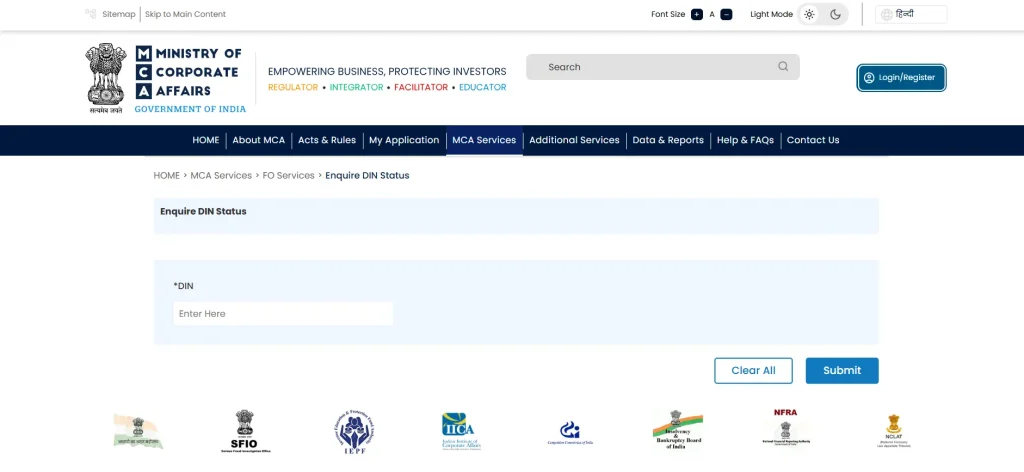
Open your web browser and visit mca.gov.in. On the MCA V3 homepage, locate the top navigation menu. Look for the “MCA Services” menu or the “Master Data” section.
Step 2: Select “Enquire DIN Status”
Within the DIN Services or Master Data section, click on the option labeled “Enquire DIN Status.” This opens the DIN status inquiry form. No login is required at this stage for a basic DIN status check.
Step 3: Enter the DIN Number
Enter the eight-digit DIN in the search field exactly as it appears in the director’s DIN certificate or MCA records. Do not add spaces, dashes, or leading zeros beyond the original DIN format.
Step 4: Complete CAPTCHA Verification
The MCA portal displays a CAPTCHA image or a security verification step before returning results. Enter the characters shown in the CAPTCHA accurately and click the Submit or Search button to proceed.
Step 5: View the DIN Status Result
The portal displays the DIN status immediately after the CAPTCHA is verified. The result shows the director’s name, DIN number, current DIN status (Approved, Deactivated, Cancelled, Surrendered, or Disqualified), and the date on which the DIN was approved.
This information represents the real-time DIN active status as recorded in the MCA database.
What Information Does the “DIN Status Check” Display?
When the MCA portal returns the DIN check result, the following information is typically displayed for the searched DIN:
- Director’s full name as recorded in the MCA database at the time of DIN registration.
- The eight-digit DIN number that was searched.
- Current DIN status:
- Approved
- Deactivated
- Cancelled
- Surrendered
- or Disqualified
- Date of DIN approval or allotment by the MCA.
- PAN linkage status, indicating whether a PAN card has been linked to the DIN.
DIN Status Types and What Each Means
The MCA portal returns one of the following status labels for every DIN status search. The table below explains each DIN status in MCA, whether the director can file forms, and what action is required:
| DIN Status | What It Means | Can You Use the DIN? | Next Step |
| Approved | MCA has approved the DIN, and it is active. | Yes, use it for director appointments and MCA filings. | Complete DIR-3 KYC within the applicable compliance timeline (currently once every three consecutive financial years) |
| Deactivated (Non-KYC) | MCA deactivated the DIN for non-compliance with DIR-3 KYC. | No, MCA filings are blocked until reactivation. | File DIR-3 KYC and pay the applicable ₹5,000 late fee. |
| Deactivated (Other Reasons) | MCA deactivated the DIN for a reason other than KYC non-compliance. | Depends on the reason. | Verify the deactivation reason on the MCA portal and follow the applicable restoration process, if available. |
| Cancelled | MCA cancelled the DIN due to a duplicate allotment, a fraudulent application, or a court/competent authority’s order. | No, the DIN cannot be used. | Contact MCA if the cancellation is erroneous. No self-reactivation is available. |
| Surrendered | The DIN holder voluntarily surrendered the DIN. | No, the DIN remains inactive. | Submit Form DIR-5 to surrender the DIN. A fresh DIN is required for any future appointment as a director. |
| Disqualified | The director is disqualified under Section 164 of the Companies Act, 2013. | No, the director cannot accept new directorships during the disqualification period. | Wait until the disqualification ends or obtain relief, where permitted under law. |
Note: A disqualification under Section 164(2) generally arises when a company fails to file its financial statements or annual returns for three consecutive financial years. The disqualification lasts for five years, and Section 167 requires the director to vacate office in other companies, subject to applicable legal provisions and judicial decisions.
A DIN with approved status and a current DIR-3 KYC compliance record is valid for MCA filings and director appointments. A Deactivated (Non-KYC) status is different from a Section 164(2) disqualification. Missing DIR-3 KYC only deactivates the DIN until the KYC requirements are completed. It does not by itself result in disqualification under Section 164(2).
Difference Between DIN Status and DIN KYC Status
DIN status shows whether a DIN is active, deactivated, cancelled, or surrendered, whereas DIN KYC status shows whether required KYC compliance is complete. The table below explains the key differences:
| Factor | DIN Status | DIN KYC Status |
| What it shows | Whether the DIN itself is active, deactivated, cancelled, or surrendered | Whether the director has completed the annual DIR-3 KYC verification for the current financial year |
| Purpose | Used to confirm whether a director can be named in MCA filings | Used to confirm whether annual KYC compliance is current |
| Impact if non-compliant | DIN is deactivated, and all MCA filings using that DIN are blocked | DIN gets deactivated after the September 30 deadline passes without KYC |
| Where to check | MCA portal DIN enquiry under Master Data or DIN Services | MCA portal DIN KYC status check under the same DIN Services section |
Troubleshooting Common Issues When Checking DIN Status
The MCA portal may sometimes show an error or fail to display the required DIN details. The following points explain common issues and the steps directors or companies can take to resolve them:
a. DIN Number Shows as “Not Found”
The MCA portal may show a “DIN not found” message if the user enters an incorrect DIN. The DIN may contain a typing error, have fewer or more than eight digits, or may not have been officially allotted.
The user should verify the DIN from the original MCA allotment email or DIN certificate before searching again.
b. Portal Not Loading or Timing Out
The MCA V3 portal may temporarily go offline during maintenance or periods of heavy filing. The user should wait and try again later. They may also check the MCA portal’s official status page for maintenance updates.
c. CAPTCHA Verification Failing
The CAPTCHA verification may fail if the entered characters do not match the image shown on the screen. The user should refresh the CAPTCHA and enter the new characters carefully.
If the issue continues, they may use another browser or clear the browser cache before trying again.
d. Mismatch in Director Name
The MCA portal may display an old name if the director has changed their legal name after obtaining the DIN. In this case, the director must file Form DIR-6 on the MCA portal to update the name linked to the DIN. The MCA records show the name submitted at the time of DIN registration until the director updates it.
A DIN issue discovered during an important MCA filing can lead to unnecessary delays and compliance hurdles. RegisterKaro can help you resolve DIN-related concerns, including DIN status issues, DIR-3 KYC filing, DIN reactivation, and other MCA compliance requirements. Contact us today for timely assistance with your director compliance needs!
