


A reply to a GST registration notice must be filed within 7 working days from the date of service, using Form GST REG-04 for REG-03 clarification notices (fresh registration), Form GST REG-18 for REG-17 show-cause notices (cancellation), and Form GST REG-24 for REG-23 notices (rejected revocation applications). All replies are filed exclusively online through the GST portal under Rules 9, 22, and 23 of the CGST Rules, 2017. Missing the 7-day deadline triggers automatic rejection through Form GST REG-05.
The CBIC Instruction No. 03/2025-GST dated 17 April 2025 strengthened applicant protection by restricting officers from demanding documents not prescribed in Form GST REG-01 (such as landlord’s Aadhaar, PAN, or MSME certificates) without prior approval from a senior officer. This gives genuine applicants stronger ground to contest excessive or arbitrary queries, but the protection only works if the reply explicitly cites this Instruction when objecting.
The CGST (Fourth Amendment) Rules, 2025 (effective 1 November 2025) introduced Rule 9A, allowing electronic registration within 3 working days for low-risk applications, and Rule 14A, providing a simplified registration process for small businesses. These amendments make complete and timely notice replies even more critical; clean replies unlock faster approvals; flawed replies still trigger 30-day physical verification under the older framework.
This guide covers the complete GST notice reply framework for 2026-27, types of notices (REG-03, REG-17, REG-23) with their reply forms and deadlines, common reasons for receiving notices, documents required for each query type, the step-by-step portal process, ready-to-use letter templates for REG-03 and REG-17 notices, six common query scenarios with sample reply language, what happens after submission, and how to appeal a REG-05 rejection.
Key Takeaways
- GST registration notices are clarification requests (REG-03), show-cause notices proposing cancellation (REG-17), or notices on rejected revocation applications (REG-23); they are not rejections.
- Reply deadline: 7 working days from the date of service. Missing it triggers automatic rejection through Form GST REG-05.
- Reply forms by notice type: REG-03 → reply in Form GST REG-04; REG-17 → reply in Form GST REG-18; REG-23 → reply in Form GST REG-24. All filed exclusively online on gst.gov.in.
- CBIC Instruction No. 03/2025-GST (17 April 2025) prohibits officers from demanding documents outside Form GST REG-01 (landlord Aadhaar, PAN, MSME certificates) without senior officer approval; applicants can formally object to such queries.
- Rule 9A and Rule 14A under the CGST (Fourth Amendment) Rules, 2025 enable a 3-working-day approval for clean low-risk applications.
- REG-17 show-cause for cancellation: If a cancellation order is issued in REG-19, file Form GST REG-21 within 30 days to seek revocation; pending returns and dues must be cleared first.
- REG-05 rejection appeals: File Form GST APL-01 to the Appellate Authority within 30 days under Section 107 of the CGST Act, 2017; condonation of delay up to 1 month is permitted.
- Vague reply = certain rejection. Address every observation in the notice individually with specific facts and supporting documents; generic “we will provide all documents” responses fail.
What is a GST Registration Notice?
A GST registration notice is an official communication issued by the GST department. The officer issues it when they find a discrepancy, a missing document, or non-compliance with GST registration requirements. A GST registration notice is not a rejection. In most cases, it is a request for clarification or additional information before the officer makes a final decision.
The CGST Rules, 2017, govern all GST registration notices. Each notice type carries a designated form number, its own reply form, and a fixed deadline to respond.
The table below covers the three main notice types every applicant and registered taxpayer must know:
| Notice Form | Issued When | Reply Form | Deadline |
| GST REG-03 | Clarification is needed during fresh registration | GST REG-04 | 7 working days |
| GST REG-17 | Show-cause notice for cancellation of GST registration | GST REG-18 | 7 working days |
| GST REG-23 | The officer is not satisfied with the revocation application submitted in Form GST REG-21 | GST REG-24 | 7 working days |
Note: From 1 November 2025, the CGST (Fourth Amendment) Rules introduced Rule 9A, which allows low-risk applications to receive electronic GST registration within 3 working days. The amendment also introduced Rule 14A, an optional simplified registration process for small businesses. Form GST REG-04 now covers clarifications for Rule 14A applications as well. These changes make faster approvals possible for clean applications and increase the importance of submitting a complete and timely notice reply.
Why Did You Receive a GST Registration Notice?
GST officers issue a notice when they find missing, incorrect, or mismatched details in your registration application. Here are the most common reasons:
- Address Mismatch: The address entered in the application does not match the supporting proof submitted. Officers cross-check the electricity bill, rent agreement, and property documents against the address declared in the application.
- Incomplete or Unclear Documents: Officers raise a query when uploaded documents are blurry, illegible, or cropped. Every document must be legible and uploaded in the correct format, either PDF or JPEG.
- Rental Agreement Issues: The stamp paper date is after the date of the rental agreement. Officers flag this as a discrepancy. The stamp paper date must always be on or before the date of the agreement.
- Aadhaar or PAN Mismatch: The name or details of the proprietor, director, or authorized signatory do not match the Unique Identification Authority of India (UIDAI) or Central Board of Direct Taxes (CBDT) databases. The applicant must correct the details at the source before filing the reply.
- No NOC for Shared Premises: The business operates from a shared address without a No Objection Certificate from the property owner. Officers require a valid NOC and the owner’s proof of ownership when the applicant does not own the premises.
- Canceled or Suspended GSTIN on the Same PAN: The applicant’s PAN already has a canceled or suspended GSTIN linked to it. Officers issue a notice seeking clarification on the reason for the earlier cancellation before approving a fresh registration.
- Inactive or Mismatched PAN: If the PAN is inactive or does not match CBDT records, the system may raise a query or reject the application. Since GST registration is PAN-based, PAN mismatches can delay approval.
- Aadhaar Authentication Not Completed: If the applicant fails or skips Aadhaar OTP verification, the system marks the application as high-risk. This triggers physical verification and extends processing to 30 days.
- Business Activity Not Matching Documents: The business activity mentioned in the application does not match the supporting documents or the declared business address, so officers may ask for additional proof.
Note: If the notice raises a query that falls outside the prescribed list under CBIC Instruction No. 03/2025-GST, applicants may contest such queries and seek clarification from the proper officer. You can formally object in your reply and request that the officer drop the query.
Documents Required for GST Notice Reply in India
The documents you need to reply to a GST registration notice depend on the type of query raised in the notice. The table below covers the most common query types and the documents required for each:
| Query Type | Documents Required |
| Address mismatch | Latest electricity bill, rent agreement, property tax receipt |
| Shared or rented premises | Registered rent agreement with the landlord’s ownership proof, such as a property tax receipt or electricity bill in the landlord’s name |
| Unregistered or informal arrangement | NOC from the property owner, along with ownership proof such as a property tax receipt or electricity bill |
| Rental agreement stamp paper issue | Fresh rental agreement on correctly dated stamp paper, or a correction letter countersigned by both the landlord and tenant, confirming the correct stamp paper date |
| Aadhaar or PAN mismatch | Aadhaar card, PAN card, UIDAI, or CBDT |
| Business activity not matching | Invoices, business photographs, and website screenshots |
| Canceled or suspended GSTIN on PAN | Cancellation order copy, explanation letter |
| Inactive or mismatched PAN | Updated PAN card, CBDT correction acknowledgment |
Note: The portal accepts PDF and JPEG files only. Keep address proof documents under 500KB and all other documents under 1MB. Always submit the most recent electricity bill. Officers typically reject bills older than two months.
How to Reply to a GST Registration Notice Online? Step-by-Step Guide
Here is the complete process to reply to a GST registration notice online:
Step 1: Log in to the GST Portal
Visit gst.gov.in. If you are a new applicant, log in using the Temporary Reference Number (TRN) generated at the time of application. If you are an existing registered taxpayer, log in using your regular username, password, and the captcha.
Step 2: Go to the Clarification Section
For a REG-03 notice issued during fresh registration, go to Services, then Registration, then Application for Filing Clarifications.
For post-registration notices such as REG-17, go to Services, then User Services, then View Additional Notices and Orders.
Step 3: Enter the Notice Reference Number
Enter the Reference Number of the Notice or the Application Reference Number (ARN) in the search field and click Search.
Step 4: Open the Notice and Read It Carefully
Click the notice to open it. Read every observation the officer has raised. Download a copy for your records.
The notice specifies exactly which documents or clarifications the officer needs.
Step 5: Select Modification or Without Modification
The system asks whether you want to modify the original registration application. Select Yes if you need to correct any details in the application itself. Select No if you only need to upload additional documents or provide a written clarification without changing anything in the original application.
Step 6: Write Your Clarification
Type your reply in the Query Response field. This is a mandatory field. Address each query raised by the officer specifically and factually. Do not write a generic response. Name the documents you are attaching and explain how each one resolves the officer’s query.
You can also add supporting information in the Additional Information field.
Step 7: Upload Supporting Documents
Click Choose File to attach your documents. The portal accepts PDF and JPEG files. Keep address proof documents under 500KB and all other documents under 1MB.
Name each file clearly before uploading. The portal allows multiple attachments.
Step 8: Submit Using DSC or EVC
Select the authorized signatory from the dropdown and enter the place of filing. Companies and LLPs must submit using a Digital Signature Certificate (DSC). Proprietors and individuals can submit using an Electronic Verification Code (EVC) via an OTP sent to the registered mobile number and email. Click Submit with DSC or Submit with EVC as applicable.
The GST portal confirms your submission immediately.
Step 9: Save the Acknowledgment
A success message appears on the screen after submission. The portal sends a confirmation via SMS and email to the authorized signatory. Save the acknowledgment reference number for future tracking.
You must complete and submit the entire reply within 7 working days from the date of the notice.
GST Mismatch Notice Reply: GSTR-1 vs GSTR-3B and GSTR-2A/2B Disputes
A GST mismatch notice is typically issued when the GST department finds discrepancies between:
- GSTR-1 (outward supplies) and GSTR-3B (summary return) of the same taxpayer
- GSTR-1 of the supplier and GSTR-2A/2B of the recipient (ITC mismatch)
- GSTR-3B and books of account during scrutiny under Section 61
These notices typically come as DRC-01A (pre-SCN intimation) or DRC-01 (SCN under Section 73/74), not as REG-series notices. Reply mechanics differ:
| Mismatch Type | Reply Form | Key Reply Strategy |
|---|---|---|
| GSTR-1 vs GSTR-3B mismatch | DRC-06 / online reply | Provide reconciliation worksheet; file amendments via GSTR-1A if errors in GSTR-1 |
| Supplier–recipient ITC mismatch (Section 16(2)(c)) | DRC-06 | Show that the supplier has paid the tax; produce GSTR-2B copy; if the supplier hasn’t paid, ITC reversal becomes payable |
| Books vs GSTR-3B difference under Section 61 scrutiny | ASMT-11 | Submit reconciliation explanation with supporting accounting entries |
GSTR-1A Amendment Mechanism (October 2024 Update)
Since October 2024, Form GSTR-1A allows taxpayers to amend outward supplies declared in GSTR-1 of the current tax period before filing GSTR-3B. This is the recommended route to fix mismatches before they trigger a notice. Once a notice is issued, the amendment must be paired with a detailed reply.
Interest Liability on Mismatch
Under Section 50 of the CGST Act, interest at 18% per annum applies on short-paid tax. For wrongful ITC claims, interest of 24% per annum may apply under Section 50(3). Always quantify the interest exposure in the reply and offer voluntary payment via DRC-03 if the mismatch is genuine; this often persuades officers to drop further proceedings.
What Happens After Filing a GST Notice Reply Online?
Once you submit the reply, the GST officer reviews the clarification, supporting documents, and GST registration application, then decides within 7 working days whether to approve or reject the application. The GST portal sends updates to your registered mobile number and email after the officer processes the application.
- If the Reply is Satisfactory: Officer approves the GST registration and issues the Certificate of Registration in Form GST REG-06. Your GSTIN gets activated, and you can start filing returns and issuing tax invoices immediately.
- If the Reply is Not Satisfactory: Officer issues a rejection order in Form GST REG-05, stating the written reasons for rejection. As per CBIC Instruction No. 03/2025-GST, a vague or blanket rejection without specific reasons is not permitted. You can correct the identified issues and file a fresh application.
- If You Do Not Reply Within 7 Working Days: The application may be rejected through Form GST REG-05 if no reply is submitted within the prescribed timeline. The department sends no further communication. You must file a fresh application from the beginning.
- If a Personal Hearing is Scheduled: Please attend the hearing with all supporting documents. If you cannot attend, inform the officer in advance and request a new date. Failure to attend without prior notice may result in an ex parte decision.
- For REG-17 Show Cause Notices: If the cancellation order is issued in Form GST REG-19, you can initiate the revocation or cancellation of GST registration by filing Form GST REG-21 within 30 days from the date of the cancellation order. You must file all pending returns and clear all dues, including tax, interest, and late fees, before applying.
Note: The Appellate Authority may condone a delay of up to one month beyond this deadline under Section 107 of the CGST Act.
Letter to GST Department for Notice Reply: Structure & Mandatory Elements
A reply letter to the GST Department must follow a specific structure to be accepted by the officer. The mandatory elements are:
| Element | What to Include |
|---|---|
| GSTIN / ARN | Your GST Number (for cancellation notices) or Application Reference Number (for fresh registration notices) at the top |
| Notice Reference Number and Date | Exact reference number of the notice as issued in REG-03 / REG-17 / REG-23 |
| Subject Line | “Reply to Notice in Form GST REG-XX bearing Reference No. [XX] dated [DD/MM/YYYY] under Rule [X] of the CGST Rules, 2017” |
| Salutation | “Respected Sir/Madam” or “To, The Proper Officer, GST Department, [Jurisdictional Office Address]” |
| Body | Point-by-point response to each query/ground raised in the notice |
| Closing Request | Specific relief sought — approval of registration, dropping of cancellation, etc. |
| Enclosure List | Clearly numbered list of all documents attached |
| Signature Block | Name, designation, business name, contact, date |
The letter must be uploaded as a PDF attachment in the Query Response field on the GST portal; it does NOT replace the online reply submission but supplements it. The portal also accepts the reply text in plain online form, but a properly formatted letter dramatically improves the officer’s clarity on your position.
GST Notice Reply Format: Sample Letter to the GST Department
A well-structured reply letter improves your chances of approval. The letter must reference the notice number, respond to each query point by point, and list all documents you are submitting. Remember, vague or generic replies are the most common reason officers reject clarifications.
Below are two ready-to-use templates based on the most common notice types:
Template 1: Reply to GST REG-03 Notice (Fresh Registration)
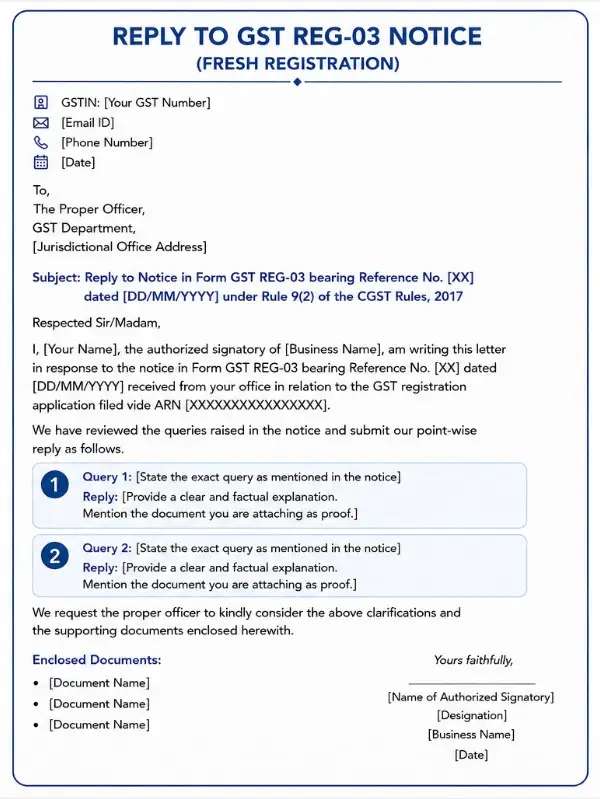
GSTIN: [Your GST Number] [Email ID] | [Phone Number] [Date]
To, The Proper Officer, GST Department, [Jurisdictional Office Address]
Subject: Reply to Notice in Form GST REG-03 bearing Reference No. [XX] dated [DD/MM/YYYY] under Rule 9(2) of the CGST Rules, 2017
Respected Sir/Madam,
I, [Your Name], the authorized signatory of [Business Name], am writing this letter in response to the notice in Form GST REG-03 bearing Reference No. [XX] dated [DD/MM/YYYY] received from your office in relation to the GST registration application filed vide ARN [XXXXXXXXXXXXXXXXX].
We have reviewed the queries raised in the notice and submit our point-wise reply as follows.
Query 1: [State the exact query as mentioned in the notice] Reply: [Provide a clear and factual explanation. Mention the document you are attaching as proof.]
Query 2: [State the exact query as mentioned in the notice] Reply: [Provide a clear and factual explanation. Mention the document you are attaching as proof.]
We request the proper officer to kindly consider the above clarifications and the supporting documents enclosed herewith.
Enclosed Documents:
- [Document Name]
- [Document Name]
- [Document Name]
Yours faithfully, [Name of Authorized Signatory] [Designation] [Business Name] [Date]
Template 2: Reply to GST REG-17 Notice (Show Cause Notice for Cancellation)
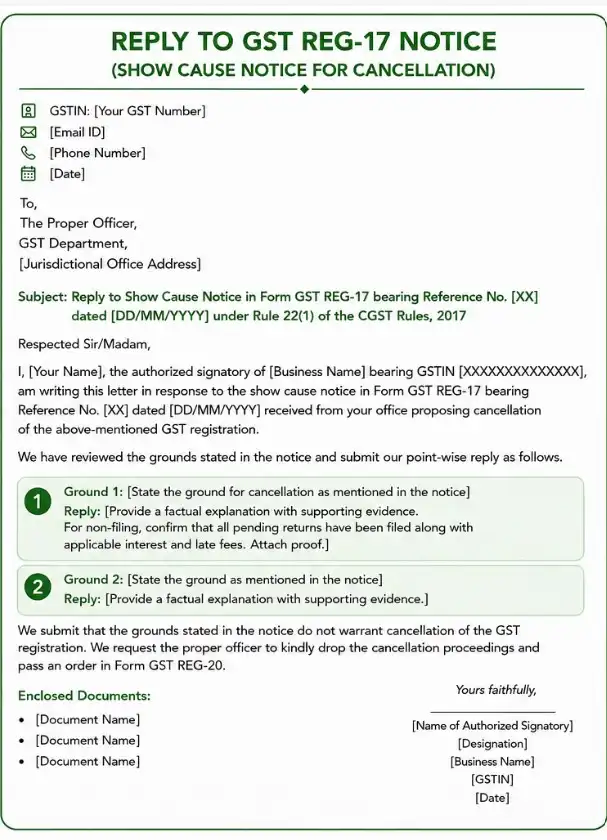
GSTIN: [Your GST Number] [Email ID] | [Phone Number] [Date]
To, The Proper Officer, GST Department, [Jurisdictional Office Address]
Subject: Reply to Show Cause Notice in Form GST REG-17 bearing Reference No. [XX] dated [DD/MM/YYYY] under Rule 22(1) of the CGST Rules, 2017
Respected Sir/Madam,
I, [Your Name], the authorized signatory of [Business Name] bearing GSTIN [XXXXXXXXXXXXXX], am writing this letter in response to the show cause notice in Form GST REG-17 bearing Reference No. [XX] dated [DD/MM/YYYY] received from your office proposing cancellation of the above-mentioned GST registration.
We have reviewed the grounds stated in the notice and submit our point-wise reply as follows.
Ground 1: [State the ground for cancellation as mentioned in the notice] Reply: [Provide a factual explanation with supporting evidence. For non-filing, confirm that all pending returns have been filed along with applicable interest and late fees. Attach proof.]
Ground 2: [State the ground as mentioned in the notice] Reply: [Provide a factual explanation with supporting evidence.]
We submit that the grounds stated in the notice do not warrant cancellation of the GST registration. We request the proper officer to kindly drop the cancellation proceedings and pass an order in Form GST REG-20.
Enclosed Documents:
- [Document Name]
- [Document Name]
- [Document Name]
Yours faithfully, [Name of Authorized Signatory] [Designation] [Business Name] [GSTIN] [Date]
Always customize these templates with facts and figures specific to your notice. A point-by-point reply gets approved faster than a generic submission.
How to Draft a GST Show Cause Notice (SCN) Reply: Practitioner Guide
A Show Cause Notice (SCN) under GST is the most serious form of notice because it proposes adverse action, typically cancellation of registration (REG-17), or proposed tax demand under Sections 73 or 74 (DRC-01). Unlike a REG-03 clarification request, an SCN already states grounds for the proposed action, and the reply must specifically refute each ground.
Three-Part Structure of a GST SCN Reply
- Address each ground point-by-point — Number each ground exactly as in the notice and respond directly. Don’t paraphrase the officer’s grounds; quote them.
- Provide factual rebuttal with evidence — Every claim in your reply must be supported by an attached document (filed returns, payment challans, audit reports, GSTN screenshots).
- Request specific relief — Clearly state what you want the officer to do (drop the SCN, issue REG-20 dropping cancellation, or set aside the proposed demand).
Common SCN Grounds and Reply Approaches
| SCN Ground | Reply Approach |
|---|---|
| Non-filing of returns for 6+ months | File all pending returns + late fee + interest BEFORE filing the reply; attach proof of filing |
| Non-business at registered premises | Photographs of premises with business signboard + utility bills in business name + customer/vendor correspondence at the address |
| Wrongful ITC claim | Genuine invoices, GSTR-2B match evidence, payment proof to suppliers, vendor filing history |
| Misuse of GSTIN / fake invoicing | Detailed transaction trail with supplier verification, payment proof through banking channels, and e-way bill records |
| Voluntary non-business | Disclose business circumstances honestly; if the business actually ceased, accept cancellation gracefully rather than contest |
Personal Hearing Request
Always end the SCN reply with a request for a personal hearing under Section 75(4) of the CGST Act, even if not strictly mandatory. This preserves your right to oral arguments and prevents an ex parte order. The officer must grant the hearing if requested.
Section 75(5) — Maximum Three Adjournments
Under Section 75(5), the officer can grant a maximum of 3 adjournments of personal hearing on sufficient cause. Plan attendance carefully; fourth adjournment requests are typically denied.
Common GST Notice Queries and How to Reply
Most GST registration notices fall into a handful of recurring query types. Knowing exactly what to write and what to attach for each scenario saves time and improves the chances of single-attempt approval.
Here are the six most common query scenarios with suggested reply language and required documents:
Scenario 1: Address in Application Does Not Match Address Proof
The officer flags a mismatch between the address entered in Form GST REG-01 and the address shown on the electricity bill or rent agreement.
Reply: The principal place of business declared in the application is correct, operational, and verifiable. The variation in the address is due to a difference in abbreviation and not an actual mismatch. The premises are accessible during working hours and capable of receiving official GST communication. A fresh electricity bill and rent agreement clearly showing the correct address are enclosed herewith.
Documents to attach: Latest electricity bill not older than two months, registered rent agreement, and property tax receipt.
Scenario 2: Stamp Paper Date is After the Date of the Rental Agreement
The officer flags this because a stamped paper must always carry a date that is on or before the date of the rental agreement. A later date makes the agreement legally invalid.
Note: A written explanation alone does not resolve this query. You must submit a fresh agreement or a countersigned correction.
Reply: We acknowledge the discrepancy in the stamp paper date. A fresh rental agreement, executed on correctly dated stamp paper, is enclosed herewith for your consideration.
Documents to attach: Fresh rental agreement on correctly dated stamp paper, or a countersigned correction letter signed by both the tenant and the landlord with the correct date mentioned.
Scenario 3: Aadhaar or PAN Details Do Not Match Database
The officer raises a query because the name or details of the proprietor, director, or authorized signatory do not match the UIDAI or CBDT database.
Note: If Aadhaar mobile OTP verification failed during the application, ensure the mobile number linked to your Aadhaar is active and complete eKYC before filing the reply.
Reply: The Aadhaar and PAN details submitted in the application belong to the authorized signatory of the business. The minor variation in the name is due to a spelling difference between records. The correction has been initiated at the source. Updated Aadhaar and PAN documents are attached for verification.
Documents to attach: Updated Aadhaar card, PAN card, CBDT or UIDAI correction acknowledgment if applicable.
Scenario 4: No NOC for Shared or Informally Arranged Premises
The officer asks for a No Objection Certificate because the rent agreement is unregistered or the premises are used under an informal arrangement with no written agreement.
Note: As per CBIC Instruction No. 03/2025-GST, a registered rent agreement does not require a separate NOC. An NOC is needed only when the agreement is unregistered or no written agreement exists.
Reply: The business operates from the premises with the full knowledge and consent of the property owner. A No Objection Certificate along with the owner’s proof of ownership is enclosed herewith. The premises are accessible during working hours and capable of receiving official GST communication.
Documents to attach: NOC from the property owner, the owner’s identity proof, and ownership proof such as an electricity bill or a property tax receipt in the owner’s name.
Scenario 5: Incomplete Witness Details in Rental Agreement
The officer raises a query when witness details in the rental agreement are missing or incomplete. This is a common but overlooked trigger for a REG-03 notice.
Reply: The witness details in the original rental agreement were incomplete. We have attached an additional sheet containing the witness’s complete details, including name, father’s name, address, age, Aadhaar number, and mobile number, duly signed by both the tenant and the landlord.
Documents to attach: Supplementary sheet with complete witness details signed by both parties, or a fresh rental agreement with complete witness information.
Scenario 6: Canceled or Suspended GSTIN Already Linked to the Same PAN
The officer raises a query because the applicant’s PAN has a previously canceled or suspended GSTIN linked to it.
Reply: We canceled the earlier GSTIN linked to our PAN due to [state the reason, for example, cessation of business or voluntary cancellation]. We have also cleared all pending returns and dues under the earlier registration. We are now applying for fresh registration as the business has recommenced operations. Supporting documents are enclosed herewith.
Documents to attach: Cancellation order of the earlier GSTIN, proof of return filing and dues clearance, and an explanation letter.
A specific, well-documented reply in the first attempt significantly reduces the chances of a second notice or rejection.
Need help drafting your GST notice reply? RegisterKaro’s GST experts review your notice, prepare a point-by-point response, and file it on the portal before the deadline. Avoid rejection with professional support. Contact us for GST notice reply assistance!
