


To download your Udyam (MSME) certificate, visit the Udyam portal, enter your registered mobile number, and verify it with the OTP sent to your phone. This method generates your Udyam Registration Certificate instantly, allowing you to download it as a PDF free of charge. If you do not remember your Udyam Registration Number (URN), first recover it using your registered mobile number, and then download the certificate.
The Udyam certificate is the official proof of MSME registration in India, required for business loans, government tenders, and subsidy schemes. Keeping a downloaded copy on hand ensures you can submit it quickly whenever a bank or government department asks for proof of your MSME status.
This guide explains how to download the Udyam certificate by mobile number, how to recover a lost registration number, and what to do if your registered mobile number has changed.
Key Takeaways
- You can download your Udyam (MSME) certificate using your registered mobile number for free on the official portal, udyamregistration.gov.in.
- The download works in two steps: recover your Udyam Registration Number (URN) using your mobile and an OTP, then download the certificate with the URN and another OTP.
- If you have forgotten your URN, use the “Forgot Udyam/UAM No?” option to recover it by your registered mobile number or email.
- The OTP is sent only to the mobile number registered on your Udyam profile, so that number must be active to complete the download.
- If your registered mobile has changed, update it through the “Update Udyam Registration” section using your Aadhaar OTP before downloading.
- The Udyam Registration Number follows the format UDYAM-XX-00-0000000, and the certificate is digitally signed with permanent validity, so it never needs renewal.
- The download is always free on udyamregistration.gov.in. Never pay a third-party website, and check that the address ends in “.gov.in.”
Can You Download the Udyam Certificate by Mobile Number?
You can download your Udyam certificate using your registered mobile number. An OTP sent to that number verifies your identity. However, the download page itself requires your URN, so the mobile number works as part of a simple two-step process:
- Recover your URN by mobile: If you do not have your URN, use the “Forgot Udyam/UAM No?” option on the portal to retrieve it using your registered mobile number and an OTP.
- Download the certificate: If you already have your URN, enter it along with your registered mobile number, verify it with the OTP, and download your certificate as a PDF. If you recovered your URN in the first step, use the same details to complete the download.
Note: The OTP is always sent to the mobile number registered during your Udyam registration, which is linked to your Aadhaar. You must have access to this number to receive the OTP and complete the download.
What Do You Need Before Downloading Your Udyam Certificate using a Mobile Number?
Before you download your Udyam Registration Certificate, keep a few things ready to make the process quick and smooth. You will need the following:
- Registered mobile number or email ID: Keep the mobile number or email ID linked to your Udyam registration ready, as the OTP for identity verification will be sent to one of these.
- Udyam Registration Number (URN): Helpful if you already have it, though you can recover it on the portal using your registered mobile number if you do not.
- A device with internet access: A computer or smartphone with a browser to open the official portal, udyamregistration.gov.in.
Note: You do not need any documents, passwords, or payment to download your Udyam Registration Certificate. The process is free and requires only your registered mobile number to receive the OTP. If your registered mobile number has changed, you will need to update it first.
How to Download the Udyam Certificate by Mobile Number? Step by Step
You can easily download your Udyam Registration Certificate using your registered mobile number. Follow these steps:
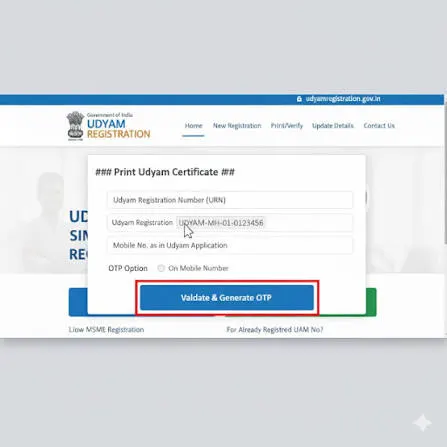
- Visit the Udyam portal: Go to udyamregistration.gov.in and click “Print/Verify” to access the certificate download option.
- Enter your URN: If you already have your Udyam Registration Number (URN), enter it to proceed. If you do not remember your URN, select “Forgot Udyam/UAM No?” to recover it using your registered mobile number or email ID.
- Verify your mobile: Choose the mobile OTP option, enter your registered mobile number, click “Validate & Generate OTP,” and enter the OTP received.
- Get your URN: Your 16-digit Udyam Registration Number is displayed on the screen and sent to you by SMS.
- Open the print page: Return to “Print/Verify” and select “Print Udyam Certificate.” Enter your URN and registered mobile number.
- Download the certificate: Your certificate opens on screen. Check the details, then click “Print” or “Print with Annexure” to save it as a PDF.
Note: The “Print with Annexure” option includes additional enterprise details and is recommended for official submissions. The certificate is digitally signed and valid without a physical signature.
What If Your Registered Mobile Number for the Udyam Certificate is Not Working?
If the mobile number linked to your Udyam profile is no longer active, you will not receive the OTP required to download your certificate. The solution depends on whether your registered mobile number is inactive or if you have access to a different number. Follow the option that matches your situation:
- Update your Udyam mobile using Aadhaar OTP: If your Aadhaar-linked mobile number is still active, log in to the “Update Udyam Registration” section using the Aadhaar OTP option. Then update the mobile number linked to your Udyam profile. You can then download the certificate using the new number.
- Update your Aadhaar-linked mobile first: If your Aadhaar-linked number is also inactive, you must update it with UIDAI before you can use the Aadhaar OTP option. This update cannot be done online, so you need to visit an Aadhaar Enrolment or Update Center with your Aadhaar and identity proof.
- Contact the Udyam helpdesk: If you cannot access either number, raise a grievance on the portal or call the Udyam helpline at 1800-111-955 (toll-free). Provide your details and request assistance to update your number.
Note: Never share your Aadhaar or Udyam OTP with anyone, including callers claiming to be from the helpdesk. Official staff will never ask for your OTP.
Is the Udyam Certificate Download Using Mobile Number Free?
Downloading the Udyam certificate is completely free on the official government portal. The Ministry of MSME does not charge any fee to register, download, print, or re-download your certificate. You can download it as many times as you need at no cost.
Keep these safety tips in mind while downloading your Udyam (MSME) Certificate:
- Use only the official portal: Download only from udyamregistration.gov.in, and check that the web address ends in “.gov.in” before entering any details.
- Use your registered mobile number: Enter the mobile number linked to your Udyam registration to receive the OTP required for verification. If your number has changed, update it before downloading the certificate.
- Never pay for the download: Many third-party websites charge a fee to “download” or “recover” your certificate, but the official service is free.
- Do not share your OTP: Never share the OTP sent to your mobile with anyone, as the portal never requires you to give it to a third party.
- Watch for fake sites: Websites that use words like “Udyam” or “registration” in their name are not always official. Verify the address carefully before proceeding.
Common Problems and Fixes When Downloading the Udyam Certificate By Mobile Number
While downloading the Udyam Registration Certificate, you may face a few common issues, but most can be resolved easily. Here are the problems you may encounter and their solutions:
- OTP not received: Check that your registered mobile number is active and has a network. If the number has changed, update it first, as the OTP is sent only to the registered number.
- Invalid URN error: This usually happens due to a typing mistake, such as confusing the number zero with the letter O. Re-enter the URN carefully, or copy it from the SMS or your email.
- Forgotten Udyam Registration Number: Use the “Forgot Udyam/UAM No?” option on the portal to recover it with your registered mobile number and an OTP.
- Old Udyog Aadhaar (UAM) not migrated: If you registered under UAM, migrate to Udyam through the portal and download the new certificate.
- Portal not loading or under maintenance: The portal is occasionally down for scheduled maintenance. Wait and try again later, or use a different browser if the page does not load correctly.
- Outdated details on the certificate: If your certificate shows old details, update them through “Update Udyam Registration” and download a fresh copy.
Lost your Udyam number and stuck at the OTP screen? RegisterKaro makes MSME registration, updates, and certificate downloads simple. You can download your certificate quickly and for free using your mobile number once you know the right steps. Contact us today to get your Udyam Certificate and unlock your MSME benefits!
