


A Udyam Registration Certificate is an e-certificate issued online through the Udyam Registration Portal after an eligible enterprise completes registration. Once issued, the certificate can be accessed and downloaded online through the official portal using the “Print Udyam Certificate” facility. It confirms the enterprise’s registration under the Micro, Small and Medium Enterprise (MSME) framework and contains its permanent Udyam Registration Number.
The certificate contains important enterprise details, including the enterprise name, MSME classification, major activity, and NIC codes. It also includes a dynamic QR code that provides access to the enterprise’s registration details on the official Udyam portal.
Udyam Registration is free, paperless, and based on self-declaration. There is no requirement to upload documents, certificates, or other proof during registration. The Udyam portal is integrated with government databases, and PAN- and GST-linked investment and turnover details are fetched automatically from the Income Tax and GST systems, where applicable. Aadhaar is required for registration, while PAN and GSTIN requirements apply according to the applicable rules.
You can use the certificate as proof of Udyam registration when accessing applicable MSME schemes, procurement benefits, and other facilities, subject to the relevant requirements. For informal micro enterprises that do not have PAN, the Government introduced the Udyam Assist Platform (UAP) in January 2023 to bring them into the formal system. The UAP certificate is treated at par with the Udyam Registration Certificate for availing Priority Sector Lending benefits.
This article explains the eligibility and MSME classification criteria for obtaining a Udyam Registration Certificate. It also covers the certificate’s key details, benefits, verification, download process, common issues, and validity.
Udyam Registration Certificate Format and Sample
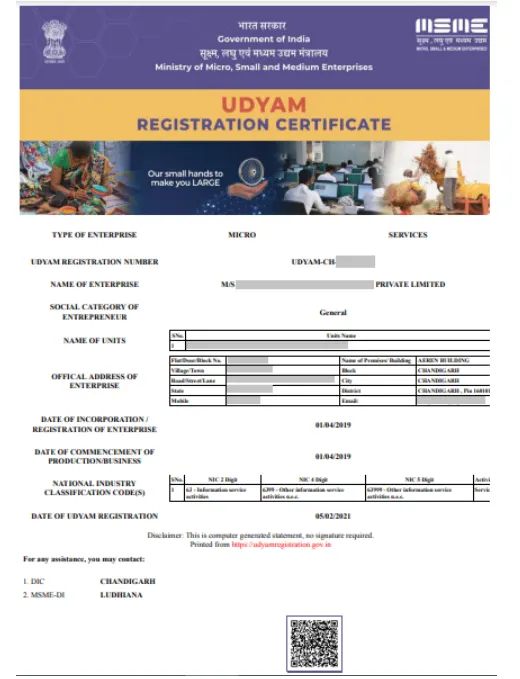
The Udyam Registration Certificate is a computer-generated certificate issued online after successful Udyam Registration. It shows the enterprise’s Udyam Registration Number, enterprise type, registered details, NIC codes, registration date, and a dynamic QR code.
The official certificate format includes the following key details:
| Certificate Detail | Information Shown |
| Udyam Registration Number | Permanent Udyam Registration Number |
| Name of Enterprise | Registered name of the enterprise |
| Type of Enterprise | Micro, Small, or Medium |
| Major Activity | Manufacturing or Services |
| Social Category | Social category of the entrepreneur |
| Unit or Plant Details | Names and details of registered units |
| Official Address | Business address, mobile number and email |
| Date of Incorporation/Registration | Date of incorporation or registration of the enterprise |
| Date of Commencement | Date of commencement of production or business |
| NIC Codes | NIC 2-digit, 4-digit and 5-digit codes with the corresponding activities |
| Date of Udyam Registration | Date on which Udyam Registration was completed |
| Dynamic QR Code | Provides access to the enterprise’s details on the Udyam portal |
The official Udyam portal provides a sample certificate for reference. The certificate is computer-generated and does not require a physical signature.
How to Download Udyam Registration Certificate Online?
The Udyam Registration Certificate is issued online after successful registration through the official Udyam Registration portal. The portal provides a “Print Udyam Certificate” option under the Print/Verify section.
Follow these steps to access and download your Udyam Registration Certificate:
Step 1: Open the Official Udyam Portal
Visit the official Udyam Registration portal. Go to the Print/Verify section and select “Print Udyam Certificate.”
Step 2: Enter the Required Details
Enter your Udyam Registration Number and the mobile number used in the Udyam application. Select the available OTP option and complete the verification process.
Step 3: Access the Certificate
After successful verification, you can access your Udyam Registration Certificate through the portal.
Step 4: Save or Print the Certificate
Save a digital copy of the certificate for your records or print it when required. The certificate contains key enterprise details, the Udyam Registration Number, MSME classification, and a dynamic QR code that provides access to the enterprise’s details on the official Udyam portal.
Udyam Registration Certificate on DigiLocker
The Udyam Registration Certificate is available electronically through DigiLocker, as the Udyam Registration Portal is integrated with DigiLocker.
Using the certificate through DigiLocker offers the following benefits:
- Digital Access: Access and present the certificate electronically when required.
- Accepted as a Registration Document: The DigiLocker certificate can be considered on par with the physical Udyam Registration Certificate where the certificate is required.
- Digital Verification: Electronic verification helps authorities check the genuineness of the certificate and enterprise details.
How to Download Udyam/MSME Certificate by Mobile Number if Missing?
If you have forgotten your Udyam Registration Number, you can retrieve it using the mobile number linked to your registration.
- Visit the official Udyam Registration portal and go to Print/Verify → Forgot Udyam/UAM Number.
- Select Udyam Registration and enter your registered mobile number.
- Complete the OTP verification.
- The portal will display your Udyam Registration Number.
- Use the number under Print Udyam Certificate to access and download your certificate.
How to Download Udyam/MSME Certificate by Aadhaar Number?
If you need to access your Udyam Registration using Aadhaar, you can use the Aadhaar-linked details for verification on the official Udyam portal.
- Visit the Udyam Registration portal and open the Print/Verify section.
- Select the applicable Aadhaar-based verification option and enter the Aadhaar number linked to the registration.
- Complete the OTP verification using the registered mobile number.
- After verification, access your Udyam Registration details and select Print Udyam Certificate to download the certificate.
Who Can Obtain Udyam Registration Certificate?
Eligible enterprises that meet the applicable MSME investment and turnover limits can obtain a Udyam Registration Certificate. The Udyam portal supports registration for the following organisation types:
- Proprietorship: Through the proprietor.
- Partnership Firm: Through the managing partner.
- HUF: Through the Karta.
- LLP: Through the organisation or authorised signatory.
- Company: Through the organisation or authorised signatory.
- Cooperative Society, Society, or Trust: Through the organisation or authorised signatory.
Retail and wholesale traders can also register on the Udyam portal, but their MSME benefits are restricted to Priority Sector Lending under the applicable policy.
Validity and Renewal of Udyam Registration Certificate
The Udyam Registration Number is permanent, and the Udyam Registration Certificate does not require periodic renewal. The official Udyam portal specifically states that there is no need for renewal of Udyam Registration. Once issued, the Udyam Registration Number remains permanent. The certificate can also be accessed again through the official Udyam portal when required.
However, if the enterprise’s registration details change, the applicable information should be updated through the “Update/Cancel Udyam Registration” facility on the official portal.
Benefits of Udyam Registration Certificate
A valid Udyam registration can help eligible MSMEs access government schemes, credit support, procurement benefits, and other facilities. The exact benefit depends on the applicable scheme and its eligibility conditions. The key benefits include:
- Government Loans and Credit Support: Eligible MSMEs can access applicable credit schemes, including collateral-free credit support under credit guarantee schemes, subject to the lender and scheme requirements.
- Public Procurement Benefits: Eligible Micro and Small Enterprises may receive benefits such as free tender sets and exemption from earnest money deposit (EMD) under the applicable Public Procurement Policy.
- Delayed Payment Support: Eligible Micro and Small Enterprises can use MSME Samadhaan for applicable delayed-payment cases.
- Priority Sector Lending: Udyam-registered MSMEs can receive applicable Priority Sector Lending treatment, subject to banking and regulatory requirements.
- IPR Support: Eligible MSMEs can receive reimbursement for patent and trademark registration under applicable MSME IPR schemes. This can help reduce eligible intellectual property registration costs.
- ISO Certification Reimbursement: Eligible MSMEs may receive reimbursement or financial assistance for ISO and other quality certification costs under applicable government schemes.
- Utility Subsidies: MSMEs may receive applicable electricity or other utility-related subsidies offered under government or state-specific schemes, subject to the relevant eligibility conditions.
- Access to MSME Platforms: Udyam-registered enterprises can access platforms such as GeM, MSME Samadhaan, and TReDS, subject to their respective requirements.
- Permanent Registration: The Udyam Registration Number is permanent, and Udyam Registration does not require renewal.
MSME Classification Under Udyam Registration
An enterprise is classified as a Micro, Small, or Medium Enterprise based on its investment in plant and machinery or equipment and annual turnover. The Government revised these limits with effect from April 1, 2025, increasing the investment limits by 2.5 times and the turnover limits by 2 times. The earlier limits that applied from July 1, 2020, are no longer applicable.
| Enterprise | Investment Limit | Annual Turnover Limit |
| Micro | Up to ₹2.5 crore (earlier: ₹1 crore) | Up to ₹10 crore (earlier: ₹5 crore) |
| Small | Up to ₹25 crore (earlier: ₹10 crore) | Up to ₹100 crore (earlier: ₹50 crore) |
| Medium | Up to ₹125 crore (earlier: ₹50 crore) | Up to ₹500 crore (earlier: ₹250 crore) |
The classification is based on both investment and turnover. Export turnover is excluded when calculating turnover for MSME classification.
An enterprise must remain within both the investment and turnover limits for its current category. If it crosses the ceiling for either criterion, it moves to the next higher category.
Common Issues When Downloading Udyam Registration Certificate
You may face issues while accessing, verifying, or printing your Udyam Registration Certificate. The official Udyam portal provides separate options to recover your registration number, verify registration details, and update your registration information.
Here are some common issues and the steps you can take to resolve them:
- Forgot Udyam Registration Number: If you do not remember your Udyam Registration Number, use the “Forgot Udyam/UAM Number” option under the Print/Verify section. Select Udyam Registration and choose OTP verification through the mobile number or email address used in the application. After successful OTP verification, the portal displays the registered numbers.
- Certificate Details are Incorrect: If the details on your certificate do not match your current business information, check the registration details on the official Udyam portal. You can use the “Update/Cancel Udyam Registration” facility to make applicable changes to coyour registration.
- Certificate Cannot Be Accessed/Downloaded: If you cannot access or print your certificate, make sure you are using the official Udyam Registration portal and the “Print Udyam Certificate” option. You can also use “Verify Udyam Registration” to check whether your registration details are available on the portal.
- Portal or Technical Issue: If the certificate page does not load or the portal does not respond, try accessing it again later. Always use the official Udyam portal or a government single-window system. The government states that private websites, agencies, or persons are not authorised to undertake Udyam Registration or related activities.
Using the official Udyam portal can help you access, verify, or update your certificate details when required. If an issue persists, use the support or grievance options provided on the official portal or reach out to our support team for assistance.
