


An Income Tax Demand Notice 143(1) is an intimation issued by the Income Tax Department after processing a taxpayer’s filed ITR. The Centralized Processing Center (CPC) verifies the details provided in the return, including income, deductions, tax credits, and tax payments, before calculating the final tax liability.
Taxpayers should review the notice carefully to understand the reason for the demand and take the appropriate action. This may include paying the outstanding tax, submitting a response to an outstanding demand, or filing a rectification request if the calculation contains an error.
This guide explains when you should seek professional assistance from a Chartered Accountant (CA) to resolve tax demand notices accurately and avoid unnecessary disputes with the Income Tax Department.
Key Takeaways
- A Section 143(1) intimation is issued after the Income Tax Department processes your ITR filed and compares it with available tax records.
- A 143(1) demand notice usually arises due to differences in TDS credits, deduction claims, unpaid taxes, TDS interest calculations, challan details, or other return-related adjustments.
- The intimation may result in no demand, a refund, or additional tax payable after processing your return.
- Taxpayers should carefully review the notice, check the reason for the demand, and respond through the Income Tax portal if required.
- You can agree with the demand and pay the amount, or disagree and submit supporting documents to explain the error.
- If the demand contains a clear mistake, you can request rectification under Section 154 through the Income Tax portal.
- Ignoring a valid demand may lead to additional interest, a refund adjustment under Section 245, and further recovery action.
- Professional assistance from a Chartered Accountant (CA) can help review complex demands, prepare responses, and handle rectification or dispute-related matters.
What is Income Tax Demand Notice 143(1)? Possible Outcomes
You may receive an Income Tax Demand Notice 143(1) when the Income Tax Department identifies a difference while processing your filed return. The Centralized Processing Center (CPC) uses a fully automated return processing system to verify your tax calculations, tax payments, deductions, and reported income details before issuing the intimation.
The communication is officially called an intimation under Section 143(1) of the Income Tax Act, 1961. Returns for tax years beginning on or after 1 April 2026 are processed under the corresponding provision, Section 270(1) of the Income Tax Act, 2025. It informs taxpayers about the differences between their submitted return and the department’s calculation.
Section 143(1) processing generally results in three possible outcomes:
| Outcome | Meaning |
| No demand and no refund | Your return matched the department’s records. No further action is needed. |
| Refund determined | You paid more tax than required. The department credits the refund to your pre-validated bank account. |
| Tax demand raised | The department found additional tax payable after processing your return. |
The third outcome is what people call the 143(1) demand notice. It means the department calculated a higher tax liability than you reported. Before finalizing any such adjustment, the CPC first issues a proposed adjustment notice under Section 143(1)(a) and allows you 30 days to accept it or explain why it is incorrect. If you do not reply within that period, the department completes the adjustment and issues the demand.
Why Do Taxpayers Receive a 143(1) Demand Notice?
A demand notice under Section 143(1) of the Income Tax may arise for several reasons. Most cases occur due to mismatches between taxpayer information and department records:
a. Difference in TDS Credit
A common reason involves incorrect or missing Tax Deducted at Source (TDS) credit. The department verifies TDS details through Form 26AS, Annual Information Statement (AIS), and related records.
If your employer, bank, or deductor reports different TDS information, the department may reduce your available credit. This difference can increase your 143(1) tax payable amount.
b. Incorrect Deduction Claims
Taxpayers sometimes claim deductions under Sections like 80C, 80D, or other provisions incorrectly. If the department identifies unsupported or incorrect deductions during processing, it may adjust the taxable income.
The adjustment increases the final tax calculation and can create an outstanding demand.
c. Unpaid Self-Assessment Tax
If you calculate your tax liability incorrectly or fail to pay the complete self-assessment tax before filing your return, the department may raise a demand.
The notice can include unpaid tax along with applicable interest.
d. Interest Calculation Under Sections 234A, 234B and 234C
The Income Tax Department may add interest under Sections 234A, 234B, and 234C when taxpayers delay filing returns or paying advance tax.
These interest calculations often appear as part of the total demand amount.
e. Incorrect Tax Challan Details
A taxpayer may have paid taxes but entered incorrect challan information while filing the return. The system may fail to match the payment and show additional tax payable.
Checking the challan details helps identify such issues.
f. Omission of Form 10E for Section 89 Relief
If you claim tax relief under Section 89 for salary arrears or advance salary but do not submit Form 10E, the Income Tax Department may disallow the claim during return processing. As a result, the department may recalculate your tax liability and raise a demand under Section 143(1).
g. Disallowed Chapter VI-A Deductions Under the New Tax Regime
If you file your return under the New Tax Regime (Section 115BAC) and claim deductions that are not allowed under Chapter VI-A (except eligible deductions permitted by law), the Income Tax Department may disallow those claims while processing your return. This adjustment increases your taxable income and may result in a 143(1) demand notice.
How to Download Income Tax Demand Notice 143(1) Online?
Taxpayers can download their intimation document from the Income Tax e-filing portal (eportal.incometax.gov.in).
Follow these steps:
- Visit the official Income Tax e-filing portal.
- Log in using your PAN and password.
- Select the “e-File” Section.
- Open “Income Tax Returns.”
- Choose “View Filed Returns.”
- Select the relevant assessment year.
- Download the Section 143(1) intimation PDF.
The downloaded document contains the detailed calculation prepared by the department.
Difference Between Section 143(1) Intimation and Demand Notice
Many taxpayers confuse an intimation with a tax demand notice. Both relate to Section 143(1), but their outcomes differ. A Section 143(1) intimation provides the processing result of your return. It may show acceptance, refund, or an additional payment requirement. On the other hand, an Income Tax demand notice 143(1) specifically refers to the situation where the department calculates additional tax payable.
What Does the Section 143(1) Intimation Contain?
The Section 143(1) intimation generally includes the following details:
- Income reported on the return
- Income considered by the department
- Tax calculation differences
- Interest charges
- Final refund or demand amount
Taxpayers should download and review the complete document before taking action.
Related Notices You May Receive Along With a Section 143(1) Demand
If the Income Tax Department raises a tax demand while processing your return under Section 143(1), you may also receive other notices depending on your case.
- Section 156 Notice of Demand: If the department determines that you owe additional tax, it issues a Notice of Demand under Section 156 along with the Section 143(1) intimation. This notice specifies the amount payable, including any applicable tax, interest, fee, or penalty, and informs you of the payment timeline.
- Section 245 Notice for Refund Adjustment: If you have a pending income tax refund for another assessment year, the department may issue a Section 245 notice before adjusting that refund against your outstanding demand. You can review the proposed adjustment and submit your response through the Income Tax e-filing portal before the department sets off the refund.
How to Open the 143(1) PDF and Find the Intimation Password?
The Income Tax Department sends the Section 143(1) intimation as a password-protected PDF to your registered email address. You can also download the document from the Income Tax e-filing portal by accessing your filed returns. To open the 143(1) PDF, you need to enter the correct 143(1) intimation password.
The password follows a specific format based on your PAN details and date of birth.
Follow these points to open the PDF successfully:
- Enter your PAN number in lowercase letters.
- Add your date of birth in DDMMYYYY format after the PAN.
- Do not include spaces, hyphens, or special characters between the PAN and date of birth.
For example, if your PAN is ABCDE1234F and your date of birth is April 10, 1990, your password will be: abcde1234f10041990. Companies and Hindu Undivided Families use the date of incorporation instead of a birth date.
If the password does not work, check whether you entered the PAN in lowercase and followed the correct date format. Most errors occur because taxpayers use capital letters, enter incorrect dates, or add unnecessary spaces while entering the password.
How to Respond to Income Tax Demand Notice 143(1)?
If you receive an outstanding demand, you must review the calculation before responding. The Income Tax portal provides an option called “Response to Outstanding Demand.”
The response process includes the following steps:
Step 1 – Log in to the Income Tax Portal: Access your account using PAN credentials and open the pending actions Section.
Step 2 – Select Outstanding Demand: Choose the relevant assessment year and review the demand details.
Step 3 – Choose the Agree or Disagree Option: Taxpayers can select:
- Agree with Demand: Choose this option when the department’s calculation is correct.
- Disagree with Demand: Choose this option when you believe the demand contains errors.
Note: The portal may ask for supporting explanations and documents.
Step 4 – Submit Supporting Information: Upload relevant evidence, such as tax challans, Form 26AS details, deduction proofs, or other documents.
A proper response helps the department review your claim.
How to Pay Income Tax Notice 143(1) Demand Challan?
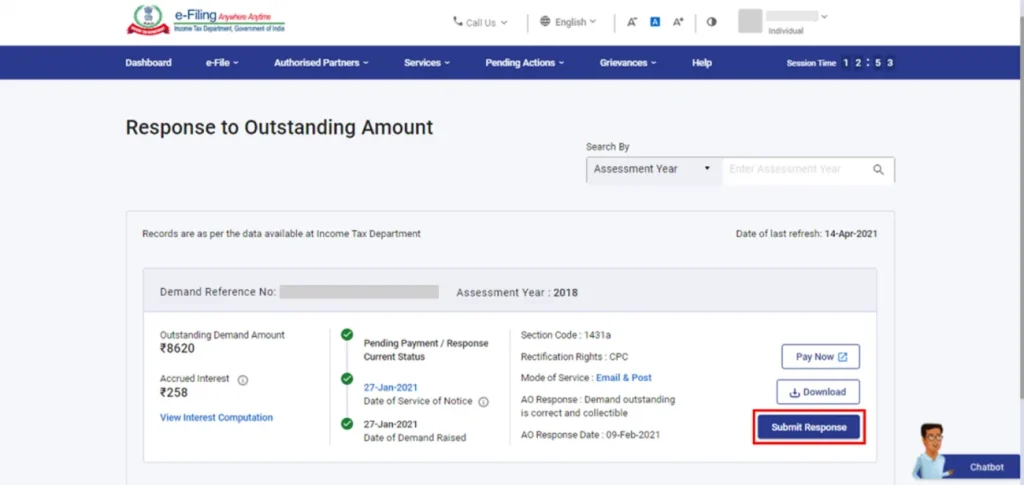
If you agree with the demand raised under Section 143(1), you must pay the outstanding amount through the Income Tax portal. Use the e-Pay Tax facility (incometax.gov.in) or Challan 280 to complete the payment.
While paying the 143(1) demand challan, select Minor Head 400 – Tax on Regular Assessment. Choosing an incorrect payment head can prevent the department from matching your payment with the outstanding demand.
Taxpayers should complete the payment or submit a response within the timeline specified in the demand notice. The deadline may vary depending on the notice issued in each case.
What Happens If You Ignore 143(1) Demand?
If you ignore a valid demand under Section 143(1), the Income Tax Department may take further action to recover the outstanding amount. The department charges interest at 1% per month under Section 220(2) on the unpaid demand. The outstanding demand remains visible on the income tax portal until you resolve it.
The department can also adjust your future income tax refunds against the pending demand under Section 245 of the Income Tax Act. For large outstanding amounts, the ITR department may initiate recovery proceedings.
Therefore, taking timely action helps you avoid additional interest, refund adjustments, and unnecessary complications. Taxpayers should verify the demand details, and either pay the amount or submit a response if they disagree with the calculation.
Rectification Under Section 154 for Incorrect Tax Demand
If the demand contains an obvious mistake, taxpayers can request rectification under Section 154.
Rectification applies when there is a clear error in the processing record. Common examples include:
- Incorrect tax credit adjustment
- Wrong interest calculation
- Incorrect personal information
- Missing tax payment records
Taxpayers can file a rectification request online through the Income Tax portal. The Centralized Processing Center (CPC) reviews the request and updates the intimation if it finds a valid mistake.
If the CPC rejects the online rectification request, the taxpayer can review the reason for rejection and take further action based on the issue involved. Depending on the nature of the dispute, the taxpayer may submit a fresh rectification request with additional details, correct the underlying error through other available options, or file an appeal if the matter requires detailed examination.
However, rectification cannot replace an appeal or detailed dispute process for complicated matters.
Time Limit for Issuing Section 143(1) Intimation
The ITR department must send the intimation within 9 months from the end of the financial year in which the taxpayer files the Income Tax Return.
The Finance Act, 2021, reduced the time limit from 12 months to 9 months to ensure faster processing of Income Tax Returns. This deadline applies to returns processed under Section 143(1), including cases involving a refund, additional tax liability, or no change in the return details.
For example, if you file your Income Tax Return for Financial Year (FY) 2024-25 in July 2025, the filing falls under FY 2025-26 because you submitted the return during that financial year. Since FY 2025-26 ends on March 31, 2026, the Income Tax Department can issue the Section 143(1) intimation until December 31, 2026.
Need Help Resolving Your Income Tax Demand Notice 143(1)? RegisterKaro helps review demand details, identify notice reasons, prepare responses, and complete rectification steps with support from experienced CA experts.
