


If you have recently applied for Goods and Services Tax (GST) registration, tracking your GST ARN status is essential to ensure a smooth, timely registration process. The GST ARN (Application Reference Number) is a unique 15-digit alphanumeric code generated when you submit your GST application. This number allows businesses and taxpayers to track their GST application status in real time and stay informed about any updates or required actions.
Delays in GST registration can impact business operations, tax compliance, and invoicing. Regularly checking your GST status by ARN verification ensures you can address any pending issues, provide additional documents if requested, and prevent unnecessary disruptions to locate your GSTIN (GST Identification Number).
In this detailed guide, we will walk you through everything you need to know about ARN updates, including what ARN is, why checking your GST ARN status is important, and a step-by-step guide to GST status check by ARN on the GST portal.
The Application Reference Number (ARN) is a unique identifier assigned to taxpayers when they submit their GST application. This number plays a crucial role in tracking the progress of GST registration on the GST portal.
Here’s how ARN works:
- The ARN status is generated automatically once you submit Form GST REG-01, the standard registration application form.
- It acts as a reference number that allows both the applicant and the GST authorities to track the GST application status.
- The ARN remains valid throughout the registration process and helps businesses verify their GST ARN verification stage.
- Whether your application is pending, approved, or requires additional clarification, you can check its status by entering the ARN on the GST portal.
Monitoring GST ARN updates regularly ensures that your application progresses without delays and helps you take timely action if needed.
Why is the GST Status Check by ARN Important for Businesses?
Regularly checking your ARN status is essential for multiple reasons:
- Stay Updated on Application Progress: By tracking your GST application status, you gain real-time insights into whether your registration is being processed, approved, or requires additional information.
- Identify and Resolve Issues Quickly: If your application is pending for clarification or rejected, monitoring GST ARN updates helps you take corrective actions without delay.
- Ensure Smooth Tax Compliance: GST registration is mandatory for businesses exceeding the threshold turnover limit. Keeping track of the GST registration process check ensures compliance with tax regulations.
- Avoid Business Interruptions: Without GST registration, businesses cannot issue tax invoices or claim input tax credits. Checking your GST status by ARN ensures that your application is processed without delays, preventing disruptions.
- Meet Legal and Banking Requirements: Many banks require GST registration for business accounts. Tracking your GST ARN verification status helps in fulfilling such legal and financial formalities smoothly.
By frequently checking your ARN status, you can ensure that your application moves forward efficiently, allowing your business to operate seamlessly.
Tracking your ARN status online is a straightforward process. Follow these steps to check your GST application status using the GST portal:
Step 1: Visit the GST Portal
Go to the official GST website: www.gst.gov.in. The GST portal is the official platform where taxpayers can check their GST ARN verification and application progress.
Step 2: Navigate to the Registration Section
Under the ‘Services’ tab, click on ‘Registration’. This section provides various options related to GST registration and status tracking.
Step 3: Select the Option to Track ARN Status
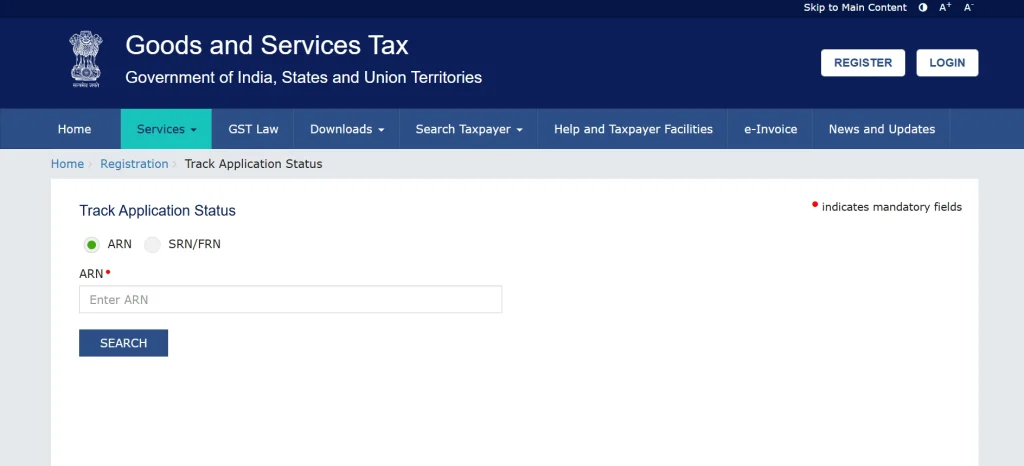
Within the registration section, select ‘Track Application Status’ and choose the option to check GST status by ARN.
Step 4: Enter Your ARN
You will be prompted to enter the 15-digit ARN that was provided to you during the GST application submission. Ensure that you enter the correct ARN to retrieve accurate information.
Step 5: View Your GST ARN Status
Once you submit the ARN, the system will fetch and display the latest GST ARN updates. The status will indicate whether your application is:
- Pending for Processing (under review)
- Pending for Clarification (additional documents required)
- Approved (GST registration successful)
- Rejected (application denied due to errors)
By following these simple steps, you can easily check your GST application status and take necessary actions based on the latest updates.
The GST portal provides multiple methods to track the GST ARN status effectively, offering flexibility for taxpayers to monitor the status of their GST registration application. Below are the primary ways to check your GST ARN verification status:
1. Using ARN (Application Reference Number)
The most straightforward way to track the ARN status is by using the ARN provided after submitting your GST application. Here’s how you can use the ARN for tracking:
- Navigate to the ‘Track Application Status’ section on the GST portal.
- Enter the 15-digit ARN you received upon submitting your GST application.
- The system will fetch and display your GST status by ARN, which will show if your application is pending verification, approved, or rejected.
This method gives you real-time GST ARN updates, helping you monitor the GST process check and take necessary actions if required.
2. Using TRN (Temporary Reference Number)
If you have not yet received an ARN, you can still track the progress of your GST application status by using the TRN (Temporary Reference Number). This number is provided during the initial submission of the GST application when the GST portal generates a reference for your application, but before the ARN is assigned.
- On the GST portal, use the TRN to check the status of your GST registration.
- Enter your TRN in the provided field and click ‘Track Application Status’.
- Your GST ARN verification status will appear, showing whether your GST application status is in progress, pending, or rejected.
3. Through Email and SMS Notifications
To ensure you’re always updated, GST ARN updates are frequently sent through registered email and SMS. When there are changes in the status of your application, such as approval or pending requests for clarification, you will be notified directly on your registered mobile number and email address. Keep an eye on these communications to ensure you don’t miss important updates regarding your GST ARN status.
By using these tracking methods, you can efficiently monitor your GST status by ARN, ensuring you stay updated on every step of your GST application status and take necessary actions on time.
When tracking your GST ARN status, you might encounter certain common errors. These errors can cause delays or confusion, but understanding the possible issues and knowing how to resolve them can help you stay on track with your GST application status. Here are some common errors and solutions for GST ARN verification:
1. Invalid ARN Entered
One of the most common mistakes users make is entering an incorrect ARN while tracking the GST application status. The ARN is a 15-digit alphanumeric code, and even a small typo can lead to errors when checking the GST ARN status.
Solution:
- Double-check the 15-digit ARN to ensure it’s accurate.
- Verify if you have copied the correct ARN from the official GST confirmation received after your application submission.
- If the issue persists, wait for 24-48 hours and try again, as newly submitted applications may take some time to show up in the system.
2. GST Portal Not Responding
Occasionally, users may face issues accessing the GST portal or experience slow response times, which can prevent them from checking their GST ARN verification status.
Solution:
- Clear your browser’s cache and cookies to ensure that no outdated data is causing the issue.
- Try accessing the portal using a different browser or device.
- If the problem continues, consider visiting the portal during off-peak hours to avoid network congestion.
3. Application Shows ‘Pending’ for a Long Time
If your GST application status is stuck on “Pending” for an extended period, it may be frustrating. This can happen if the authorities are still processing your application or verifying the provided details.
Solution:
- Be patient and wait for a few days, as the GST ARN verification process may take time.
- If the delay is longer than expected, contact the GST helpdesk for assistance and ask for a status update.
- Ensure that you’ve provided all necessary documents and information to avoid delays.
4. Rejected Application Without Explanation
In some cases, applicants find that their GST ARN status shows as “Rejected” without any clear explanation. This can happen due to incomplete documentation or discrepancies in the application.
Solution:
- Log in to the GST portal and check for any rejection notices that explain the reasons for the rejection.
- Review the details of your GST application status, correct the issues (e.g., missing documents, wrong information), and resubmit the application.
- If needed, consult a professional or GST expert to ensure your application meets all requirements.
- By addressing these common errors promptly, you can ensure that your GST ARN updates are accurate, and your GST process check moves forward smoothly.
If your GST ARN status shows that your application is pending or rejected, it’s crucial to take immediate and appropriate steps to resolve the issue. Here’s what you should do if you encounter either of these situations:
1. Pending Status
If your GST application status shows “Pending,” it means that your application is under review by the GST authorities or additional information is required for processing.
Steps to Take:
- Be patient: Wait for a few days as authorities may be processing your application or verifying documents.
- Verify document submission: Ensure that you have submitted all required documents as per the GST registration guidelines. Missing or incorrect documents can cause delays.
- Contact GST Helpdesk: If your application remains pending for an extended period, get in touch with the GST helpdesk for clarification on the status and potential next steps.
2. Rejected Status
If your GST ARN status shows “Rejected,” it means your application has been denied by the GST authorities, typically due to discrepancies in the application or missing information.
Steps to Take:
- Review rejection reasons: Log in to the GST portal and check the rejection notice to identify the reasons behind the denial of your application.
- Correct errors: Once you identify the issue, correct the discrepancies in your application, whether it’s a document issue or incorrect details.
- Resubmit application: After making the necessary corrections, resubmit your GST application. Ensure all details match official records to avoid further rejections.
- Seek professional assistance: If you find the process confusing or challenging, consider consulting a GST expert to help with the resubmission.
Taking the right steps when your GST status by ARN shows “Pending” or “Rejected” can help you resolve issues quickly and complete the GST registration process successfully.
Tracking your GST ARN status online is a crucial step in ensuring a smooth and hassle-free GST registration process. By following the steps outlined above, you can efficiently check your GST application status, resolve any issues that may arise, and ensure your business remains compliant with GST regulations.
Staying proactive in this process helps avoid unnecessary delays, enabling you to obtain your GST registration without complications and continue your business operations seamlessly.
If you’re facing difficulties with GST ARN verification or need expert assistance in GST registration, RegisterKaro is here to help! Our team of professionals will guide you through the entire GST process check and ensure your registration is done instantly. Contact Now!
