


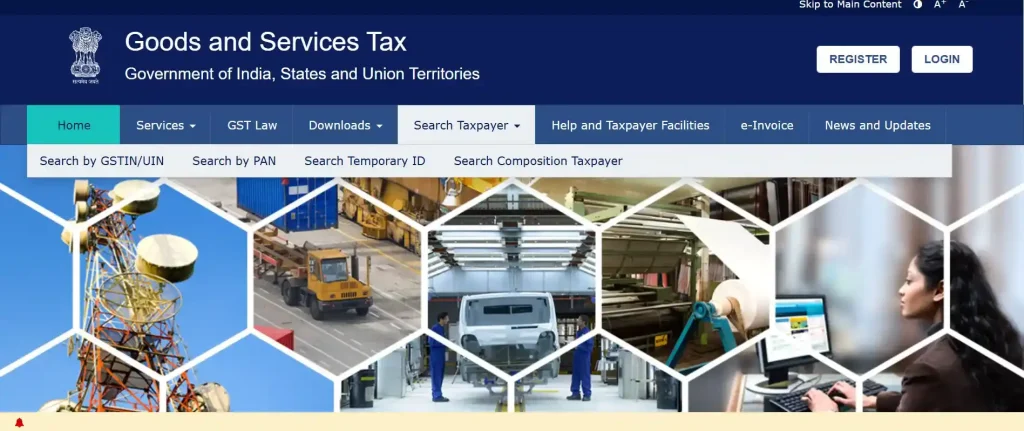
The feature to search GST number by name comes in handy when one needs to check the authenticity of a GST registration number in an invoice or evaluate a vendor for onboarding. You can search the GST number of a registered entity by visiting the GST portal (gst.gov.in), clicking on the “Search Taxpayer” feature. Initially, a 5th option named “Search by Name’ existed, allowing users to search GST by company name.
However, it was later removed to avoid misuse, like data scraping. At present, the GST portal provides 4 options for selection, namely:
- Search by GSTIN/UIN: Requires the 15-character GSTIN.
- Search by PAN: Returns all GSTINs linked to a given PAN.
- Search by Temporary ID: ID in GST for unregistered individuals or entities.
- Search Composition Taxpayer: Looks up taxpayers registered under the Composition Scheme.
If you only have a company name and want to find the corresponding GST number, you need to use a trusted third-party verification tool first. You can then cross-verify the result on the official portal. Not only does a correctly verified GSTIN confirm the legitimacy of the taxpayer, but it also helps protect your Input Tax Credit (ITC).
This guide explains the correct two-step approach to perform a GST number search by name and how to handle common verification challenges.
Key Takeaways
- The official GST portal does not allow users to search a GST number by business name directly.
- To perform a GST number search by name, first use a trusted third-party GST lookup tool and then verify the GSTIN on the official GST portal.
- GST verification helps protect Input Tax Credit (ITC) claims, validate suppliers, and detect fake invoices.
- If you have a business’s PAN, the official GST portal’s PAN search feature provides a faster and more reliable verification method.
- Always verify the registration status of a GSTIN, as cancelled or suspended registrations can create compliance and ITC risks.
- A valid GSTIN contains 15 characters and follows a fixed structure comprising the state code, PAN, entity number, and check digit.
- Businesses should verify GST details during vendor onboarding and periodically re-check high-value or long-term suppliers.
- Maintaining GST verification records can help reduce audit risks and strengthen tax compliance processes.
Why You Need to Search GST Number by Name?
Here are the general situations in which a GST search by name becomes essential:
- Verify suppliers during vendor onboarding.
- Protect Input Tax Credit (ITC) claims by confirming the supplier’s GST registration status.
- Validate invoices by matching the GSTIN with the supplier’s name.
- Detect fraud by identifying fake or mismatched GST details.
- Verify e-commerce sellers before entering into B2B transactions.
In each of these situations, you usually start with a business name and need to find the GSTIN.
Important: The Official GST Portal Does Not Allow Search by Name
The most common mistake is to assume that the GST portal offers a name-based search option. There is no “Search by Name” option. This is verified directly on the official GST portal.
How to Search GST Number by Name Using Trusted Third-Party Tools?
Several reputable GST verification platforms have indexed the public GST registration database and offer name-based search as a value-added feature. Here’s how to use them:
Step 1: Choose a Trusted GST Verification Tool
Reliable platforms allow you to search for a GST number by company name in India via free tools.
- Find the “GST Search by Name” or “GSTIN Lookup” feature.
- Enter the registered business name exactly as it appears on the company’s documents or invoice.
Even small variations in spelling, spacing, or abbreviations (Pvt Ltd vs Private Limited) can affect results, so be vigilant while searching.
Step 2: Review the Matching GSTINs
As per your search, the tool will return a list of GSTINs registered against businesses with matching names. Each entry typically shows the GSTIN, the legal name of the business, the trade name (if different), the state, and the current registration status of the GST-registered entity (as Active, Cancelled, Suspended).
Step 3: Cross-Verify on the Official GST Portal
Once you have identified the GSTIN you were searching for, ensure to cross-verify it on the official GST portal. Keep this step as a non-skipable one, as third-party data can be incorrect due to being scraped at intervals, whereas the official portal shows real-time registration status.
Here’s how to use the GST Portal to search for a GST number:
- Visit gst.gov.in.
- Click “Search Taxpayer” → “Search by GSTIN/UIN”.
- Enter the GSTIN, enter the CAPTCHA, and click “Search.”
- The portal will display the legal name, trade name, registration date, state, type of taxpayer, principal place of business, and current status.
If all of these match the business you’re verifying, you can rely on this data as genuine and currently valid.
Tip: Filter by State (Optional but Recommended)
For common business names (“Sharma Traders,” “Patel Enterprises”), name-only searches can return dozens of matches across different states. Most tools let you filter by state — if you know where the business operates, applying the state filter narrows results sharply.
How to Search GST Number by Name and Address Together?
Several third-party tools support combined filtering for a more precise GST number search by name and address. After entering the business name, you can typically add the state, city, or PIN code to narrow results. This is particularly useful when:
- You have a partial address from an invoice or contract, but not the full GSTIN.
- The business has multiple GST registrations in different states. In that case, each state requires a separate GSTIN, even if the legal entity is the same.
- You want to confirm that the GSTIN on an invoice matches the physical address from which goods or services were supplied.
You can also search for the GST number through the PAN. Every GSTIN is built around the business’s PAN, and the official GST portal directly supports PAN-based search.
Tips to Speed Up the Search for GST Number by Firm Name
Even with the right tools, a search for GST number by firm name can hit a few common obstacles. Here’s how to resolve each:
- Common business names may return multiple results. Use state, city, or PAN filters to narrow the search.
- Try alternative spellings and variations such as “Pvt Ltd,” “LLP,” or full company names.
- If the search comes out as “No result,” then this could mean that the business may not be GST-registered or could be operating below the registration threshold.
- Always verify the GSTIN on the official GST portal, as third-party tools may show outdated statuses.
- New GSTINs may take time to appear on third-party platforms. Request the GSTIN directly and verify it on the GST portal.
- Always cross-verify a third-party tool’s result on the official GST portal before relying on it for invoicing or ITC claims.
- Save a screenshot or PDF of the official portal’s verification page when onboarding a new vendor. This serves as your due diligence record.
- Check the registration status, not just the existence of a GSTIN. An “Active” status confirms the supplier can charge GST and pass on ITC.
- When the official portal shows “Cancelled” or “Suspended,” do not claim ITC on invoices dated after the cancellation effective date.
- For composition taxpayers, remember they cannot charge GST or pass on ITC — verify their composition status separately at services.gst.gov.in.
Need help verifying suppliers, managing your GST compliance, or onboarding vendors with proper documentation? RegisterKaro’s GST experts handle GST registration, return filing, ITC reconciliation, and vendor verification end-to-end. Contact us today to set up reliable GST compliance for your business.
