GST E-Invoice Online in India
Simplify your GST compliance with fast, error-free e-invoice generation through RegisterKaro. Get real-time IRN, seamless portal integration, and expert-backed support to avoid penalties.
 Instant GST E-Invoice Generation with IRN100% Integration with GSTN & IRP PortalsAuto-Validation of Invoice DataReal-Time Error Detection & SupportTrusted by Thousands of Compliant Businesses

 What Sets Us ApartWhat Sets Us Apart
What is GST E-Invoice?
GST E-Invoice does not mean creating invoices on the GST portal. Instead, it's about reporting already generated invoices to a government-designated portal, the Invoice Registration Portal (IRP), for validation and registration. When you generate an invoice in your accounting or billing software, the details are sent to the IRP.
You can keep generating invoices through your existing billing or ERP system without any major changes to your workflow. The only extra step is to send the invoice details in a prescribed JSON format to the IRP for authentication.
The IRP checks the data, creates a unique Invoice Reference Number (IRN), digitally signs the invoice, and attaches a QR code to it. Once the IRP verifies and signs the invoice, it becomes a valid GST e-invoice. This process ensures standardized data and facilitates real-time B2B reporting to the GST system.
Why Was E-Invoicing Introduced Under GST in India?
The shift to e-invoicing under GST was driven by several key goals:
- Curb Tax Evasion: By ensuring real-time reporting of invoices, it becomes much harder for businesses to create fake invoices or manipulate sales figures, thus reducing tax evasion.
- Automate Compliance: It automates the process of filing GST returns, especially GSTR-1, as the data from GST E-Invoice is directly populated, reducing manual errors and saving time.
- Improve ITC Matching: With real-time invoice data, the system can more accurately match Input Tax Credit (ITC) between buyers and sellers, minimizing disputes and discrepancies.
- Standardize Data: It brings uniformity to invoice data across different businesses and software, making data analysis and reconciliation much easier for both taxpayers and tax authorities.
- Eliminate Fake Invoices: The unique IRN and digital signature make it almost impossible to generate or use fake invoices.
- Facilitates Faster GST Refunds: With accurate, real-time reporting, e-invoicing speeds up the verification process, leading to quicker GST refunds.
Key E-Invoice Words You Must Know
To navigate the GST E-Invoice portal and process, knowing these terms is essential:
-
IRP (Invoice Registration Portal)
This is the central government portal where taxpayers upload their invoice details for validation. It's the gateway for generating your GST E-Invoice. Currently, there are multiple IRPs operated by the NIC (National Informatics Centre) and other government-approved private entities.
-
IRN (Invoice Reference Number)
This is a unique 64-character hash generated by the IRP for each valid invoice. It's based on the supplier's GST Search by GSTIN, invoice number, financial year, and document type, ensuring its uniqueness. No two invoices can have the same IRN.
-
QR Code
A Quick Response Code is a machine-readable barcode generated by the IRP and embedded in the GST E-Invoice. It contains key invoice details like GSTIN of the supplier and the recipient, IRN, invoice value, and date, allowing for quick verification by tax officers and buyers.
-
JSON (JavaScript Object Notation)
This is the standardized digital format in which invoice data must be prepared and uploaded to the IRP. It ensures uniformity and ease of data exchange between different systems.
GST E-Invoice Applicability: Who Needs to Generate GST E-Invoice?
The applicability of GST E-Invoice depends on a business's aggregate turnover. The government has implemented e-invoicing in phases, progressively bringing more businesses under its ambit.
Currently, e-invoicing is mandatory for all GST-registered persons (excluding those specifically exempted) whose aggregate turnover in any preceding financial year from 2017-18 onwards exceeds Rs. 5 Crore. This applies PAN-wise, meaning if the total turnover across all GSTINs registered under the same PAN exceeds this limit, then GST e-invoice is applicable for all branches of that entity.
It's crucial to track aggregate turnover carefully to determine your e-invoice applicability. If you need assistance, our experts can help.
Types of GST Invoices
While GST E-Invoice is a system for reporting, it applies to certain types of documents you generate:
| Type of GST Invoice | Purpose | Applicable Scenario | Key Features |
| Tax Invoice | Issued to charge GST on the supply of goods or services | Regular B2B supplies or B2C sales and exports | Includes GSTIN, invoice number, HSN Bcode, tax rate, tax amount, and buyer details |
| Bill of Supply | Issued when GST is not applicable or charged | Composition scheme dealers or exempt/non-GST goods | Does not include tax amount; used instead of tax invoice |
| Receipt Voucher | Issued on receipt of advance payment from a customer | When an advance payment is received for future supply | Contains the amount received, applicable tax, and GSTIN of the recipient |
| Refund Voucher | Issued when an advance payment is received, but the supply is not made | Order cancellation or non-supply after advance payment | Links to receipt voucher; includes refund details and tax reversal if applicable |
| Payment Voucher | Issued by the recipient for reverse charge payments | When paying for goods/services liable under the reverse charge | Contains details of the supplier, tax rate, and amount paid |
| Credit Note | Issued when the invoice amount is reduced post-issuance | Discounts, returns, or corrections in the original invoice | Adjusts taxable value and tax liability downward |
| Debit Note | Issued when the invoice amount is increased post-issuance | Price increases or undercharged tax corrections | Increases taxable value and tax liability upward |
| ISD Invoice | Used by an Input Service Distributor (ISD) to distribute Input Tax Credit (ITC) for services to its branches | The head office distributes input tax credit to different branches | Includes details of ITC distributed, GSTIN of the recipient unit |
How to Calculate Your Aggregate Turnover for E-Invoicing?
Calculating your aggregate turnover for e-invoicing under GST is crucial to determining if the rules apply to you. Here's how it's done:
Formula:
Aggregate Turnover = (Taxable Supplies + Exempt Supplies + Exports + Inter-State Supplies) – (Taxes like GST, IGST, CGST, SGST + Inward Supplies under RCM)
| Component | Included in Turnover | Amount (Rs.) |
| Taxable Outward Supplies | Yes | 80,00,000 |
| Exempt Outward Supplies | Yes | 5,00,000 |
| Export of Goods or Services | Yes | 10,00,000 |
| Inter-State Branch Transfers | Yes | 5,00,000 |
| Subtotal | 1,00,00,000 | |
| Less: GST Components (CGST, SGST, IGST, UTGST, Cess) | No | 10,00,000 |
| Aggregate Turnover | 90,00,000 | |
| Inward Supplies under RCM | No | - |
| Non-Taxable Inward Supplies | No | - |
| Duties and Taxes other than GST | No | - |
This calculation is done on an all-India basis (across all GSTINs under the same PAN) and excludes GST and cess.
What Transactions Need an E-Invoice?
GST E-Invoice is mandatory for the following types of transactions, provided the supplier is required to generate e-invoices (i.e., their aggregate turnover exceeds the threshold):
- Business-to-Business (B2B) Supplies: All invoices issued by a registered person to another registered person.
- Exports (with or without payment of IGST): This includes direct exports and supplies to SEZ units.
- Supplies to SEZ Units: Even if they are located in India, supplies to Special Economic Zone (SEZ) units are considered exports for e-invoicing under GST.
- Deemed Exports: Specific categories of supplies are treated as exports even if goods don't physically leave the country.
- B2B transactions where the Reverse Charge Mechanism (RCM) is applicable: The supplier, if mandated, still needs to generate an e-invoice.
- Credit Notes and Debit Notes: Issued for B2B transactions and exports by applicable taxpayers.
Who is Exempt from E-Invoicing?
Certain categories of registered persons are exempt from e-invoicing under GST, regardless of their turnover. These include:
- Special Economic Zone (SEZ) Units (though supplies to SEZ units by a liable supplier require an e-invoice)
- Insurers
- Banking companies, including Non-Banking Financial Companies (NBFCs)
- Financial institutions
- Goods Transport Agencies (GTA) supply services concerning the transportation of goods by road in a goods carriage
- Suppliers of passenger transport services
- Suppliers of services by way of admission to the exhibition of cinematograph films in multiplex screens
- Government Departments
- Local Authorities
How to Generate a GST E-Invoice?
Generating a GST E-Invoice involves a structured process that begins from your billing system and ends with the IRP. Here's how to generate an e-invoice in the GST portal (or rather, via the IRP):
Step 1: GSTIN Enablement and IRP Registration
First, ensure your GSTIN is enabled for e-invoicing under GST. This typically involves providing your GSTIN, setting up credentials, and verifying your details. This is your gateway to the GST E-Invoice portal.
Step 2: Choose Your Method to Communicate with the IRP
You have several options for sending your invoice data to the IRP:
- API-based Integration: This is ideal for large businesses with high volumes of invoices. Your ERP (Enterprise Resource Planning) or accounting software directly integrates with the IRP's API (Application Programming Interface), allowing for seamless, automated, and real-time generation of IRNs. This is efficient for constant e-invoicing under GST.
- Offline Utility: The IRP provides an offline utility (like an Excel-based tool) where you can manually enter or import your invoice data. This tool then generates a JSON file that you can upload to the IRP. This is suitable for businesses with a moderate volume of invoices.
- Web-based and Mobile App: The IRP also offers a web-based portal where you can manually enter invoice details one by one. The mobile app option is either limited or not officially available from NIC; it is only offered through GST Suvidha Providers (GSPs).
Step 3: Create and Upload the Invoice Data
You continue to create your invoices in your own accounting or billing software. Ensure all mandatory fields for an e-invoice are accurately captured. Once ready, your software (if integrated via API) or you (if using an offline utility or web portal) will prepare the invoice data in the prescribed JSON format and upload it to the IRP.
Step 4: IRP's Validation and Return
The IRP receives your invoice data (JSON file). It performs several validation checks, including:
- Checking for duplicate IRNs (to ensure a unique invoice)
- Validating mandatory fields and data format
- Verifying the GSTINs of the supplier and recipient.
If all checks pass, the IRP generates a unique 64-character IRN, digitally signs the invoice, and creates a QR Code.
Step 5: Issuing the Final, Valid E-Invoice
The IRP returns the digitally signed e-invoice (with the IRN and QR Code embedded) to your accounting software or through the portal. You then issue this validated GST E-Invoice to your buyer.
It's important to note that an invoice for which e-invoicing under GST is applicable is only considered valid if it has a valid IRN and QR code.
Mandatory Fields of a GST E-Invoice
For a GST E-Invoice to be valid, it must contain specific mandatory fields, ensuring all critical information is captured. These details are reported to the IRP:
1. Document Details
- Document Type: (e.g., Tax Invoice, Credit Note, Debit Note)
- Document Number: Your unique invoice number
- Document Date: Date of invoice issue
2. Supplier Information
- Supplier's GSTIN: Your Goods and Services Tax Identification Number
- Supplier's Legal Name: Your registered business name
- Supplier's Address: Full address including pin code, state, and country
3. Recipient (Buyer) Information
- Recipient's GSTIN: Buyer's Goods and Services Tax Identification Number (if registered)
- Recipient's Legal Name: Buyer's registered business name
- Recipient's Address: Full address including pin code, state, and country
- Place of Supply: State where the supply is made
- Shipping Address: If different from the recipient's address
4. Item Details (for each product or service)
- HSN/SAC Code: Harmonized System of Nomenclature (for goods) or Services Accounting Code (for services)
- Item Description: Name of the good or service
- Quantity: Number of units
- Unit of Measurement (UQC): (e.g., KGS, NOS)
- Unit Price: Rate per unit
- Taxable Value: Value of the item before tax
- GST Rate: Applicable GST percentage (e.g., 5%, 12%, 18%, 28%)
- Tax Amounts: CGST, SGST, IGST, Cess (if applicable)
Common E-Invoicing Errors and Solutions
Some common e-invoicing errors and solutions are as follows:
| Error Code | Error Type | Description | Common Cause | Solution |
| 2150 | IRN Generation Failure | Invoice Reference Number not generated | Incorrect data or mandatory fields missing | Validate invoice format, fill all mandatory fields, and reattempt submission |
| 9999 | GSTIN Mismatch | GSTIN does not match the registered details | Wrong GSTIN entered or a mismatch with government records | Cross-check the GSTIN on the GST portal before uploading |
| 2154 | Duplicate IRN Error | Attempt to generate an IRN for the same invoice multiple times | Re-submitting the same invoice without cancellation | Do not re-upload without checking IRN status; cancel and reissue if needed |
| 2155 | Invalid HSN Code | An incorrect or outdated HSN code was entered | Typing errors or using an outdated HSN list | Use the updated HSN directory from the GST portal |
| 2156 | Wrong Invoice Type Selected | Selecting B2B instead of B2C or vice versa | Manual selection error | Review the invoice type based on the transaction and correct it before IRN generation |
| 2157 | Incorrect Document Number Format | The document number format is not as per the GSTN guidelines | Special characters or inconsistent formats are used | Use an alphanumeric, consistent, and GST-compliant invoice number format |
| 3029 | Date Errors | The invoice date does not match or is older than allowed | Backdated or future-dated invoices submitted | Ensure the invoice is generated and uploaded on the same or the next day as per GST norms |
| 401 | Authentication Token Expired | API or portal login token expired during operation | Session timeout | Refresh the token or re-authenticate before retrying |
| 2182 | Error in JSON Format | Technical format error in the uploaded file | Improper JSON schema or syntax error | Use government or GSP-approved tools to validate and generate JSON files |
| 1001 | QR Code Not Visible or Invalid | QR code missing on the final invoice | Improper IRN generation or file not updated | Regenerate the invoice from IRP with a valid QR code |
How to Cancel or Change an E-Invoice?
Once an IRN is generated for a GST E-Invoice, you cannot directly edit or modify it on the GST E-Invoice portal. The system is designed for immutability to prevent fraud.
1. The 24-Hour Cancellation Window
Please note that GST regulations allow you to cancel an e-invoice through the IRP only within 24 hours of the IRN being generated. After this period, cancellations must be handled using credit or debit notes. If you realize a mistake (like a data entry error or duplicate invoice) within this window:
- Log in to the GST E-Invoice portal.
- Navigate to the Cancel option.
- Enter the Invoice Reference Number (IRN) you want to cancel.
- Select the reason for cancellation (e.g., Duplicate or Data Entry Mistake).
- Submit the cancellation request.
2. What Happens After 24 Hours?
If the 24-hour window for cancellation passes, you cannot cancel the e-invoice on the IRP. In such cases, you must make the necessary corrections by:
- Issuing a Credit Note: If you need to reduce the value or cancel the supply.
- Issuing a Debit Note: If you need to increase the value.
These Debit/Credit Notes should then be reported in your GSTR-1, referencing the original GST E-Invoice to adjust the tax liability.
3. You Can NEVER Edit an E-Invoice
It's critical to remember: you cannot edit an e-invoice after its IRN has been generated. The only action allowed on the IRP after generation is cancellation within 24 hours. Any required modifications after this period must be done through credit or debit notes.
The details in your GSTR-1 will automatically populate from the e-invoice data. You can edit some fields in GSTR-1 before filing to fix minor discrepancies. However, critical fields linked to the IRN, such as the invoice number and supplier/recipient GSTIN, cannot be edited.
GST E-Invoice Certificate Format
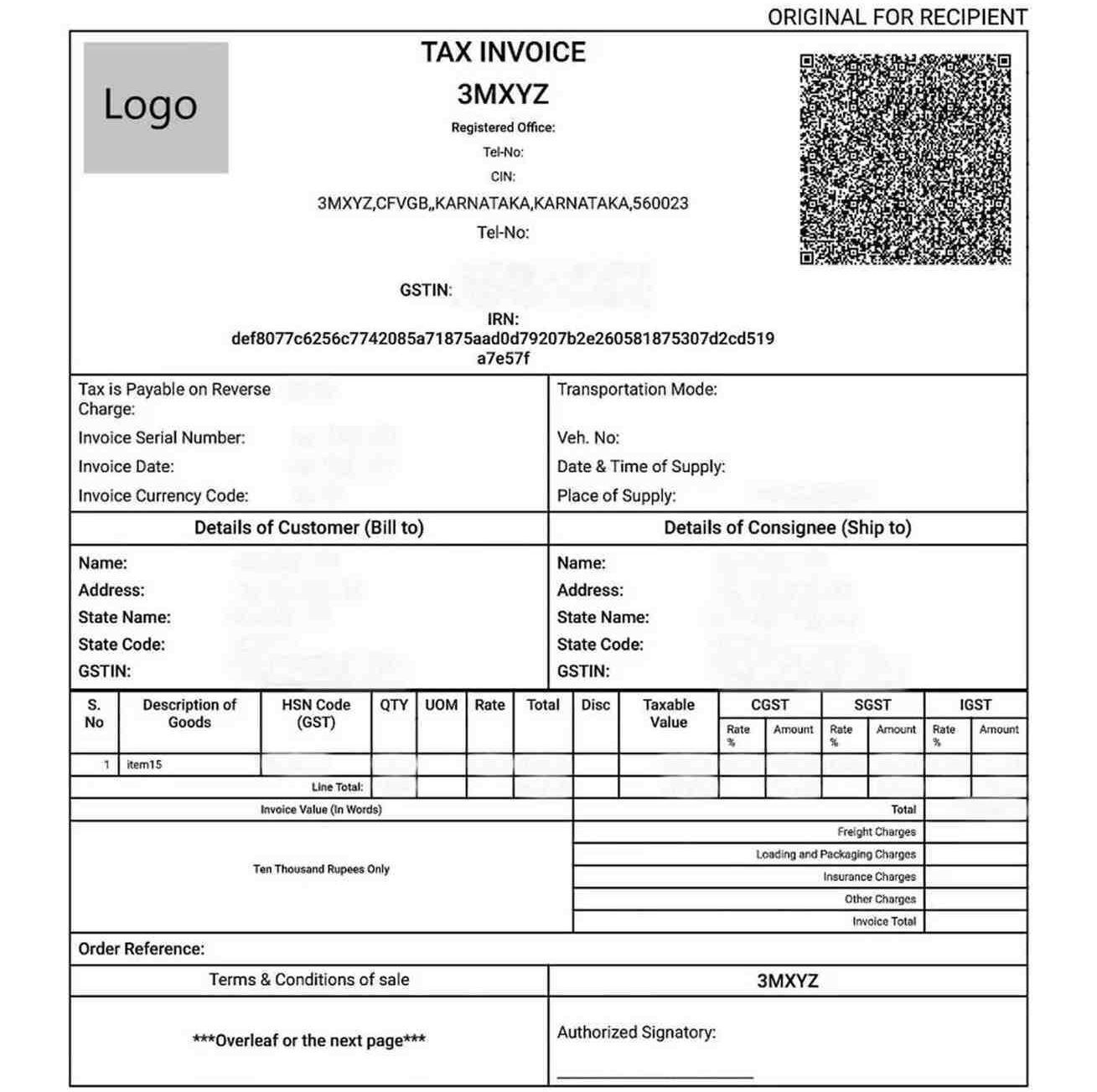
A GST E-Invoice Certificate is an official document issued by the Invoice Registration Portal (IRP) under the Goods and Services Tax (GST) system. It validates a business invoice with a unique Invoice Reference Number (IRN) and a QR code, confirming real-time authentication. This certificate is mandatory for businesses that exceed the turnover threshold prescribed under GST regulations, typically ₹5 crore or more.
The certificate ensures that the invoice is compliant with government norms, timestamped, and digitally signed by the IRP, serving as a verified proof of transaction. It is a key requirement for audit readiness and seamless input tax credit claims.
How to Download the GST E-Invoice Online?
To download your GST e-invoice certificate from the IRP:
- Visit the official e-Invoice portal (einvoice1.gst.gov.in/).
- Log in using your GSTIN credentials.
- Navigate to the "E-Invoice History" or "Generate IRN" section.
- Search and select the desired invoice by IRN, invoice number, or date.
- Download the invoice in PDF format, which includes the IRN and QR code.
How to Check GST E-Invoice Status Online?
To check the status of a GST e-invoice:
- Go to the e-Invoice portal (einvoice1.gst.gov.in/).
- Select “Search” > “IRN” or “Invoice Reference Number Status.”
- Enter your IRN, invoice number, or GSTIN.
- The system will display the current status: Generated, Pending, Failed, or Cancelled.
- In case of any discrepancies or failures, consult your GST Suvidha Provider (GSP) or contact the GSTN helpdesk.
Connect with RegisterKaro and let our experts handle the legal hassle while you grow your business.
Frequently Asked Questions (FAQs)
What is the main purpose of e-invoicing?
The main purpose of e-invoicing under GST is to enable the electronic authentication of B2B invoices and certain other documents, ensuring real-time reporting to the tax authorities. This helps in curbing tax evasion, automating GSTR-1 filing, and improving ITC matching.
Is an invoice valid without an IRN if I am supposed to generate one?
No, if your business falls under GST e-invoice applicability, an invoice issued without a valid IRN from the IRP is not considered a valid tax invoice. It means the invoice is non-compliant and can lead to penalties.
My turnover crossed the limit this year. When do I have to start e-invoicing?
If your aggregate turnover crosses the e-invoice limit in GST (currently Rs. 5 Crore) in any preceding FY, GST E-Invoice becomes applicable to your business from the start of the next FY.
Is e-invoicing applicable for B2C (Business to Consumer) invoices?
No, e-invoicing under GST is currently not applicable for B2C invoices. However, for taxpayers with an aggregate turnover exceeding Rs. 500 Crores, a dynamic QR Code is mandatory on their B2C invoices to promote digital payments.
Do I need to generate an e-invoice for a nil-rated or exempt supply?
No, you do not need to generate a GST E-Invoice for nil-rated or exempt supplies. E-invoicing is only applicable for taxable supplies made to registered persons (B2B) and exports. For nil-rated/exempt supplies, you generally issue a Bill of Supply.
How many IRP portals are there?
Currently, there are multiple Invoice Registration Portals (IRPs) notified by the government, including those operated by NIC and other private players. Taxpayers can use any of the notified IRPs for GST e-invoice login and generation.
Is there a time limit to report an invoice to the IRP?
Yes, as of current regulations (check latest updates), invoices must be reported to the IRP within 30 days from the invoice date for businesses with an Annual Aggregate Turnover (AATO) of Rs. 10 crore and above. For others, while there was no strict limit earlier, it's always advisable to report promptly.
Can I generate an IRN for an invoice with a future date?
No, you cannot generate an IRN for an invoice with a future date. The invoice date must be on or before the date of IRN generation.
Can I upload invoices in bulk?
Yes, the IRPs provide options for bulk upload of invoices. You can use offline utilities (like Excel-based tools) to prepare a JSON file containing multiple invoices, which can then be uploaded in one go for bulk IRN generation.
Is the Invoice Number the same as the IRN?
No, the Invoice Number is the unique sequential number you assign to your invoice in your billing system. The IRN (Invoice Reference Number) is a separate, unique 64-character hash generated by the IRP after it validates your invoice.
Do I have to print the IRN on the invoice?
Yes, it is mandatory to print the IRN on the face of the GST E-Invoice that you issue to your recipient.
Is it compulsory to print the QR code on the invoice?
Yes, it is compulsory to print the QR code on the GST E-Invoice generated by the IRP, as it contains critical invoice details and serves for quick verification.
Can I print the QR code on a separate sticker and paste it?
While there is no explicit prohibition, it is strongly recommended to print the QR code directly on the invoice document itself to ensure its integrity and prevent tampering.
What is the time limit to cancel an e-invoice?
A GST E-Invoice can only be canceled on the GST E-Invoice portal within 24 hours of its generation. After this period, cancellation on the portal is not possible.
What do I do if I find a mistake after 24 hours?
If you find a mistake in an e-invoice after 24 hours, you cannot cancel or modify it on the IRP. You must issue a Credit Note (to reduce value/cancel supply) or a Debit Note (to increase value) and report it in your GSTR-1, referencing the original e-invoice.
If I cancel an IRN, can I use the same invoice number again?
No, if an IRN is canceled, you cannot use the same invoice number again to generate a new GST E-Invoice. The combination of GSTIN, Invoice Number, Document Type, and Financial Year must always be unique to generate a valid IRN.
Does e-invoicing replace the e-way bill?
No, e-invoicing under GST does not replace the e-way bill. The e-way bill is required for the movement of goods above a certain consignment value. However, the e-invoice system can auto-populate Part A of the e-way bill, streamlining the process if both are applicable.
How does e-invoicing link with GSTR-1?
The details of the GST E-Invoice (IRN, invoice data) are automatically populated into the supplier's GSTR-1 return. This significantly simplifies the GSTR-1 filing process, reducing manual data entry and errors, thereby enhancing e-invoicing under GST compliance.

Reviewed by
Joel DsouzaJoel Dsouza is a Chartered Accountant (CA) and compliance expert with over 7 years of hands-on experience in company registration, tax structuring, GST, ROC filings, and MCA compliance. As a qualified member of the Institute of Chartered Accountants of India (ICAI) and Co-Founder at RegisterKaro, he has personally advised more than 1,000 startups and SMEs across India, helping founders navigate incorporation, regulatory frameworks, and financial planning from Day 1. With deep expertise across all three levels of Finance and Portfolio Management, Joel is committed to promoting financial literacy and simplifying India's startup ecosystem through clear, actionable guidance that entrepreneurs can act on immediately.
Why Choose RegisterKaro for the GST E-Invoicing?
RegisterKaro offers a seamless and reliable solution to manage your GST E-Invoice needs, ensuring you stay compliant without hassle.
- Quick Setup: Our platform is designed for quick and easy setup, getting you ready to generate GST E-Invoice without extensive technical knowledge or delays.
- 100% Uptime and Uninterrupted Business: Reliability is key. Our robust system guarantees high uptime, so you can generate e-invoices anytime without worrying about service interruptions.
- Simple for Anyone to Use: Whether you are a seasoned accountant or a new business owner, you can easily navigate our platform to create and manage your GST E-Invoice documents.
- Expert Support: Our dedicated team is ready to provide accurate support, guiding you through any challenges and ensuring that your e-invoicing compliance is handled correctly.
- Secure Data Archiving: We ensure secure archiving of your GST E-Invoice records, providing you with peace of mind regarding data safety.
What Our Clients Say
View All
Harsh Aggarwal
 Verified
I had a good experience with RegisterKaro. The overall process was smooth and well-organized, and the team was responsive throughout. They explained t... Read more

Aayushi Srivastava
VerifiedIn handling company incorporation matters, SnehaLata Yadav has exhibited outstanding commitment and professionalism. Her meticulous attention to every... Read more

sindhu n
VerifiedI Would like to appreciate support of Muskan and the funding Ops team to get seed funding. There is no friction Muskan is knowledgable and talented mo... Read more

Paban Sadhu
VerifiedChahat Batra has always replied very soon as I dropped my query. Besides Chirag has been great support, he was always available whenever I had any Dou... Read more

Swaraj Chakraborty
VerifiedRegisterKaro has been managing my GST filings for the past 6 months, and everything has been filed on time without any delays. Swapnil has been highly... Read more

Nihal Shetty
VerifiedDeepak Paneru has been providing monthly support for our GST filings, and the experience has been excellent. He is proactive in following up, highly k... Read more

Abhisek Agarwal
VerifiedIt was a nice experience getting my incorporation done through RegusterKaro. Jiya was a great help throughout the process. Thank you Jiya and Register... Read more

Fenil Sathvara
VerifiedI had a great experience with RegisterKaro. The team is very helpful and kept me updated at every step of the process. The timely updates and smooth c... Read more

Well Gathered Resour...
VerifiedMy representative from Registerkaro Swati did an excellent job of company incorporation. Expecting further support in getting GST registered. Apprecia... Read more

Rohan Kumar
VerifiedI had a great experience with RegisterKaro while registering my company. Their team was professional, responsive, and guided me through the entire pr... Read more
Related Blogs
View All
Letter of Authorization for GST: Format, Sample & Rules
How to Check GST Active Status Online?
Documents Required for GST Registration in India (Checklist)

How to Change Email ID on GST Portal? 2026 Guide
Can You Run Multiple Businesses Under One GST Number?
GST Registration Fees & Charges in India: Filing Cost Breakdown
SAC vs HSN Code Under GST: Key Differences Explained
GST Refund Process 2026: Section 54 Rules, Form RFD-01 & Time Limit

GST Composition Scheme: Features, Benefits & Tax Rates 2026

GST on Catering Services: Tax Rates and Compliance