

LLP Incorporation Certificate: Meaning, Benefits & Download Guide

Forming a partnership is simple, but protecting it legally requires more than just agreements among partners. A certificate of incorporation for LLP is the foundation of legal recognition and contributes to solidifying the partnership’s status. The Ministry of Corporate Affairs issues it and confirms that your LLP exists under the LLP Act, 2008.
LLP registration online in India is growing steadily. According to the CFO Economic Times (2025), over 7,400 LLPs were incorporated in May 2025, marking a 37% increase compared to the same month last year.
This guide explains what an MCA LLP certificate is, why it matters, and how to download it online.
What is a Certificate of Incorporation for LLP?
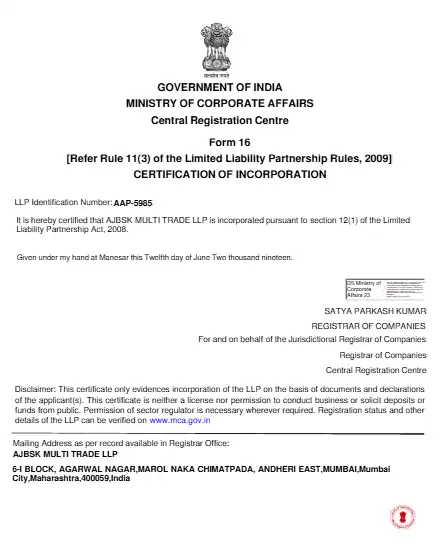
A certificate of incorporation for an LLP is an official document issued by the MCA after successful registration of a Limited Liability Partnership (LLP).
The certificate also allows your LLP to operate legally, open bank accounts, enter into contracts, and comply with statutory requirements. It is issued digitally as a PDF, which can be downloaded via the MCA portal after completion of registration.
Benefits of Having an LLP Incorporation Certificate
Holding an LLP registration certificate gives your partnership legal standing and recognition under the law. It not only proves your LLP exists but also unlocks opportunities for banking, contracts, and business credibility. Here are the key advantages:
- Confirms Legal Recognition: Serves as official proof that your business is registered as an LLP.
- Enables Banking & Financial Operations: Allows your LLP to open bank accounts and access financial services.
- Boosts Business Credibility: Builds trust with clients, investors, and partners.
- Ensures Compliance: Confirms adherence to the LLP Act, 2008, and other statutory requirements.
- Supports Growth & Opportunities: Helps your LLP participate in contracts, government tenders, and formal business activities.
Key Details Mentioned on the LLP Incorporation Certificate
An LLP incorporation certificate includes the following essential information:
- LLP Name: The officially registered name of the LLP.
- LLPIN (LLP Identification Number): The unique number assigned to your LLP.
- Date of Incorporation: The official date the LLP was registered.
- Registered Office Address: The legal address of the LLP.
- Designated Partners: Names and identification numbers of all partners.
- Legal Statement: Confirms official recognition under the LLP Act, 2008.
- Digital Authentication: Includes the official MCA digital signature and seal.
This information serves as proof of your LLP’s legal existence. It can be presented to banks, clients, and government authorities. It also helps other organizations recognize your LLP’s legitimacy and operational compliance under the law.
Who Can Obtain an LLP Incorporation Certificate? Is it Mandatory?
Any LLP that meets the registration requirements under the LLP Act, 2008, can obtain the LLP incorporation certificate. Compliance with statutory requirements becomes easier with this certificate.
Here’s who can apply for an LLP incorporation certificate:
- Newly Formed LLPs: LLPs finished registration with the Ministry of Corporate Affairs (MCA) can obtain the certificate. It serves as proof of legal existence.
- Existing LLPs: Firms that need a digital copy or want to re-download their LLP certificate of incorporation can access it from the MCA portal.
- Partnerships Updating Registration Details: LLPs that have changed their name, designated partners, or registered office address can download a revised certificate. The updated certificate reflects all changes.
- Foreign LLPs with Indian Operations: International partnerships registered to operate in India can also apply. This ensures their legal recognition in India.
- LLPs Planning Bank or Financial Operations: LLPs that require proof of legal existence to open corporate bank accounts or apply for loans can obtain the certificate.
Obtaining an LLP Certificate of Incorporation is mandatory to legally operate your LLP in India. It serves as official proof of your LLP’s existence under the LLP Act, 2008. Without this certificate, your LLP cannot open bank accounts, sign contracts, or participate in government tenders. It ensures legal recognition and operational legitimacy for all business activities.
Pre‑Requisites to Download Certificate of Incorporation For LLP
Before you can download an LLP incorporation certificate, your LLP must meet certain conditions. Fulfilling these requirements ensures a smooth and successful download.
- Completed Registration: You can download only after completing all registration formalities with the MCA. Pending or incomplete applications cannot download the certificate of registration for LLP.
- Active Certificate Status: The LLP Certificate of Incorporation does not expire. Only LLPs with an Active status can download it. Certificates may not be accessible if the LLP is Under Process or Strike Off.
- Accurate Business Details: Ensure that all LLP details, such as name, designated partners, and registered office address, are correct. Incorrect information may prevent the certificate from being generated.
- No Pending Updates or Corrections: Any pending updates must be completed before downloading. The MCA portal will not allow downloads if unresolved issues exist.
- Digital Accessibility: The certificate is issued in a secure PDF format. Ensure your device can access and save the file safely for future use.
Meeting these pre-requisites helps your LLP download its certificate of incorporation for LLP smoothly and without delays. Also, know about how to register an LLP in India for smooth handling.
How to Download Certificate of Incorporation for LLP Online from the MCA Portal?
After registering your LLP, you can easily download your certificate of incorporation for LLP from the official MCA portal.
Below is a step-by-step guide on how to download your certificate of incorporation of LLP online:
1. Visit the Official MCA Portal
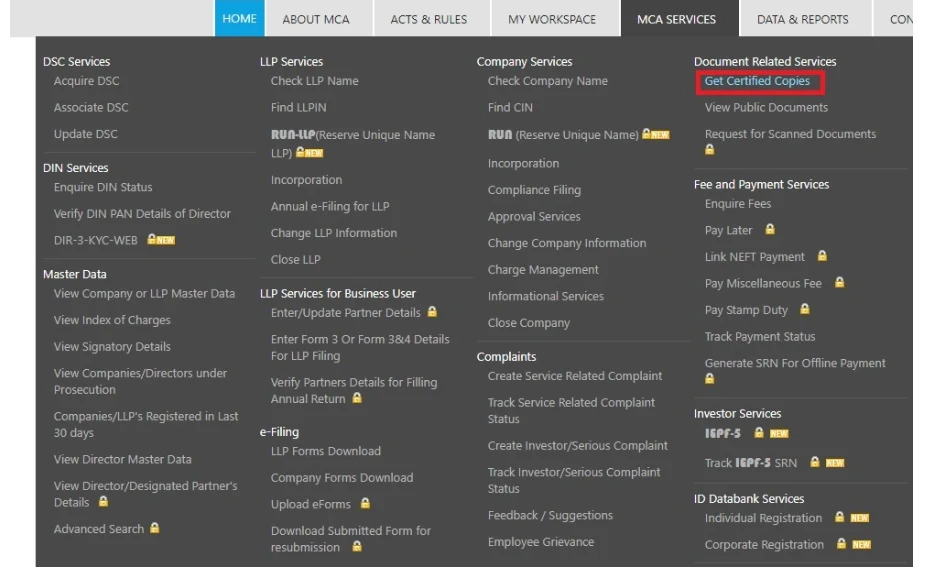
- Open the portal (mca.gov.in) in your browser.
- Go to the “MCA Services” section and click on “View LLP Master Data” or the certificate download option.
2. Enter Your LLP Details
- Enter your LLP Identification Number (LLPIN) or the LLP certificate of registration details.
- Double-check the information carefully. The certificate is linked to these details, so accuracy is important.
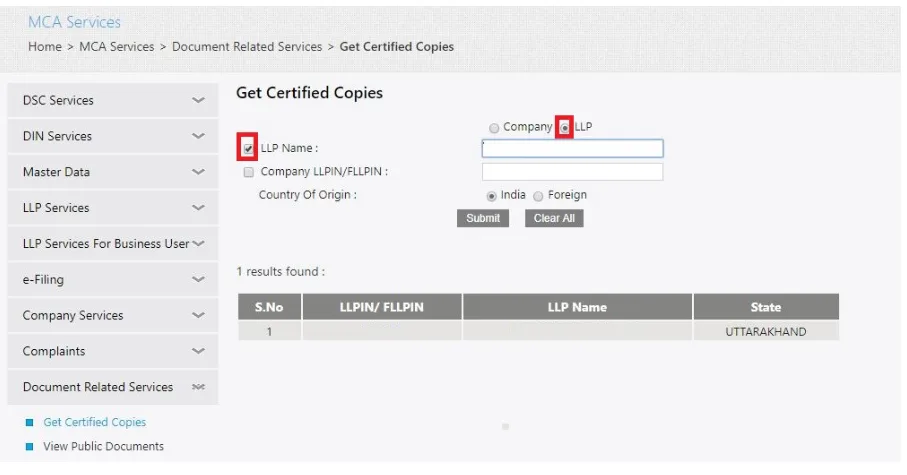
3. Verify LLP Details and Status
- Make sure all the information is correct. Only LLPs with completed registration and active status can download the certificate.
- The portal will display your LLP’s name, registered office, and designated partners.
4. Download the Certificate
- Once verified, click the download button to get your certificate in PDF format.
- Save it securely on your device. You will need to open bank accounts, sign contracts, or comply with statutory requirements.
You can download the certificate of incorporation of LLP multiple times without any fee.
How to Check the Status of Your LLP Incorporation Application?
Once you submit your LLP registration, it’s important to track its status. Checking regularly ensures your application is processed on time and avoids delays in obtaining your LLP incorporation certificate. The Ministry of Corporate Affairs (MCA) provides an online system for real-time updates.
- Start by opening the official MCA website at mca.gov.in. From the homepage, click on “MCA Services” and select either “View LLP Master Data” or “Track LLP Application Status” to access the status check feature.
- Next, input your LLP Identification Number (LLPIN) or your registered LLP details. Make sure all information is accurate, as incorrect entries can prevent the portal from showing your current status.
- The portal will display your LLP’s name, registered office, and designated partners. Check whether your application is pending, approved, or requires corrections. This helps you stay updated on your LLP’s registration progress.
- If the status shows pending verification or errors, follow the instructions provided on the portal. Update any discrepancies immediately to avoid delays in downloading your LLP incorporation certificate and ensure your LLP remains legally recognized.
Tracking your application ensures timely approval and keeps your LLP compliant with statutory requirements. Regular checks help you download the LLP incorporation certificate without unnecessary delays.
Common Issues While Downloading LLP Incorporation Certificate & How to Fix Them
Even after completing LLP registration, some LLPs may face issues while trying to download the incorporation certificate. Knowing the common problems and their solutions helps ensure a smooth LLP incorporation certificate download process.
- Certificate Not Found on the Portal: The portal may not display the certificate if you enter an incorrect LLPIN.
Solution: Recheck the LLPIN or details carefully and retry. Ensure the mobile number linked to the LLP is active for verification.
- Certificate Status Showing Pending or Inactive: Certificates cannot be downloaded if registration is incomplete or under verification.
How to fix: Check the LLP registration status on the MCA portal and complete any pending verification steps.
- Mismatch in LLP Details: Incorrect details such as LLP name, designated partners, or registered office address can block access to the certificate.
Solution: Submit a correction request on the MCA portal to update and align all LLP details.
- Technical or Portal Errors: Temporary server issues or browser problems can interrupt the download process.
How to fix: Clear your browser cache, switch browsers, or try accessing the portal during non-peak hours.
Resolving these issues ensures a smooth LLP incorporation certificate download without delays.
Difference Between LLP Agreement and LLP Incorporation Certificate
LLP partners need both internal rules and legal recognition to run their business smoothly. The LLP Agreement and LLP Incorporation Certificate serve different purposes but are equally important.
The table below highlights their key differences:
| Feature | LLP Agreement | LLP Incorporation Certificate |
| Definition | A legal document that outlines the rights, duties, and responsibilities of partners in an LLP. | An official certificate issued by MCA that confirms the LLP’s legal existence. |
| Purpose | Governs internal management, profit sharing, and partner obligations. | Provides legal recognition and proof of the LLP under the LLP Act, 2008. |
| Issued By | Prepared and executed by the LLP partners. | Issued by the Ministry of Corporate Affairs (MCA). |
| Legal Requirement | Mandatory for operational clarity, but not registered with MCA as a standalone document. | Mandatory for LLP formation and legal existence. |
| Contents | Includes partners’ details, capital contribution, profit-sharing ratio, and management structure. | Shows LLP name, LLPIN, date of incorporation, registered office, and designated partners. |
| Validity | Remains effective throughout the LLP’s life unless amended. | Serves as permanent legal proof of LLP formation and can be re-downloaded if lost. |
| Usage | Used internally for dispute resolution, operational guidance, and partner compliance. | Used externally for opening bank accounts, signing contracts, participating in tenders, and legal verification. |
The LLP Agreement guides operations, while the LLP Incorporation Certificate proves legal existence, ensuring compliance and credibility.
RegisterKaro simplifies the entire LLP registration process. We assist you from registration to the certificate of incorporation for LLP download, so your business can operate legally without delays. Focus on growing your LLP while we take care of the paperwork and compliance. Contact us today!
