


The E-Way bill login system is a crucial part of GST compliance, designed to track the movement of goods across India. Taxpayers or transporters must generate an E‑Way Bill for goods valued above ₹50,000 under a single invoice, bill, or delivery challan. This system ensures a uniform and transparent mechanism for the interstate and intrastate movement of goods.
To manage high user volumes and ensure uninterrupted access, the government operates a centralized e-Way Bill portal (ewaybillgst.gov.in) for taxpayers and transporters. On July 1, 2025, the National Informatics Centre launched a second portal, E‑Way Bill 2.0, which synchronizes data in real time with the original portal, as advised by the GSTN. This dual-portal setup helps users generate, update, and manage E‑Way Bills efficiently through a single login interface.
In this blog, we will discuss the e-Way Bill login portal, its services, registration process, and provide step-by-step guidance for generating e-Way Bills.
What is the E-Way Bill Login Portal?
The E-Way Bill login portal is the official government platform for generating, managing, and canceling E-Way Bills under the GST framework.
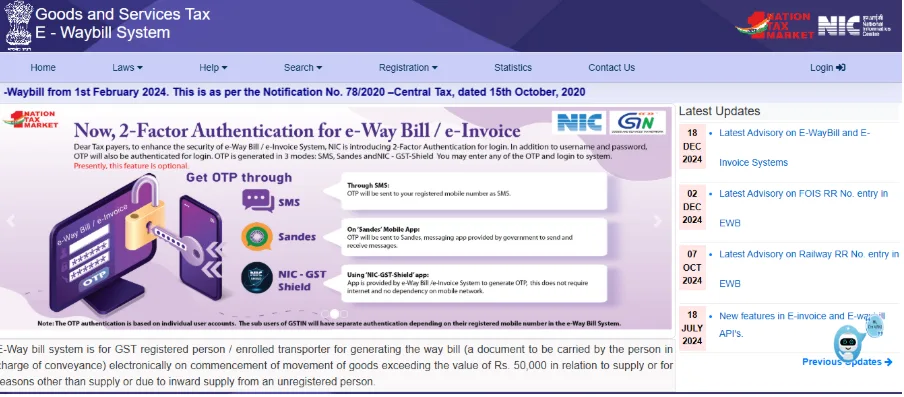
Originally, the system operated on ewaybill.nic.in, but it was migrated to ewaybillgst.gov.in under the GST Council’s guidance to improve security and streamline GST operations. The system creates a uniform and transparent process for moving goods and helps prevent tax evasion through digital monitoring.
Through these portals, users can:
- Generate new E-Way Bills for intra-state and inter-state transport
- Update transport and vehicle details
- Cancel bills in case of errors
- Extend validity based on distance and transport mode
- Track and verify the status of E-Way Bills
- Generate consolidated bills for multiple consignments
This dual-portal setup ensures uninterrupted access, reduces errors, and allows taxpayers and transporters to stay fully compliant with GST regulations.
E‑Way Bill Login Portal Home Page Tabs
Before logging in, users can access several important tabs on the E‑Way Bill login portal home page.
Here’s what each tab includes:
- Home: The landing page displays general information, latest updates, and announcements on e‑Way Bill compliance.
- Laws: Provides access to E‑Way Bill rules, official forms (EWB‑01 to EWB‑06, ENR‑01, INV‑01), state-wise notifications, circulars, and related legal documents.
- Help: It offers resources such as the user manual, video tutorials (Computer-Based Training), and FAQs. Additionally, it provides tools like the bulk generation utility to upload multiple e‑Way Bills at once.
- Search: Allows tracking and verification using GSTIN, transporter ID, E‑Way Bill number, HSN code, or product name. Users can also check GSTIN block status and identify states using pincodes.
- Registration: Designed for new users, including taxpayers, transporters, and unregistered businesses. Users can enroll as transporters (ENR-01) or register as citizens to generate or manage e‑Way Bills if not registered under GST.
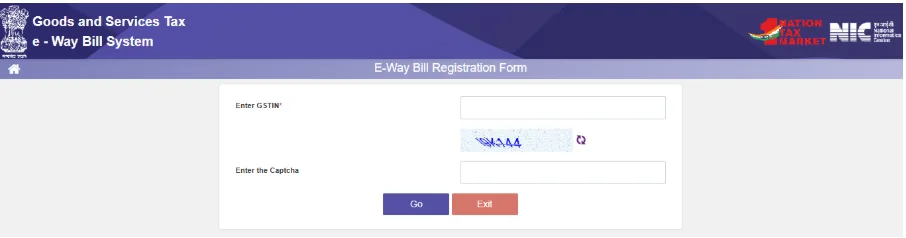
- Statistics: Displays reports and analytics of e‑Way Bill generation and portal usage.
- Contact Us: Provides official helpdesk numbers, links to the GST grievance redressal portal, and state-wise support details.
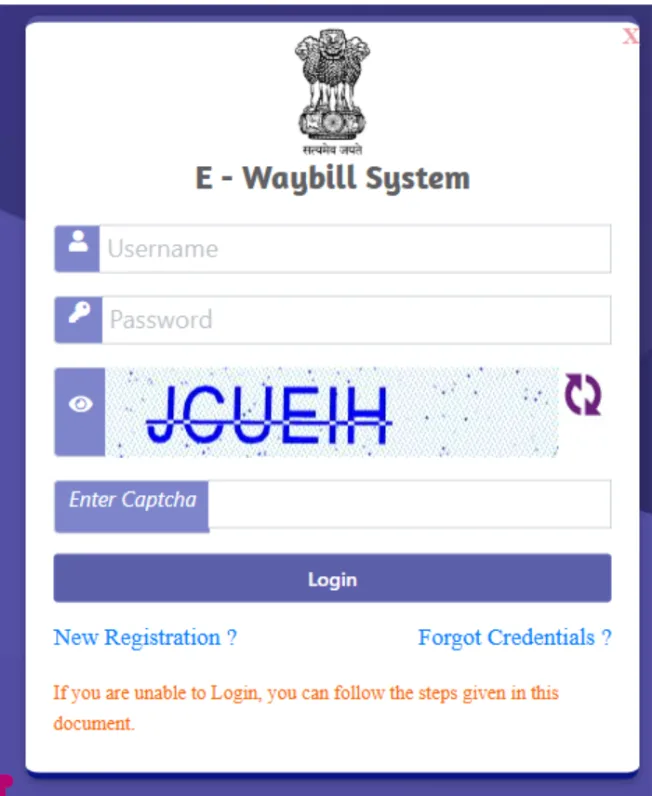
- Login: Opens the interface for registered users to enter credentials and access the dashboard and e‑Way Bill services.
These tabs help Indian taxpayers and transporters quickly navigate rules, tools, search functions, registration options, and support resources.
What Services Can You Access After Logging Into the E-Way Bill Portal?
After logging into the E-Way Bill portal, Indian taxpayers and transporters can access a wide range of services to manage GST compliance efficiently. These include:
1. Generate E-Way Bill: Create a new E-Way Bill for transporting goods worth more than ₹50,000 under a single invoice, bill, or delivery challan. To do this, you must enter details of the supplier, recipient, goods, and transport vehicle accurately.
2. Update Vehicle Number: Modify vehicle details for an ongoing E-Way Bill if the vehicle carrying goods changes during transit.
3. Cancel E-Way Bill: Cancel incorrectly generated or unused E‑Way Bills within 24 hours of generation to maintain GST compliance. Cancellation is allowed only if the goods have not yet been transported.
4. Extend Validity: Extend the validity of an E‑Way Bill if the goods cannot be delivered within the original validity period due to longer distances, delays, or changes in the mode of transport. The extension ensures legal compliance during transit.
5. Track and Verify E-Way Bill: Check the status of an E-Way Bill using the unique E-Way Bill Number (EBN) and verify details to ensure correctness.
6. Bulk Generation and Upload: Upload multiple E-Way Bills at once using the bulk generation tool, saving time for large shipments.
7. Reports & Analytics: Access detailed reports of generated, canceled, or expired E-Way Bills for audits, reconciliation, and GST compliance tracking.
8. Generate E-Way Bill by Document Number: Generate an E-Way Bill directly using invoice numbers, delivery challans, or other document references.
Users can efficiently generate, manage, track, and analyze e‑Way Bills, ensuring smooth GST compliance.
Information Needed to Login and Generate an E-Way Bill
To access the E-Way bill login system and generate an E-Way Bill, users need to have specific information and credentials ready.
1. Login Credentials
To access the E-Way Bill system, registered users require the following:
- Username: The E‑Way Bill username created during registration. This is a separate username linked to your GSTIN (for taxpayers) or Transporter ID (for transporters), and is not the GSTIN or Transporter ID itself.
- Password: Set during registration on the E-Way bill login system.
- Captcha/OTP: Used for security verification during login.
2. Business Details
Keep all business information ready to avoid errors while generating the bill.
- GSTIN of Supplier and Recipient: Mandatory for both intra-state and inter-state shipments.
- Legal and Trade Name: As registered under GST.
- Address: Complete address of supplier and recipient, including pincode.
3. Invoice or Delivery Challan Details
Accurate invoice or challan details ensure the E‑Way Bill reflects the transaction correctly.
- Invoice Number and Date: Unique transaction identifier.
- Value of Goods: Total value of goods in the invoice or delivery challan (required if above ₹50,000).
- Goods Description and Quantity: Include units of measurement (Kg, Litre, Units, etc.).
- HSN/SAC Code: Harmonized System of Nomenclature code for proper classification.
4. Transport Details
Prepare transport information to calculate the E‑Way Bill’s validity and ensure legal compliance.
- Mode of Transport: Road, Rail, Air, or Ship.
- Vehicle Number/Transport Document Number: Registration number of the transport vehicle.
- Place of Dispatch: City and state from where goods are dispatched.
- Place of Delivery: City and state of delivery.
- Approximate Distance: Estimated distance between the dispatch and delivery locations.
5. Transporter Details (If Applicable)
Have transporter information ready if someone else is moving the goods.
- Transporter Name: Full name of the transporter or transport company.
- Transporter ID: Required if the transporter is registered on the portal.
- Vehicle Information: Needed for unregistered transporters.
6. Optional Information
Providing optional details can help link the E‑Way Bill to existing documents for easier record-keeping.
- Document Type: Invoice, Bill of Supply, or Delivery Challan.
- Reference Document Number: If generating an E-Way Bill linked to an existing document.
With these details ready, users can log in and generate e‑Way Bills quickly, ensuring GST compliance.
When Should You Generate the E-Way Bill?
Generating an E-Way Bill at the correct time is essential to comply with GST rules and avoid penalties. The E‑Way Bill system requires generating the bill before transporting goods under specified conditions.
Here’s when you should generate this bill:
- Before Transport: Generate the E-Way Bill before moving goods from the supplier’s location.
- High-Value Shipments: E-way Bill generation is mandatory when the value of goods exceeds ₹50,000 under a single invoice, bill, or delivery challan.
- Multiple Vehicles: If goods from one invoice are transported using more than one vehicle, a separate E‑Way Bill must be generated for each vehicle. Vehicle details should then be updated individually for every movement.
- Exemptions: Goods like unprocessed agricultural produce or intra-state shipments below the threshold may be exempt. Always check GST notifications before transport.
Generating the bill at the right time ensures smooth goods movement and full GST compliance using the E-Way bill login system.
Documents Required to Generate an E-Way Bill
Having all necessary documents ready before using the E‑Way Bill login system ensures smooth processing and full GST compliance.
Required Documents:
- Tax Invoice: Mandatory for regular supply of goods; must include GSTIN of supplier and recipient, invoice number, date, value, and description of goods.
- Bill of Supply: Required when goods qualify for GST exemption or are supplied by a composition dealer. It must include the invoice number, date, and description of the goods.
- Delivery Challan: Used when goods are transported for non-sale purposes like job work, returns, or samples. It must include the challan number, date, quantity, and description of goods, and GSTIN if applicable.
- Goods Details: Include quantity, unit of measurement (Kg, Litre, Units, etc.), description of goods, and HSN code.
- Transporter Details: Provide name, Transporter ID (if registered), and vehicle number. For unregistered transporters, vehicle information and contact details are mandatory.
- Place of Dispatch & Place of Delivery: Complete city and state addresses of the goods’ origin and destination to ensure accurate tracking and E‑Way Bill validity.
- Other Supporting Documents: Any linked documents, such as an e-invoice reference, purchase order, or additional shipment proof, for verification.
These documents help users generate E-Way Bills quickly and accurately using the E-Way bill login system, ensuring GST compliance.
How to Generate E‑Way Bills on the E‑Way Bill Portal? Step-by-Step
Generating an E‑Way Bill through the E‑Way Bill login system is simple when all required documents and shipment details are prepared in advance.
Follow these steps to create an E‑Way Bill (Form EWB‑01) for transporting goods:
Step 1: Log In to the E-Way Bill System
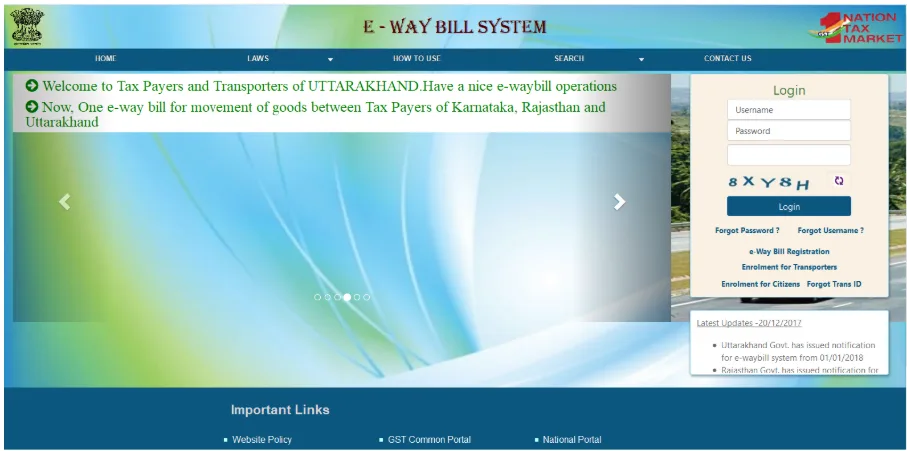
- Enter your Username, Password, and Captcha code.
- Complete the captcha and OTP-based authentication.
- Click ‘Login’.
Step 2: Click on ‘Generate New’
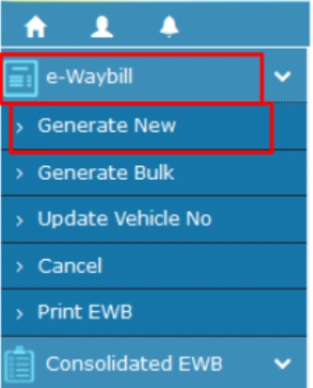
From the dashboard, click ‘Generate New’ under the E-Waybill option on the left-hand side.
Step 3: Fill in the E-Way Bill Entry Form
Before you start, make sure you have all the invoice and transport details ready to complete the form accurately. These are:
a. Transaction Type:
- Select Outward if you are the supplier of the goods.
- Select Inward if you are the recipient.
b. Sub-Type:
Choose the relevant subtype for your transaction.

Example: SKD/CKD – Semi Knocked Down / Complete Knocked Down.
Note: These details can auto-populate in your GST Returns during filing.
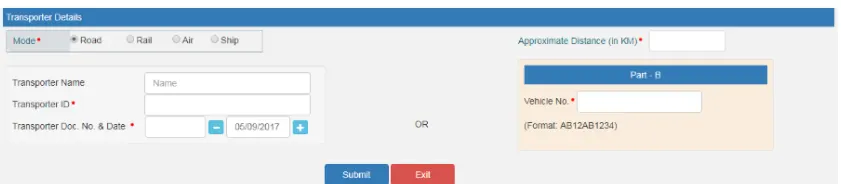
c. Transporter Details:
- Mode of Transport: Select Road, Rail, Ship, or Air.
- Distance: Enter the approximate distance in kilometers.
d. Provide Transport Information:
- Option 1: Enter Transporter Name, Transporter ID, Transport Document Number, and Date.
- Option 2: Enter Vehicle Number in one of these formats: AB12AB1234, AB12A1234, AB121234, or ABC1234.
Once all fields are filled accurately, you can proceed to generate the E‑Way Bill for the shipment.
Tip: For frequently used suppliers, clients, products, and transporters, update the ‘My Masters’ section on the dashboard first.
Step 4: Submit the E-Way Bill
- Review all the details and click ‘Submit’.
- The system validates the data and shows errors, if any.
Once successful, the E-Way Bill (EWB-01) is generated with a unique 12-digit number.
Step 5: Print & Carry the E-Way Bill
Download or print the E‑Way Bill and carry it during the transportation of goods in the selected vehicle.
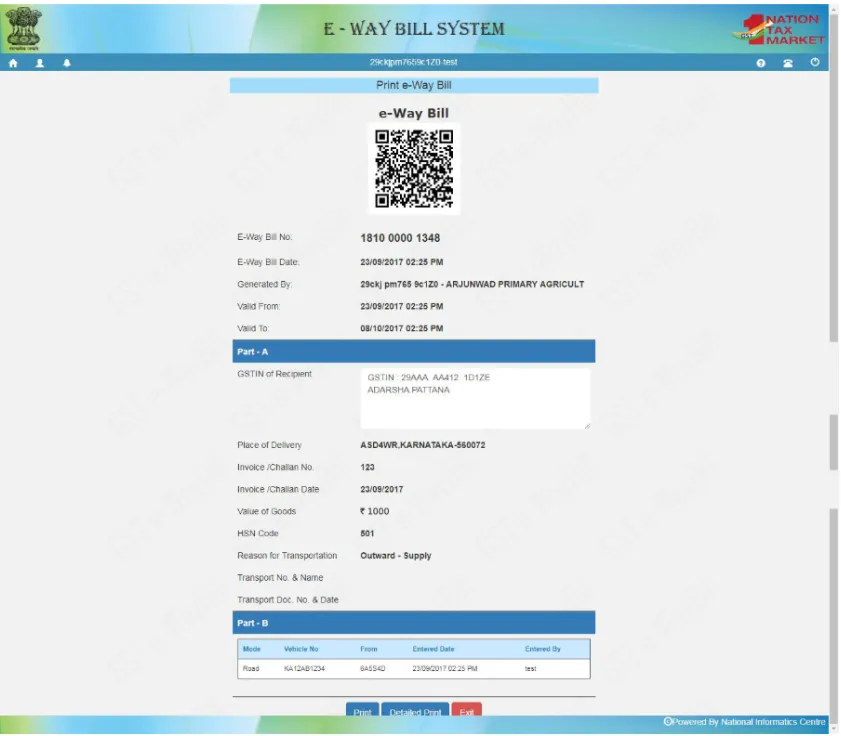
Check all details and generate the E‑Way Bill before transport to stay GST-compliant, avoid penalties, and ensure smooth tracking.
E‑Way Bill SMS Updates for Taxpayers and Transporters
Taxpayers and transporters can receive E‑Way Bill updates via SMS by enabling the service through the E‑Way Bill portal after logging in. This ensures you stay informed and compliant even without constant internet access.
Steps to Register:
- Log in to the Portal: Open the E-Way bill portal and click ‘Registration’ on the left-hand menu.
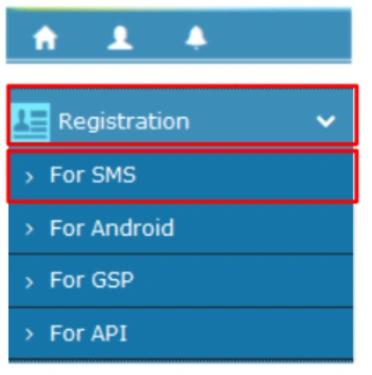
- Select SMS Registration: From the drop-down, choose ‘For SMS’.
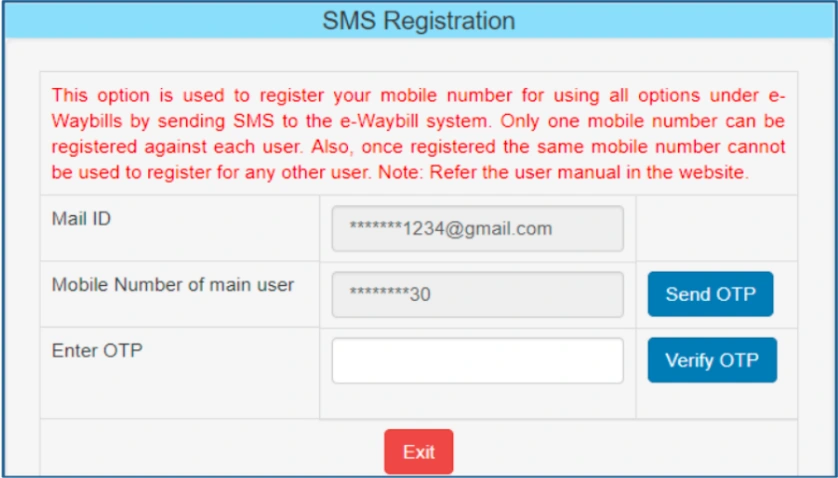
- Verify Mobile Number: Your GST-registered mobile number will be partially displayed. Click ‘Send OTP’, enter the OTP received, and click ‘Verify OTP’.
- Submit Verified Number: After successfully verifying the OTP, click ‘Submit’ to complete the mobile number verification process.
Only mobile numbers registered with GST can be used, with a maximum of two numbers allowed per GSTIN.
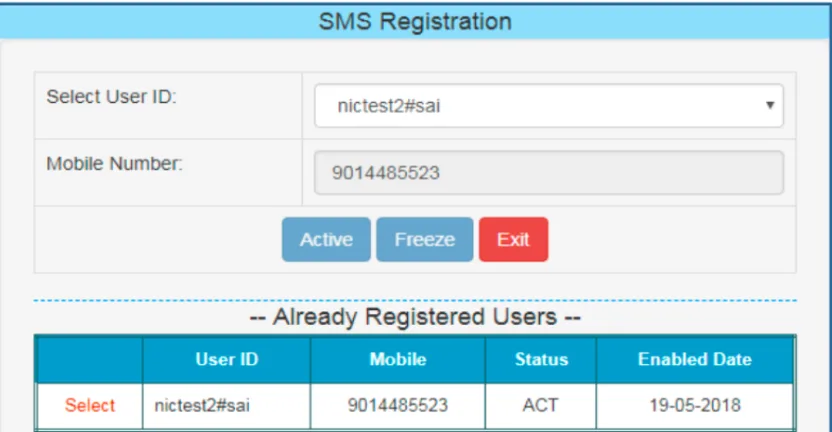
If a mobile number is associated with multiple User IDs, choose the desired ID and click ‘Submit’.
Once registered, you will receive E-Way Bill updates directly on your mobile, helping you track consignments and stay GST-compliant.
E-Way Bill Registration Process for Unregistered Transporters
Unregistered transporters in India must register under the GST E‑Way Bill system to legally transport goods. Registration enables them to create E-Way Bills and stay fully compliant. The process can also be done using the E-Way bill login on mobile for convenience.
Steps to Register:
- Visit the Portal: Access the E-Way bill login on mobile at ewaybillgst.gov.in or ewaybill2.gst.gov.in.
- Click on Registration: Tap ‘Registration’ from the left-hand menu.
- Select Transporter Registration: Choose ‘For Transporter (Unregistered)’.
- Enter Details: Provide your PAN, Name, Mobile Number, and Email ID.
- Verify Mobile Number: Enter the OTP sent to your registered mobile number.
- Submit Registration: Review details and tap ‘Submit’.
- Receive Transporter ID: After successful registration, you will get a unique Transporter ID (TRANSIN) to generate E-Way Bills.
Use this ID to update vehicle details and manage E-Way Bills linked to consignments.
Steps to Generate E-Way Bill Through e-Invoicing
Businesses using e-invoicing can generate E-Way Bills directly from their e-invoices, saving time and reducing errors. The process is integrated with the E-Way bill login on mobile, making it convenient for on-the-go operations.
Steps to Generate E-Way Bill via e-Invoicing:
- Log in to the Portal: Open the E-Way bill login in mobile and log in with your credentials.
- Select e-Invoice Option: On the dashboard, click ‘Generate E-Way Bill through e-Invoice’.
- Enter Invoice Details: Provide the Invoice Reference Number (IRN) and other relevant details automatically fetched from your e-invoice.
- Verify Goods & Transport Details: Check the item details, HSN codes, quantities, and transport information.
- Submit for E-Way Bill: Click ‘Submit’ to generate the E-Way Bill.
- Receive E-Way Bill Number: A unique 12-digit E-Way Bill number will be generated instantly.
- Print or Save: Download or print the E-Way Bill for carrying during transportation.
Using the E-Way bill login on mobile with e-invoicing ensures fast, accurate E-Way Bill generation and full GST compliance.
For stress-free E-Way Bill registration and compliance, RegisterKaro provides complete support. We help businesses and transporters with e-Way Bill generation, tracking, and management, ensuring smooth operations and full GST compliance. Our expert services simplify the process, allowing you to manage all your E-Way Bills efficiently. Contact us today to streamline your e-Way Bill tasks and stay fully GST-compliant.
