


Need access to your savings due to a job change, unemployment, or a financial emergency? Employees Provident Fund Organization (EPFO) has simplified the process of PF withdrawal online, allowing members to claim their provident fund directly through the official portal. Moreover, the PF claim status can be tracked in real-time without visiting any office.
PF interest rate for FY 2024-25 is confirmed at 8.25%, the highest for long-term savings. Before you apply for PF withdrawal online, your Aadhaar, PAN, and bank details should be properly seeded with your UAN. Remember, mismatches are a major cause of claim rejection.
Note: If you withdraw your PF before completing 5 years of continuous service, the withdrawn amount may become taxable. Also, if you are an NRI or migrate abroad, EPFO may reverse interest beyond a certain period based on account status.
PF Withdrawal Rules and Limit: Eligibility Criteria
Your Provident Fund (PF) account grows throughout your career with regular contributions. Both you and your employer add money to this account monthly (12% of Basic Salary + Dearness Allowance). The government also credits annual interest to increase your savings significantly.
EPFO permits both partial and complete withdrawals under specific situations. You can access funds for medical emergencies, property purchases, or unemployment periods. Interestingly, you can withdraw 75% of your PF amount online within just 1 month of unemployment.
Below is a detailed breakdown for PF withdrawal options you can choose from and might be eligible for:
| Type of Withdrawal | Condition / Eligibility | Maximum Amount You Can Withdraw |
| Full PF Withdrawal | Unemployment for ≥ 12 months | Up to 100% of PF balance (employee + employer + interest) after 12 months of unemployment |
| Retirement (age 58+) | 100% of PF balance | |
| Pension portion (EPS) | Can be withdrawn after 36 months of unemployment | |
| Partial Withdrawal (Advance) | Medical treatment | Least of: 6 months’ basic wages + DA or your share + interest |
| Education expenses | Up to 90% of the PF balance, or as per service requirement | |
| Marriage | Up to 90% of the PF balance is subject to eligibility | |
| Home purchase/construction / EMI repayment | Up to 90% of the PF balance | |
| Home renovation | Least of: 12× monthly basic + DA, your share + interest, or renovation cost | |
| Pre-retirement | Up to 90% of the accumulated corpus before retirement (after reaching 54 years) | |
| General Partial Limits (Simplified Rules) | Any eligible purpose | Up to 75% of the total PF balance while maintaining 25% minimum balance in the account |
Whether you’re planning a partial withdrawal or a full PF settlement, you can directly withdraw PF from the EPFO portal without delay.
PF Withdrawal Form and Other Essential Documents
Before starting the PF withdrawal process, gather these important documents:
- Aadhaar Card: You must link this with your UAN for verification
- PAN Card: EPFO requires this for tax compliance and identity confirmation
- Bank Account Details: Provide a passbook or statement showing the account number and IFSC code
- UAN and Password: Keep your login credentials ready for portal access
- Mobile Number: Register an active number for receiving OTPs and updates
- PF Withdrawal Form: Official application form used by EPF members to claim their provident fund amount, either partially or fully.
Additionally, you should link your mobile number to your UAN account. This connection enables you to receive instant notifications throughout the process. Most importantly, you must seed your bank account details with your UAN.
Did you know? As of 2026, over 29 crore EPFO members have registered on the online portal. Additionally, nearly 99% of PF claims are now processed digitally. Furthermore, the average processing time has reduced from 30 days to just 7-15 days through online methods.
How to Withdraw PF Amount Online: Step-by-Step Guide
Before initiating PF withdrawal online, it is essential that both the employer and employee are registered with EPFO. If your organization has not yet completed this process, you can apply for EPF registration.
Get your PF money quickly and easily through the online portal in just a few simple steps:
Step 1: Access the EPFO Portal
Visit the official EPFO website at www.epfindia.gov.in. Click the “Online Services” section from the homepage menu. Then, select “For Employees” to reach the member portal.
Enter your UAN and password to access your account. Complete the captcha verification to reach your dashboard. You can now use all PF-related services through this portal.
Step 2: Go to Withdrawal Services
Once you log in, locate the “Online Services” tab. Click the “Claim (Form-31, 19 & 10C)” option for withdrawal requests. This section manages all types of PF withdrawal applications.
The system displays your complete employment history and current PF balance. Verify that all details match your actual employment records.
Step 3: Choose Your PF Withdrawal Form Type
Select the appropriate withdrawal option based on your specific needs:
- PF Form 19 handles final settlement when you leave your job permanently.
- Form 31 enables partial withdrawal for designated purposes like medical expenses.
- Form 10C processes pension-related withdrawals from the EPS scheme.
Choose the correct form to prevent processing delays. Each form follows different eligibility rules and documentation requirements.
Step 4: Complete the Online Application
Fill in all mandatory fields in your selected form with accurate information. Provide your current residential address, updated bank details, and a valid withdrawal reason. Double-check every detail before submitting your application to avoid rejection.
Upload all required supporting documents in the accepted format. The system accepts only PDF, JPEG, and PNG file types.
Different Types of PF Claim Forms: Explained with Examples
Let’s understand when and how to use each PF claim form for different financial needs:
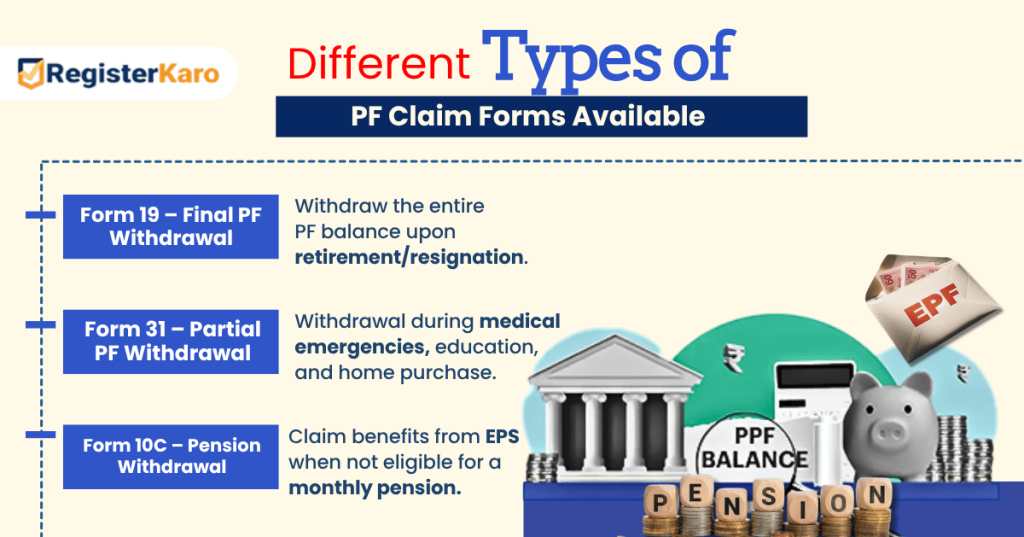
1. PF Claim Form 19: Final Settlement
Form 19 enables complete PF withdrawal when you permanently leave employment. You can submit this claim after remaining unemployed for two months. The approval process typically takes 7-10 working days.
Example: Raj left his IT job in March 2024. He waited two months and applied using Form 19 in May. EPFO processed his complete PF amount of ₹2.5 lakhs within 10 days.
2. PF Claim Form 31: Partial Withdrawal
This form allows partial withdrawal for emergencies while you continue working. Common approved reasons include:
- Medical Treatment: Serious illness treatment for yourself or family members
- Home Purchase: Down payment for buying or constructing residential property
- Education: Higher education expenses for yourself or your children
- Marriage: Wedding expenses for yourself, children, or siblings
You must complete five years of service for most withdrawal purposes.
Example: Priya needed ₹1 lakh for her daughter’s medical treatment. She used Form 31 to withdraw 75% of her PF balance while continuing her current job.
3. Form 10C: Pension Withdrawal
Form 10C handles EPS (Employee Pension Scheme) related withdrawals. You can withdraw the PF amount if you have completed at least 6 months but less than 10 years of continuous service. However, this decision permanently affects your future pension eligibility.
Example: After 6 years of employment, Amit used Form 10C to withdraw his EPS amount upon leaving his job. This one-time withdrawal made him ineligible for future monthly pension payments.
How to Check PF Claim Status Online?
After submitting your application, EPFO provides a unique claim number. Use this number to monitor your PF claim status regularly through the portal. The EPFO system provides real-time updates on claim processing stages.
You can also check online PF claim status through SMS services:
- Send “EPFOHO UAN ENG” to 7738299899 from your registered mobile number.
- Replace “ENG” with your preferred language code (e.g., HIN for Hindi).
- This service operates 24/7 for your convenience and accessibility.
Give a missed call to 011-22901406 from your UAN-linked mobile for PF balance, or call 1800 118 005 for EPFO support.
Recent EPFO PF Claim Rule Changes
EPFO has introduced several rule changes to enhance service delivery:
- Auto-Processing: The system processes claims under ₹50,000 automatically without manual verification.
- Aadhaar Mandatory: All transactions now require Aadhaar linking for enhanced security measures.
- Faster Grievances: The new online grievance system resolves issues within 30 days.
- Digital Verification: Advanced algorithms verify documents automatically for quicker processing.
The organization has also made the process more transparent with real-time tracking features.
How to Calculate PF Amount at Withdrawal?
Your PF balance includes employee contribution, employer contribution, and accumulated annual interest. The calculation works as follows:
- Employee Contribution: You contribute 12% of your basic salary plus DA monthly
- Employer Contribution: Employer adds 3.67% to the Employee Provident Fund and 8.33% to the EPS
- Annual Interest: Government credits 8.15% interest per year (as of 2023-24)
Example Calculation: If your basic salary equals ₹30,000 per month:
- Your monthly PF contribution = ₹3,600
- Employer’s PF contribution = ₹1,100
- Total monthly deposit = ₹4,700
- Approximate amount after 5 years with interest = ₹3.2 lakhs
However, the final calculation includes various factors like bonus periods and salary increments over time.
How Many Times Can You Withdraw a PF Advance?
You can withdraw a PF advance multiple times during your employment as long as you meet the specific eligibility conditions for each purpose (such as medical treatment, education, marriage, housing, etc.). There is no fixed upper limit on the number of times you can apply for partial PF withdrawals, but each withdrawal must satisfy the criteria and minimum service requirements specified by EPFO.
However, frequent withdrawals may reduce your PF corpus and long-term retirement savings, so use advance withdrawals judiciously.
Tips to Withdraw PF Amount Faster
Follow these proven strategies to accelerate your PF withdrawal:
- Complete Documentation: Submit all required documents in your first attempt
- Clear Digital Copies: Upload high-quality, readable copies of all necessary documents
- Accurate Information: Double-check all personal and banking details before final submission
- Regular Monitoring: Check your PF claim status weekly for updates or additional queries
- Quick Response: Reply immediately to any clarifications requested by EPFO officials
Pro Tip: Submit your application on weekdays before 2 PM for same-day processing consideration. Weekend submissions get processed on the next working day.
What to Do If Your Claim Gets Rejected?
Do not panic if EPFO rejects your PF claim initially. Here is your complete action plan:
- Check Rejection Reason: Log in to your account and review the specific issue mentioned clearly.
- Gather Missing Documents: Collect any additional papers required for successful resubmission.
- Correct All Errors: Fix KYC issues, bank details, or form-filling mistakes immediately.
- Resubmit Application: File a fresh claim after addressing all the mentioned problems completely.
- Raise Formal Grievance: Use EPFO’s online grievance portal if the rejection seems unfair. EPFO resolves genuine grievances within 15–30 calendar days.
Remember that your PF serves as your retirement savings and financial security net. Consider partial withdrawals only for genuine financial emergencies. Plan your finances wisely to avoid unnecessary PF claim process complications later.
Need help with EPF Registration or any tax compliance? Contact Registerkaro today and get answers with a free consultation!
