


Checking your trademark registration status online requires: visiting the IP India eRegister portal, verifying your identity with a one-time password, and entering your application number. The status label indicates where your trademark application currently stands within the registration process. However, the deadline attached to that status is what carries real consequences. Misinterpreting a status like Objected, Opposed, Removed, or Abandoned can result in the permanent loss of your filing date.
Applicants who complete trademark registration online should monitor their application status regularly instead of assuming the process will move forward automatically. However, keeping up with notices and deadlines can be difficult for busy founders and business owners. You should check the status through the IP India portal to track your application’s progress, identify important updates, and avoid missing key deadlines.
Key Takeaways
- Check your trademark status free on the IP India eRegister portal using your application number; for hands-off monitoring, RegisterKaro’s team can track your deadlines for you.
- Check your trademark registration status regularly to avoid missing objections, opposition notices, or other important deadlines.
- An “Objected” status requires a reply within 30 days, while an “Opposed” status requires a counter-statement within 2 months.
- An uncontested trademark application typically takes 12–18 months to reach registration.
- You can check your trademark registration status online for free through the IP India eRegister portal.
What is Trademark Registration Status & Why You Should Check It?
Trademark registration status shows the current stage of your application in the IP India registry, from filing to registration. Regularly checking the trademark status helps you track progress, identify objections or opposition, and avoid missing important deadlines. Each status has a specific legal meaning under the Trade Marks Act, 1999, so similar terms like “Objected” and “Refused” or “Removed” and “Cancelled” require different actions.
Here are the primary categories your trademark registration status can fall under:
- Registered: The Trademark Registry has entered your trademark in the Register, giving it legal protection.
- Application Filed: You have submitted your application, and the Registry has recorded it.
- Under Examination: The Registrar is reviewing your application for compliance under the Trade Marks Act, 1999.
- Published: The Registry has published your accepted mark in the Trademark Journal, allowing third parties to oppose it.
- Objected or Opposed: The examiner has raised an objection in the examination report, or a third party has filed a formal trademark opposition against your application.
Steps to Check Trademark Registration Status in India
Here is the process to check trademark registration status step by step, using the current IP India portal:
Step 1: Visit the Official eRegister Portal
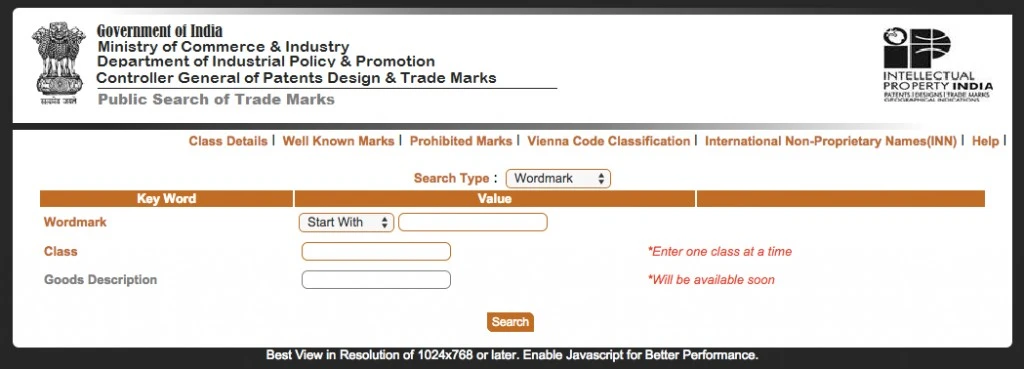
- Go to the E-Register and Application Status page on the official IP India portal.
- This is the authoritative source for status information, more reliable than any third-party tracking tool, since those mirror the Registry’s records with a delay.
If you don’t have your application number, use a trademark search tool or the IP India Public Search portal. You can search by Wordmark, Vienna Code, Phonetic Match, or Proprietor Name to locate your record.
Tip: Once you know your application number, the IP India Queue List lets you check your position in the Examination Queue or Hearing Queue. This gives you a realistic estimate of when your next status update is likely.
Step 2: Select ‘Trademark Application/Registered Mark’
- Enter any valid email address or mobile number to receive a one-time password.
- This OTP is session-specific only; it does not need to match the contact details on record with the Registry.
- Obtaining an OTP does not establish ownership of the mark.
Step 3: Enter Your Trademark Details
- Provide your trademark application number in the designated field.
- Optionally, enter your brand name and the relevant class of goods or services to help verify the correct record.
Accurate trademark details ensure the correct results appear for your registration application status.
Step 4: Click on ‘Search’
Click the search button to retrieve the current status of your application.
Step 5: Review and Analyze the Status
- Review the status carefully once the results appear.
- The record typically displays more than a single-line status. It also lists the journal number once a mark is advertised, along with a link to the examination report where one has been issued.
- Use the key dates shown to determine exactly which deadline, if any, is currently active.
How a Verified Trademark Strengthens Your Business?
Beyond avoiding legal risk, consistently checking your trademark registration status delivers real business advantages:
- Catches Problems Early: Regularly checking your status surfaces objections, oppositions, or record errors while there’s still time to act, rather than discovering them after a deadline has already passed.
- Strengthens Investor Confidence: Investors generally prioritize businesses with verified, registered trademarks, since brand exclusivity and legal protection reduce risk in their decision-making.
- Builds Long-Term Brand Credibility: A verified, registered mark signals legitimacy to customers and partners, supporting trust that takes longer to establish otherwise.
- Keeps You Compliant: Ongoing verification ensures you stay aligned with deadlines and requirements under the Trade Marks Act, 1999, avoiding unexpected complications down the line.
How Long Does Trademark Registration Status Take to Change?
Trademark registration status timelines vary by class, filing volume, and Registry workload, but here are indicative benchmarks based on current processing patterns:
| Stage Transition | Indicative Duration | Notes |
| Filing to Formalities Check | 2 to 4 weeks | Faster for e-filed applications |
| Formalities Check to Mark for Exam | 2 to 6 weeks | Depends on queue volume |
| Marked for Exam to Examination Report | 8 to 12 months | Varies by class; expedited examination is faster |
| Objection Reply to Show Cause Hearing | 2 to 4 months after reply | Only if the reply doesn’t satisfy the examiner |
| Acceptance to Journal Publication | 3 to 6 weeks | Publication in the Trademark Journal |
| Publication to Registration | 2 to 4 months after the opposition window closes | The 4-month opposition window is statutory |
| Uncontested Application, Total | 12-18 months | From the original filing date |
| Contested Application, Total | 24–36 months or longer | If the opposition proceeds to a final hearing |
Applicants who need faster processing can request an expedited examination by filing Form TM-M. The government charges ₹20,000 per class for individuals, startups, and small enterprises and ₹40,000 per class for other applicants. However, expedited examination does not shorten the 4-month opposition period.
What to Do If You Find Errors in Your Trademark Details?
Errors in trademark registration can be costly. If you find a mistake when you check trademark registration online, follow these steps to fix it:
- Identify the Issue: Check if the issue is a spelling error, incorrect classification, or missing details.
- File a Rectification Request: Go to the trademark registry portal and apply for correction by filing a rectification request.
- Submit Necessary Documents: If required, submit proof of correct details, such as business registration certificates or original application copies.
- Follow Up Regularly: Tracking your trademark registry verification process ensures your request is processed smoothly and on time.
Legal Risks of Not Checking Your Trademark Status
Skipping a trademark registration status check can lead to legal and financial problems, not just administrative delays. The following outcomes illustrate what can result from an unverified trademark:
- Infringement Exposure: If another party has already registered a similar mark, you risk facing a trademark infringement suit for using it, regardless of whether your use was intentional.
- Loss of Brand Identity: Without registration, a competitor can claim the mark first, potentially forcing you into a costly rebrand.
- Reputational Damage: Operating under a contested or unverified mark can generate negative publicity and erode customer trust once the conflict becomes public.
- Financial Setbacks: Rebranding, legal fees, and lost goodwill can run into high costs, directly affecting business growth and investor confidence.
Regularly verifying your trademark registration status check results is what prevents these risks from materializing in the first place.
Trademark Registration Status Meanings: Complete Glossary
The table below covers all 21 statuses you’re likely to encounter, in order, with the action required and how urgent each one is:
| Status on Portal | What It Means | Action Required | Urgency |
| New Application | Filed; application number and filing date recorded | Verify applicant name, class, and goods/services | Low |
| Send to Vienna Codification | Figurative elements of a device mark are being classified | None; internal processing | Low |
| Formalities Chk Pass | Documents are in order; the application has cleared the examination queue | None | Low |
| Formalities Chk Fail | A procedural deficiency was identified | Remedy within one month | High |
| Send Back to EDP | Returned internally for a record correction | Monitor for the next update | Low |
| Send to PRAS | A pre-registration amendment is being processed | Track if you filed one via Form TM-M | Low to Moderate |
| Marked for Exam | Queued for substantive examination | None; prepare supporting evidence | Moderate |
| Exam Report Issued | The examiner has issued the examination report | Read it and act if objections are raised | Moderate |
| Objected | Objections raised under Section 9 or Section 11; not a refusal | Reply within 30 days (one month) | High |
| Ready for Show Cause Hearing | A hearing has been scheduled | Prepare and attend | High |
| Accepted | Application accepted; awaiting advertisement | None; await publication | Low |
| Advertised before Acc | Published before formal acceptance | Monitor the 4-month opposition window | Moderate |
| Accepted and Advertised | Accepted and published in the Trademark Journal | Monitor weekly for opposition | Moderate |
| Opposed | A third party has filed a notice of opposition | File a counter-statement within 2 months | High |
| Registered | Entered in the Register; certificate issued | Download certificate; set renewal reminder | Low |
| Rectification Filed | Registration challenged under Section 57 | Respond within the period directed | High |
| Removed | Struck off, usually for non-renewal | Renew or restore within the applicable window | High |
| Cancelled | Cancelled by order or a successful proceeding | Seek legal advice on appeal | High |
| Refused | Application refused after examination or hearing | Appeal to the High Court or re-file | High |
| Abandoned | Lapsed due to a missed deadline | Re-file; priority date is lost | Terminal |
| Withdrawn | Voluntarily withdrawn before registration | None; re-file if needed | Low |
Key Differences Between Trademark Registration Statuses
People often confuse these statuses, but each one requires a different response:
- Objected vs. Refused: An objection gives the applicant an opportunity to respond. A refusal means the Registrar has refused the application.
- Accepted vs. Registered: Acceptance does not mean that the trademark is registered. The application must complete the applicable publication and opposition process before registration.
- Removed vs. Cancelled: Removal and cancellation can occur in different circumstances and have different legal consequences.
- Abandoned vs. Withdrawn: Abandonment generally follows the applicant’s failure to complete a required step, while withdrawal occurs when the applicant voluntarily withdraws the application.
Common Issues While Checking Trademark Status and How to Resolve Them
An online trademark registration check is generally simple, but a few recurring issues can cause confusion or delay:
- Incorrect Application Number: Entering an incorrect or incomplete number prevents accurate results, and even a small typo can block access entirely. Copy the number directly from your official acknowledgment receipt rather than retyping it.
- Status Not Updating: Databases don’t update instantly, so your trademark registration status check may show the same result for several days, particularly during examination or publication. Wait a few working days and check again; this usually reflects a processing delay, not an error.
- Technical or Portal Errors: Heavy traffic or scheduled maintenance can interrupt your session. Access the portal during non-peak hours using a stable connection.
- Unclear Status Terminology: Status labels can appear technical without legal familiarity. Refer to the status glossary above, or consult a trademark professional.
- Missed Objections or Deadlines: Infrequent checking increases the risk of missing a response deadline. Check consistently on the fortnightly schedule outlined earlier, with the three-reminder system for any active deadlines.
Conclusion
Checking your trademark registration status regularly helps you track your application and identify any action you need to take. Statuses such as Objected, Opposed, Abandoned, or Refused may require you to respond within a specific period. The official IP India portal lets applicants track their application and view relevant updates.
Keep your application details updated and review every notice from the Trade Marks Registry carefully. Acting within the prescribed time can help you avoid delays or loss of your trademark application.
