


Suppose you are a manufacturer in Delhi. You supply electronic items worth Rs. 75,000 to a buyer in Jaipur. In this case, you need to get an e-Way Bill download under GST because the consignment value (aka total value) exceeds Rs. 50,000.
An e-way bill is required to record and monitor the movement of goods during transit. It applies to both intra-state and inter-state transactions once your trade value exceeds the prescribed limit. You can generate and complete the e-Way Bill download easily through the E-Way Bill System portal online.
This blog explains the detailed process for checking and downloading an e-Way Bill online and clarifies why it is mandatory for certain businesses.
What is an E-Way Bill Under GST?
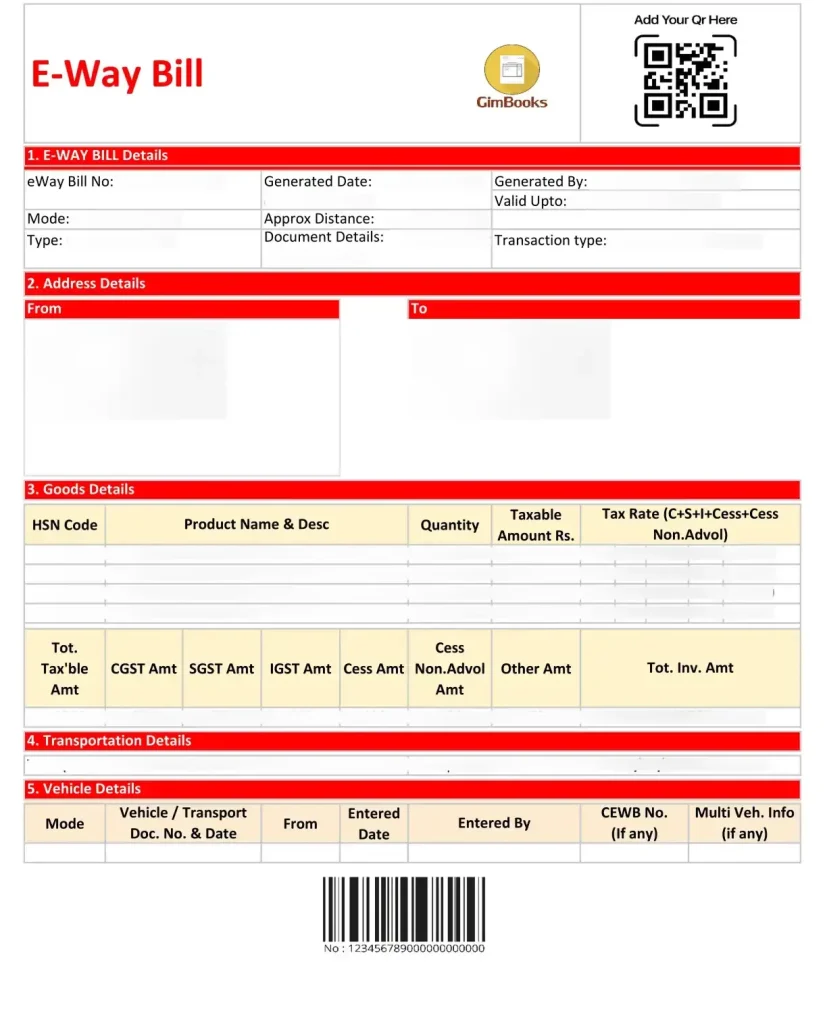
An e-Way Bill is an electronic document required under GST for transporting goods valued at more than Rs. 50,000. It includes details such as invoice number, date, consignment value, GST amount, HSN code, and transporter information. It ensures the lawful movement of goods, enables tracking during transit, and helps authorities verify tax compliance.
E-Way Bill Validity Rules and Key Components
An e-way bill contains the following key details that help authorities track and verify shipments:
- EWB Number (EBN): An EWB or EBN number is a unique number generated after successful filing. Authorities use it to verify the shipment.
- Validity Period: E-Way Bill is valid for 1 day for every 200 km of travel. If the distance exceeds 200 km, even by 1 km, the system adds an extra day of validity. The per-kilometre rule is subject to updates by the GST Council.
- Vehicle Number: The transporter must update the vehicle number, i.e., the number plate used to move the goods.
- Location Details: It must include the dispatch and delivery locations, along with complete address information for the supplier and recipient.
Non-compliance, such as errors or expired e-Way Bills, can lead to penalties ranging from Rs. 10,000 to the tax amount involved, whichever is higher. It may also result in the detention of goods and vehicles. It may also result in the detention of goods and vehicles until the applicable tax and penalty are paid.
Read more about the e-way bill in detail, including its meaning, rules, and registration process.
Pre-Requisite Details of an E-Way Bill Online
You can check your e-way bill online through the official government portal (ewaybillgst.gov.in). This portal allows you to generate, track, and download e-Way Bills online. You must have the following pre-requisite components before checking or downloading your e-Way Bill status:
- Goods and Services Tax Identification Number (GSTIN): A unique 15-digit number issued to your business when you register under GST. It identifies the supplier or recipient in the system.
- E-Way Bill (EWB) Number: A unique 12-digit number automatically generated when you create an e-Way Bill. It is used to track a specific consignment.
- Document Number: The invoice, challan, or delivery note number associated with the goods being transported.
- Date range: Used when searching for multiple e-Way Bills within a specific period. It helps filter results for easier tracking or verification.
Having the correct pre-requisite details is useful only when your business is properly registered on the e-Way Bill portal. E-Way Bill Registration officially links your GSTIN to the system and allows you to generate, track, and download e-Way Bills online.
Step-by-Step Guide to Check E-Way Bill Status Online
Visit the official E-Way Bill System portal and log in using your GSTIN and password. Here’s how you can do it:
1. Navigate to the Tracking Section
After logging into the E-Way Bill System portal, you will see the main dashboard with multiple options. Look for the “Track E-Way Bill” tab, usually listed under the E-Way Bill menu.
2. Enter Required Details
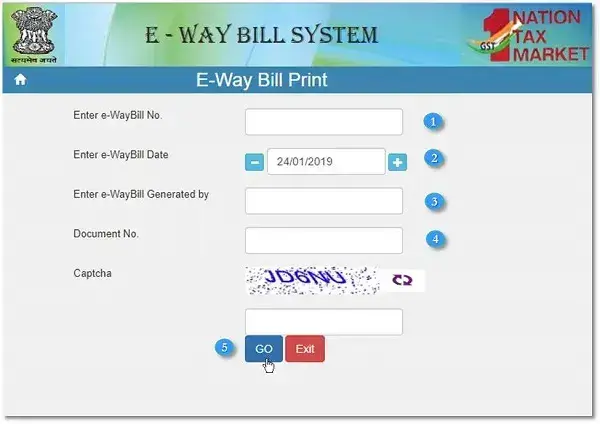
Click on Track E-Way Bill to open the tracking page and enter the following details:
- EWB Number
- GSTIN
- Document Number
- Date Range
After entering the details, click Go or Search to view the results.
3. View Current Status
The portal displays the following details:
- Shipment details (goods, quantity, value, HSN code)
- Transport details (vehicle number, mode of transport)
- Dispatch and delivery locations
- EWB validity and any updates on movement
This process allows you to track your consignment in real time and verify that the shipment complies with GST rules.
How to Download an E-Way Bill PDF From the GST Portal?
You can download your e-Way Bill from the official portal and choose to print it as a hard copy or save it digitally for your records.
1. Navigate to the Tracking Section
After logging into the E-Way Bill System portal, you will see the main dashboard with multiple options. Look for the “Print E-Way Bill” tab, which is usually under the E-Way Bill menu.
2. Enter Required Details
Click on Track E-Way Bill to open the tracking page and enter the following details:
- EWB Number (Select relevant EWB for specific consignment)
- GSTIN (If you want to download all e-Way Bills under your business)
- Document Number (Optional, but helps narrow down searches to a specific invoice or challan)
- Date Range
After entering the details, click on Download to save the e-Way Bill as a PDF.
3. Reading the Downloaded Format of the E-way Bill
The downloaded e-Way Bill contains multiple blocks:
- Vehicle Details: Vehicle number and transport mode.
- Consignor Details: Name, address, and GSTIN of the supplier.
- Consignee Details: Name, address, and GSTIN of the recipient.
- Item Details: Description, HSN Code, quantity, and value of goods.
- EWB Number & Validity: Unique identifier and expiry date for the e-Way Bill.
Note: You can also print a hard copy if the driver or transporter needs it during transit.
How to View E-Way Bill History Online?
EWB History is a record of all e-Way Bills generated by your business. It helps track consignments, ensure compliance, and maintain proper documentation for audits.
Details Included in EWB History:
- Past Entries: Review previous e-Way Bills for reference or audit purposes.
- Tracking Delivery & Compliance: Verify whether consignments reached the recipient on time and complied with GST rules.
- EWB Number: The unique 12-digit number assigned to each consignment.
- Invoice/Document Details: Invoice or challan number and date.
- Consignor & Consignee Information: Names, addresses, and GSTINs of the supplier and recipient.
- Goods Details: Description, HSN code, quantity, and value of goods.
- Transport Details: Vehicle number, mode of transport, and current location updates.
- Validity & Status: EWB validity period and real-time status of the consignment.
How to Access Your EWB History?
Log in to the official E-Way Bill portal using your GSTIN to access your e-way bill history. Follow the steps mentioned below to get results:
- Navigate to the EWB History section.
- Apply date filters to search for bills within a specific period.
- View the list of e-Way Bills along with their status and movement details.
- You can export the history as a CSV file or generate reports for record-keeping or audit purposes.
By regularly checking your EWB History, you can stay up to date on all consignments and quickly identify any delays or issues.
Common Problems While Downloading E-Way Bill and Solutions
Some common issues users face with handling e-Way Bills online are:
1. EWB Not Found
- Cause: Incorrect EWB number, GSTIN, or document number entered.
- Solution: Double-check the details and ensure the e-Way Bill was successfully generated.
2. Incorrect Details Showing
- Cause: Mistakes in the invoice, GSTIN, or item details during e-Way Bill generation.
- Solution: Update the e-Way Bill using the Update EWB option on the portal before the consignment moves.
3. Unable to Download PDF
- Cause: Browser issues or pop-up blocker preventing download.
- Solution: Use a compatible browser, disable pop-up blockers, and try again.
4. Session Timeout Issues
- Cause: Inactivity on the portal for a long time.
- Solution: Log in again and ensure you complete the process without long delays.
5. Portal Not Loading Errors
- Cause: Server overload or internet connectivity issues.
- Solution: Refresh the page, try at a different time, or check your network connection.
These solutions help ensure smooth generation, tracking, and download of e-Way Bills.
Conclusion
The e-Way Bill ensures legal movement, GST compliance, and easy tracking of consignments. By understanding how to generate, download, and check EWB history, businesses can avoid delays, errors, and penalties while maintaining accurate records for audits.
For a smooth experience with E-way bill Registration and compliance, RegisterKaro can help. We assist you with e-Way Bill registration, generation, tracking, and overall GST regulations. Our services streamline your compliance and enable you to manage all your e-Way Bills efficiently with expert support. Contact us today to get started!
