


A trademark registration certificate is the official legal document issued by the Indian Trade Marks Registry after a trademark completes the registration process under the Trade Marks Act, 1999. This includes examination, publication in the Trademark Journal, and the 4-month opposition period. It grants the proprietor exclusive statutory rights under Section 28 to use the mark and take legal action against unauthorized use. It also serves as prima facie evidence of the trademark’s validity under Section 31. Until this certificate is issued, brand owners may only use the ™ symbol; once registered, they may use ®.
The certificate is digitally signed and downloadable for free from the IP India portal once the status changes to “Registered.” For court enforcement or foreign filings, however, you’ll instead need a certified copy issued directly by the Registry, requested by filing Form TM-M with the applicable fee at your jurisdictional Trade Marks office. The certificate supports assignment and transfer (recorded via Form TM-P) and licensing/registered-user entries (via Form TM-U) once trademark registration is complete.
Key Takeaways
- The Registrar of Trade Marks issues the certificate after the trademark clears examination, journal publication, and the four-month opposition period.
- It grants exclusive statutory rights under Section 28 and serves as prima facie evidence of validity under Section 31, a strong but rebuttable legal presumption.
- The certificate is free to download from the IP India portal once the status shows “Registered.”
- The self-downloaded PDF works for business use; court enforcement or foreign filings typically need a certified copy, requested via Form TM-M (₹900 e-filing / ₹1,000 physical).
- Common download issues include portal delays, incorrect owner details, pending oppositions, Madrid Protocol mismatches, and lapsed renewals.
What Details are Mentioned on a Trademark Registration Certificate?
A trademark registration certificate includes the following key details that confirm a trademark’s legal identity and the scope of its protection:
| Detail | What It Shows |
| Trademark Number | The unique registration number assigned to your trademark |
| Trademark Class | The class of goods or services the trademark is registered under |
| Owner Name and Address | Details of the individual or business that owns the trademark |
| Date of Registration | The official date the trademark was registered |
| Validity / Renewal Information | The validity period and trademark renewal requirements |
| Trademark Representation | The logo, name, slogan, or symbol registered as the mark |
| Legal Statement | Confirmation that the mark is officially registered under the Trade Marks Act, 1999 |
| Territorial Scope | Confirms protection applies throughout India |
| Digital Authentication | The official seal and digital signature of the Registrar of Trademarks |
Note: A certified copy includes the same fields as the original certificate. Only the issuing authority and the purpose for which the copy is accepted differ; the certificate format remains the same.
Who Can Obtain a Trademark Registration Certificate?
Any person or entity that owns a registered trademark in India is eligible to obtain the registration certificate. Eligible applicants include:
| Who They Are | Description |
| Individual | Any Indian citizen who owns a registered trademark, including freelancers, artists, sole proprietors, and small business owners. |
| Startup / MSME | Startups and small businesses can secure legal ownership of their brand with a 50% concession on government fees. DPIIT-recognized startups and Udyam-registered MSMEs pay ₹4,500 per class instead of ₹9,000. |
| Private Limited Company / LLP | Companies and LLPs can obtain certificates for each registered trademark. |
| Foreign Entity | International companies doing business in India can register trademarks under Indian law. Must provide a local Indian address for service, typically through a registered Indian trademark agent. |
| Trusts, Societies, NGOs, and Section 8 Companies | Registered trusts, societies, NGOs, and Section 8 companies can obtain trademark certificates for logos or names used in operations. |
| Assignees and Transferees of a Trademark | Individuals or entities who legally acquire a trademark through assignment or transfer (Form TM-P) can apply for the updated certificate in their name. |
| Madrid Protocol Applicants | International applicants filing through the Madrid Protocol can obtain certificates once India grants protection and the mark is reflected as “Registered” in India. |
Pre‑Requisites to Download a Trademark Certificate in India
Before you can download your trademark registration certificate from the IP India portal, make sure it meets the following conditions:
- Status must show “Registered”: Marks listed as Pending, Objected, Published, Abandoned, Refused, or Removed aren’t eligible. Status typically updates within a few days after the 4-month opposition window closes without objection.
- Application must exist in the IP India database: The original filing must be correctly recorded in the Registry’s electronic records.
- Keep trademark application number handy: This is required to locate and verify your registration on the portal.
- No pending post-registration issues: All amendments, oppositions, or compliance requests, including outstanding fees or Power of Attorney, must be resolved first.
- Owner and address details must be accurate: Incorrect records can cause the Registry to withhold certificate generation until corrected.
- Madrid Protocol registrations need India-specific status: Downloadable only after India grants protection and the mark shows “Registered” status specifically in India, not just internationally.
- Renewal status must be active: Expired or lapsed trademarks aren’t eligible for certificate download until renewed.
- Trademark must be properly reflected in the E-Register: This is the Registry’s authoritative public record; the certificate can’t be generated until it’s correctly updated there.
How to Find Your Trademark Application Number?
You’ll need your trademark application number before you can download the certificate.
If you don’t have it on hand, here’s how to find it:
- Visit the official trademark public search page.
- Enter your brand name or registered company name in the search field.
- Choose the trademark class your mark is registered under, then click “Search.”
- The portal displays your trademark’s details, including its current status and application number.
- Save this number; you’ll need it to proceed with the certificate download in the next step.
How to Download a Trademark Registration Certificate Online?
Below is a step-by-step guide on how to download a trademark registration certificate from the IP India portal:
1. Visit the Official IP India Portal
- Open ipindia.gov.in in your browser.
- Click on the “Trademark” section on the homepage to access trademark-related public services and records.
2. Access the Trademark Public Search or E-Register Section
- On the Trademark page, open the Public Search or E-Register of Trademarks
- These sections allow users to view details of registered trademarks and download registration certificates.
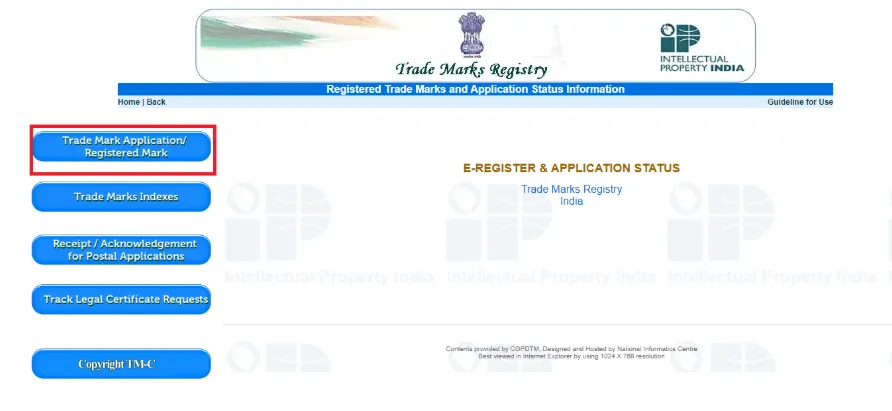
3. Enter Your Trademark Application/Registration Number
- Select the appropriate search option and input the registration number issued after your trademark approval. This number links your certificate to your registered brand.
- Make sure the number is correct to avoid errors.
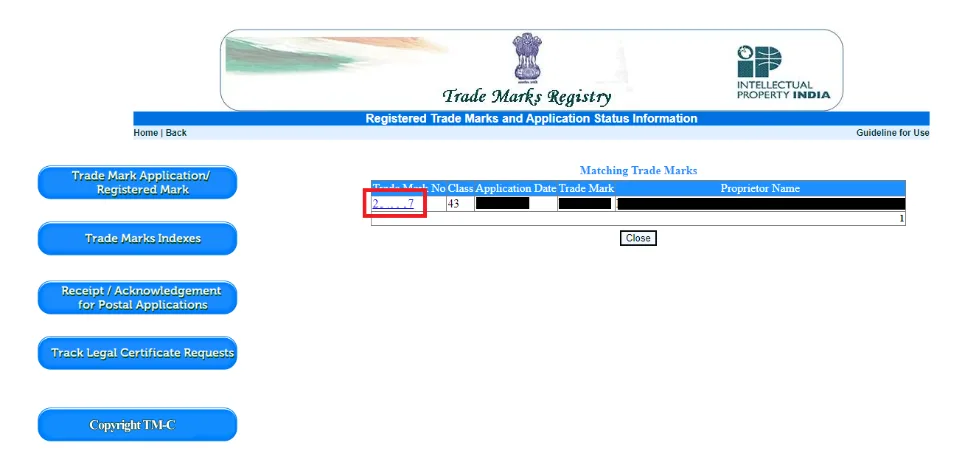
4. Verify Trademark Details and Status
- Press the search button after entering your registration number.
- The portal will display your trademark status, owner details, and the classes of goods or services registered.
- Make sure the status shows “Registered,” as the certificate is available only after successful registration. Also, verify that all details are accurate before downloading.
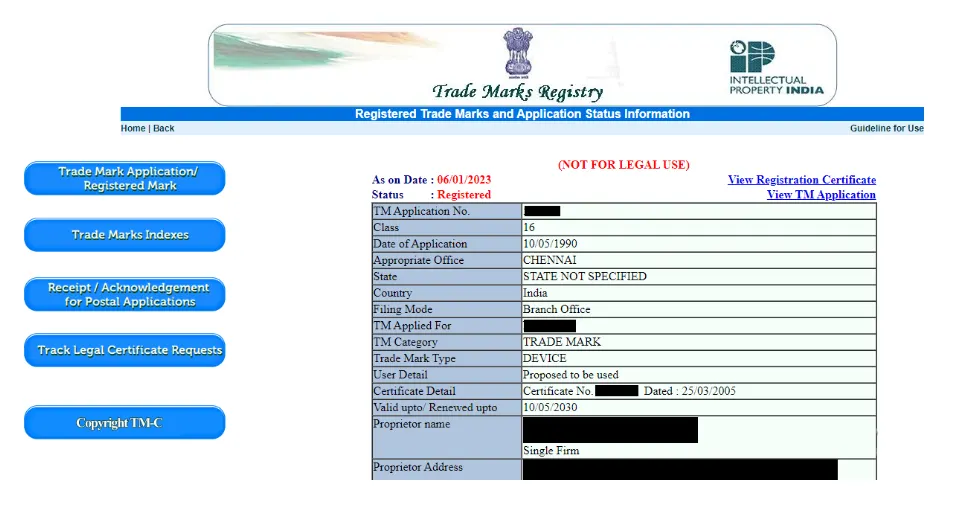
5. Download the Trademark Registration Certificate
- Once the trademark status is confirmed as Registered, open the trademark record.
- Look for the Registration Certificate or View Certificate link.
- Click the link to download the digitally signed PDF certificate.
- Save the certificate securely for legal and business use.
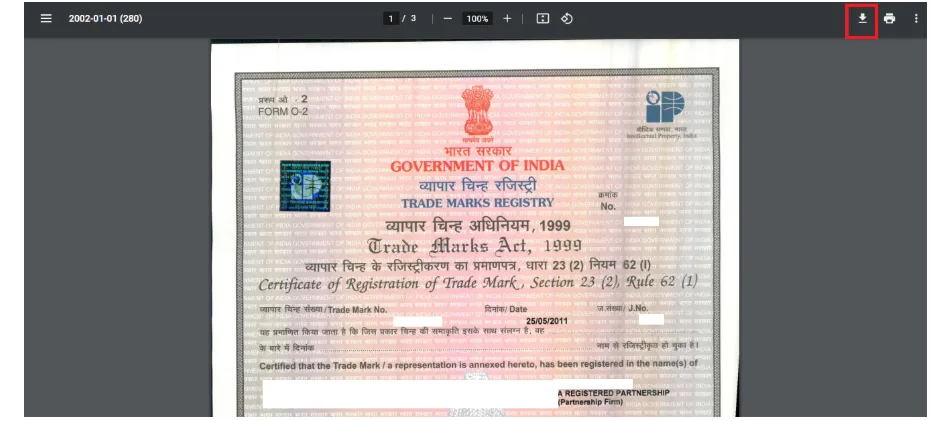
The Trade Marks Registry grants a trademark registration certificate that remains valid for 10 years from the date of filing. Section 23 of the Trade Marks Act, 1999, treats this filing date as the date of registration. To continue protection, file Form TM-R and pay the prescribed renewal fee before the registration expires.
What to Do After Downloading Your Trademark Certificate?
Here’s what you can do after obtaining your certificate:
- Use the ® Symbol: Display the ® symbol next to your brand name or logo. This signals that you have legally registered and protected your trademark, discouraging others from copying it.
- Include in Contracts and Agreements: Attach your certificate in licensing deals, franchising agreements, or partnerships. It acts as legal proof that you own the brand.
- Show to Investors and Stakeholders: A registered trademark enhances your business credibility. Investors and partners often look for a valid certificate as part of due diligence.
- Protect Against Infringement: The certificate enables you to take legal action against trademark infringement. It serves as strong legal evidence in court to enforce your rights and protect your brand.
Note: Keep a secure PDF copy and, if required, a printed copy of your certificate so you can provide proof whenever legal or commercial needs arise.
Free Portal Download vs. Legal Certified Copy: What’s the Difference?
Not every use case calls for the same version of your certificate. Here’s how the two compare:
| Particulars | Free Portal Download | Certified Copy |
| Where to get it | IP India portal (ipindia.gov.in), self-downloaded | Requested via Form TM-M from the Trade Marks Registry |
| Cost | Free | ₹900 (e-filing) / ₹1,000 (physical filing) |
| Format | Digitally signed PDF | Physical or attested copy bearing the Registry’s official seal |
| Accepted for | Business use, licensing discussions, display, and investor due diligence | Court proceedings, foreign filings, official legal submissions |
| Turnaround | Available immediately once status shows “Registered” | Typically 2-3 weeks, depending on Registry workload |
Troubleshooting Common Issues While Downloading a Trademark Registration Certificate
Even after registration, some applicants run into trouble accessing their certificate. Here’s how to fix the most common issues:
- Certificate Not Visible on the Portal: The certificate may take 2–7 working days to appear after the registration order while the Register entry updates. If it remains unavailable after 15 days, contact the IP India helpdesk.
- Download Link Inactive or Broken: If the “View Certificate” link appears but doesn’t open or throws an error, try a different browser or device, clear cached data, and retry during off-peak hours. If the issue continues, contact the IP India helpdesk.
- Incorrect or Missing Owner Details: Update the owner details in the IP India database before attempting to download.
- Trademark Under Opposition or Pending Amendments: Clear all pending trademark objections, oppositions, or compliance requests first.
- Madrid Protocol Registrations Not Reflected Properly: Check that the registration correctly designates India and appears in the E-Register through WIPO’s Madrid Monitor. Correct any mismatch before attempting to download the certificate.
- Expired or Non-Renewed Trademarks: Check renewal status and file Form TM-R to restore eligibility.
