


Form SH-7 is the notice a company files with the Registrar of Companies (ROC) when it alters its share capital. Companies most commonly use it to increase their authorized share capital, but the form also covers actions such as consolidating or dividing shares, converting shares into stock or vice versa, or cancelling shares.
Under Section 64(1) of the Companies Act, 2013, read with Rule 15 of the Companies (Share Capital and Debentures) Rules, 2014, the company must file SH-7 with the ROC within 30 days of the alteration. Timely filing updates the company’s capital structure on MCA records, while delay attracts a statutory penalty.
Key Takeaways
- Form SH-7 notifies the ROC about an alteration in a company’s share capital under Section 64(1) of the Companies Act, 2013.
- Companies commonly file SH-7 to increase authorized share capital, consolidate or divide shares, convert shares, cancel shares, redeem preference shares, or implement a government or Tribunal order.
- The company must file SH-7 within 30 days of the alteration.
- SH-7 primarily covers authorized share capital and structural capital changes. A fresh allotment that increases paid-up capital generally requires Form PAS-3.
- Private companies, public companies, OPCs, small companies, and Section 8 companies must file SH-7 when the relevant alteration applies to them.
- Late filing attracts a ₹500 per-day penalty, subject to the statutory limits applicable to the company and officer in default.
Who Must File Form SH-7?
As per the Companies Act, 2013, the following company types must file Form SH-7 when they alter their share capital:
a. Private Limited Companies: Private limited companies must file Form SH-7 to register any increase in share capital. This ensures compliance with the Companies Act, 2013.
b. Public Companies: Public companies are required to file SH-7 when they increase their authorized capital or make significant changes to their share capital structure. This ensures transparency and legal compliance.
c. One Person Company and Small Companies: One Person Companies (OPCs) and small companies must file Form SH-7 when altering their share capital. These entities must also adhere to ROC filing requirements, even with simpler structures.
d. Section 8 Companies (Non-Profit Organizations): Section 8 companies (non-profit organizations) must file Form SH-7 for any capital increase or share structure changes. This ensures proper registration of the capital alteration with the ROC.
Documents Required for Filing Form SH-7
When filing the Form SH-7, companies must attach the appropriate documents to ensure the process complies with legal standards. Here’s a breakdown of the key documents required for Form SH-7:
- Board Resolution: A certified true copy of the resolution is necessary when altering the share capital, especially if the company increases it independently.
- Ordinary resolution of members: Submit a certified true copy of the ordinary resolution passed by the shareholders in a general meeting to approve the alteration. For an increase in authorized share capital, Section 61 requires this members’ approval, along with the notice of the general meeting.
- Government Order: If the increase in share capital is due to a Central Government order, you must attach a copy of this order.
- Tribunal Order: If the capital increases as per a Tribunal order, you must include a copy of the Tribunal’s order.
- Board Resolution for Redemption: When redeeming redeemable preference shares, a certified true copy of the board resolution authorizing this action is mandatory.
- Altered MOA: Attach the updated Memorandum of Association (MOA) when there is an increase in share capital.
- Altered AOA: If the company’s articles are altered, a certified true copy of the updated Articles of Association (AOA) must be included.
- Calculation working: Provide the calculation showing the conversion ratio when converting shares from one class or form to another.
Step-by-Step Procedure for Filing eForm SH-7 on the MCA Portal
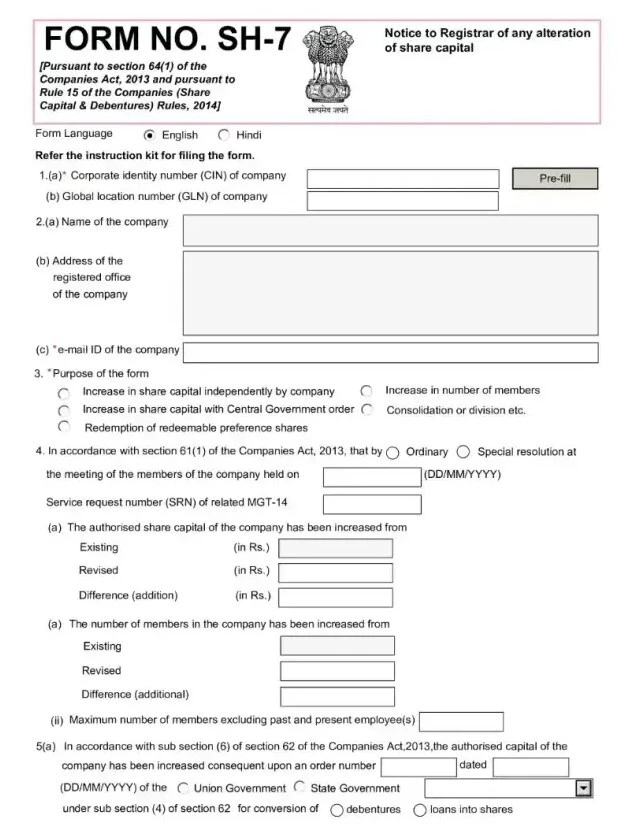
Here’s how you can file eForm SH-7 through the MCA portal correctly:
Step 1: Log in to the MCA Portal
Visit the official MCA portal and log in with your credentials. Make sure you have all the required documents ready for filing Form SH-7.
This ensures a smooth and efficient filing process.
Step 2: Enter the CIN of the Company
Next, input the valid Corporate Identity Number (CIN) of the company. Click on Pre-fill to automatically populate the company’s name, registered office address, and email ID.
If the email ID has changed, update it accordingly.
Step 3: Select the Purpose of Filing the Form
Choose the appropriate SH-7 form purpose from the dropdown options. If none of the listed options match, specify the purpose in the description box.
Step 4: Provide Details of Alteration in Authorized Capital
Fill in the details about the alteration in authorized capital. This includes specifying whether the increase is independent, due to a Central Government order, or involves share consolidation.
Step 5: Enter the Board Resolution Details
Enter the details of the Board Resolution that authorizes the capital alteration. Include the resolution’s date and the Service Request Number (SRN) from eForm MGT-14, if applicable.
Step 6: Specify the Break-Up of Additional Capital
Provide the breakdown of additional capital if the form relates to an increase in authorized capital. Specify the amount of equity shares and preference shares.
Step 7: Increase in Number of Members (if applicable)
This step is only applicable to companies that are not limited by shares. Enter the revised number of members and the difference in the number of members after the increase.
Step 8: Details of Share Consolidation or Division
For companies that have consolidated or divided shares, enter the date of this action and any relevant details.
Step 9: Redemption of Redeemable Preference Shares
If the form pertains to redeeming preference shares, provide the required details, such as the description of the shares, issue date, and redemption date.
Step 10: Payment of Stamp Duty
The MCA portal will automatically calculate the stamp duty based on the state rules. You can then proceed to pay the form SH-7 fees electronically.
Step 11: Declaration and Digital Signature
Select the appropriate option for the declaration and digitally sign the SH-7 form. If the signer is a director, enter their DIN (Director Identification Number). If the signer is a company secretary, include the membership number. Ensure that the digital signature is attached.
Note: Follow these steps within 30 days of the capital alteration for timely filing of eForm SH-7 through the MCA portal.
Applicable Fees for Filing eForm SH-7
The fees for filing eForm SH-7 vary based on the nominal share capital of the company. Below is a breakdown of the applicable fees for form SH-7:
| Nominal Share Capital | Other than OPCs and Small Companies | OPC and Small Companies |
| Up to ₹1,00,000 | ₹5000 | ₹2000 |
| More than ₹1,00,000 up to ₹5,00,000 | ₹5000 + ₹400 per 10,000 or part thereof | ₹2000 |
| More than ₹5,00,000 up to ₹10,00,000 | ₹21,000 + ₹300 per 10,000 or part thereof | ₹2000 |
| More than ₹10,00,000 up to ₹50,00,000 | ₹36,000 + ₹300 per 10,000 or part thereof | ₹2000 + ₹200 |
| More than ₹50,00,000 up to ₹1,00,00,000 | ₹156,000 + ₹100 per 10,000 or part thereof | N/A |
| More than ₹1,00,00,000 | ₹206,000 + ₹75 per 10,000 or part thereof | N/A |
Note: If you delay filing SH-7 beyond the 30-day window, you may incur penalties of ₹500 per day (maximum ₹5 lakh for the company and ₹1 lakh for the officer in default under Section 64(2) as per the Companies Act, 2013. Ensure you file within the prescribed timeframe to avoid any compliance issues.
Legal Framework for Filing eForm SH-7
The filing of eForm SH-7 is governed by the Companies Act, 2013 and the Companies (Share Capital and Debentures) Rules, 2014. The key provisions are:
- December 2020 amendment (G.S.R. 794(E)): Revised SH-7 to cover additional alterations, including cancellation of unissued shares of one class and their conversion into another class.
- Section 64(1): Requires companies to notify the ROC within 30 days of altering their share capital. This includes increases in authorized capital, Central Government-directed increases, and redemption of redeemable preference shares.
- Section 61: Permits alterations such as increasing authorized capital, consolidating or subdividing shares, converting shares into stock or vice versa, and cancelling unissued shares, subject to applicable conditions.
- Rule 15: Prescribes Form SH-7 for notifying the ROC of share-capital alterations, along with the applicable fees.
What Happens After Filing eForm SH-7?
After you file eForm SH-7, the process of filing Form SH-7 moves to the next stage. This includes:
- SRN and email acknowledgement: The MCA generates a Service Request Number (SRN) after successful submission. It also sends an email acknowledgement. Use the SRN to track the filing status and future correspondence.
- Fee challan generation: The MCA generates a challan showing the applicable filing fees and stamp duty paid through the portal. Keep the challan with your company records as proof of payment and filing.
- ROC processing: The ROC reviews the SH-7 and supporting documents. The processing time depends on the filing and whether the submitted information and documents meet the requirements.
- MCA Master Data update: Once the ROC approves the form, the MCA updates the company’s Master Data to reflect the altered share capital. You can check the updated authorized capital on the MCA portal.
How to Download eForm SH-7?
You can easily download eForm SH-7 from the MCA portal after successfully submitting it. Follow these steps:
- Login to the MCA Portal: Use your credentials to access the Ministry of Corporate Affairs (MCA) portal.
- Navigate to e-Forms Section: Go to the ‘e-Forms’ section on the portal.
- Search for SH-7: Look for the eForm SH-7 under the submitted forms section.
- Download the Form: Click on the download link to get a copy of your filed eForm SH-7.
The form will be available for easy access and future reference. Keep a copy for your records, and ensure all details are correct for compliance.
