

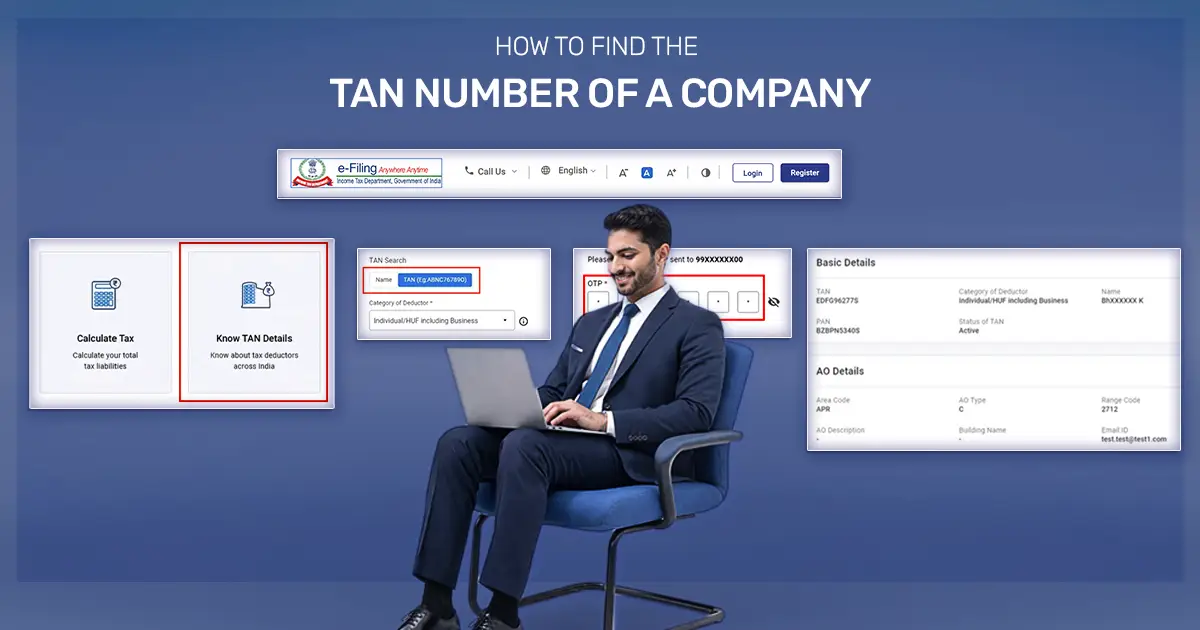
To find a company’s TAN online, use the Income Tax Department’s “Know TAN Details” service. Select “Name,” enter the deductor category, state, and company name, and complete the verification process. You can also find the TAN on documents issued by the company, such as TDS certificates (Form 16 or Form 16A), TDS challans, or invoices.
A company’s TAN (Tax Deduction and Collection Account Number) is a unique 10-character code (e.g., DELA12345E) issued by the Income Tax Department to anyone who deducts or collects tax at source. It differs from a company’s PAN, which identifies the taxpayer, and its CIN number, which identifies the company with the MCA. To look up the PAN instead, see how to check a company’s PAN number. Businesses and individuals often need to find TAN number details to verify an employer, check a vendor’s tax credentials, or access their own company’s records.
Key Takeaways
- The Income Tax Department’s free “Know TAN Details” service lets users find a company’s TAN using its name, state, and deductor category. The service does not require login.
- A company’s TAN appears on TDS-related documents, including Form 16, Form 16A, TDS challans, and invoices.
- The “Know TAN Details” service also verifies an existing TAN and displays the deductor’s name, category, and Assessing Officer (AO) details.
- Companies can download their TAN allotment letter through the Protean/NSDL portal using the TAN application acknowledgement number.
- Businesses must quote the correct TAN when filing TDS returns, issuing TDS certificates, and completing other applicable TDS or TCS compliances.
Why Do You Need a Company TAN in India?
A Company TAN in India is essential for all tax deduction and reporting purposes. Any entity that deducts or collects tax at source must have it under the Income Tax Act (Section 203A).
Here’s why TAN registration is important:
- Filing TDS Returns: You cannot file TDS returns without a TAN. It links tax deductions directly to the correct company, ensuring smooth compliance with the Income Tax Department.
- Verifying Employer (Form 16): Employers include their TAN on Form 16. Employees can verify it to confirm correct TDS deductions and the employer’s tax credentials.
- Property Transactions (TDS on Property): TDS on property purchases under Section 194-IA is paid through Form 26QB using the buyer’s PAN. Section 203A(2) exempts these payments from the TAN requirement.
- Vendor Verification: Businesses can check a vendor’s TAN before making payments. This prevents fraud and ensures accurate tax reporting.
- Compliance Checks: The Income Tax Department monitors TDS/TCS compliance using TAN. Quoting the correct TAN keeps your company legally compliant and avoids penalties.
- Issuing TDS Certificates: Companies must use TAN when issuing TDS certificates (Form 16/16A) to employees or vendors. Recipients can accurately claim tax credits using this information.
Key Details You Need to Search a Company TAN Online in India
Before you start to search a company TAN online, check what the Income Tax e-filing portal requires:
- Company Name (Correct Spelling): Use the company’s full official name as registered.
- State of Registration: Enter the state where the company is officially registered.
- Category of Deductor: Select the correct type, such as Company, Firm, or Government Body.
- Active Mobile Number for OTP: You must verify an OTP to access TAN details online.
How to Find the TAN Number of a Company Online?
There are three practical ways to find the TAN number of a company, depending on what information you already have. These are:
| Method | Best when | What you need |
|---|---|---|
| “Know TAN Details” portal (by name) | You know the company name | Company name, state, deductor category, and a mobile number for OTP |
| From TDS documents | You hold a Form 16 / 16A or TDS certificate | The document itself |
| Ask the company / vendor | You’re onboarding a vendor or partner | A direct request to the company |
Note: The Income Tax Department provides the “Know TAN Details” service free of charge. You can use it without logging in to search for a company’s TAN by name, making it the quickest and most reliable method for TAN verification.
How to Search a Company’s TAN by Company Name?
Here’s how to find a TAN number by company name, step by step:
1. Go to the Income Tax e-filing portal and click on Know TAN Details.
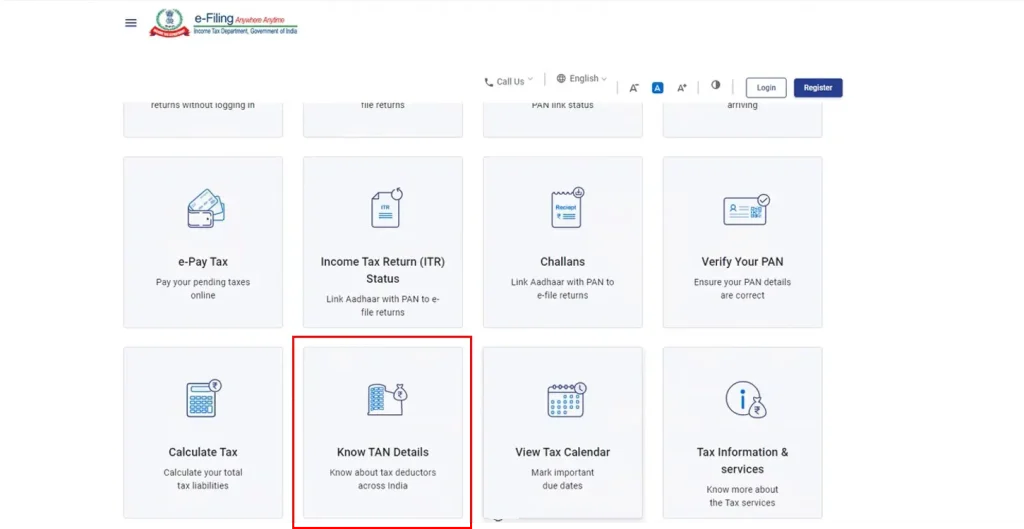
Open the Income Tax e-Filing portal and click “Know TAN Details,” as shown in the image above.
2. Under “TAN Search”, select Name.
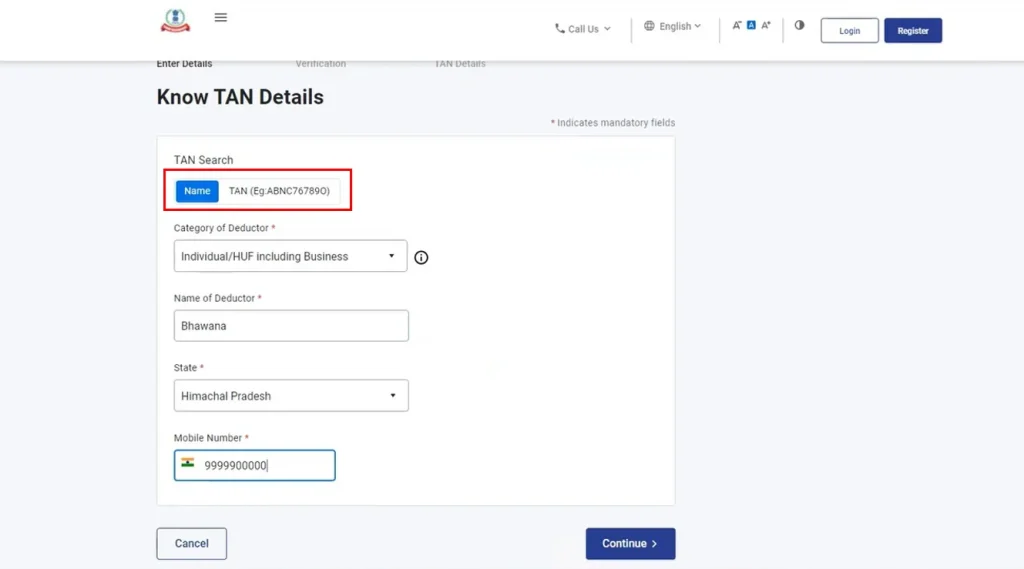
Open the “TAN Search” section and choose “Name,” as shown in the image above.
3. Choose the Category of Deductor (e.g., Company).
4. Select the State where the company is registered.
5. Enter the company name.
6. Enter your mobile number, click Continue, and validate the OTP. The OTP remains valid for 15 minutes and allows up to three attempts.
7. Review the list of matching records, then select the correct deductor to view its full TAN and Assessing Officer (AO) details.
Note: You can also use the “Know TAN Details” service to verify a TAN you already have. Just select “By TAN,” choose the Category of Deductor, enter the TAN, and complete the OTP verification.
How to Find a Company’s TAN from Documents?
If you already have paperwork from the company, you often don’t need the portal at all. A company’s TAN is printed on the TDS documents, so you can find it on:
- Form 16 / Form 16A, the TDS certificate given to employees or vendors.
- TDS payment challans and quarterly TDS return acknowledgements.
- Agreements or TDS correspondence where the company has quoted its TAN.
This is the quickest option when you’re verifying an employer or vendor you already deal with. Simply cross-check the TAN on the document against the “Know TAN Details” result to confirm it’s valid and active.
How to Download the TAN Certificate?
If you need an official TAN certificate for record-keeping, you can download it easily from the NSDL/Protean portal using the acknowledgment number.
A new company gets its TAN automatically through SPICe+ during the private limited company registration process, for a ₹65 fee included in the total fees. The TAN is also printed on the Certificate of Incorporation. Companies that applied separately through Form 49B can download the TAN allotment letter from the Protean portal using the acknowledgement number.
Here’s how to get it:
- Visit the NSDL/Protean Portal: Go to the Protean (formerly NSDL e-Gov) TIN portal and open the TAN application status service.
- Enter Acknowledgement Number: Use the acknowledgement number you received when applying for TAN. This helps locate your TAN allotment details.
- Download the Allotment Letter: The portal displays your TAN status with a link to download the TAN Allotment Letter in PDF. Keep a copy for your company records.
- Check the Details: Make sure the company name, TAN, and other details on the certificate match your records.
Tip: To download the company’s incorporation certificate, see how to download company registration certificate.
Benefits of Knowing the TAN of a Company
Here are the key benefits of knowing a company’s TAN:
- Prevent Fraud: By checking a company’s TAN, you can confirm it is genuine. This reduces the risk of dealing with fraudulent vendors or fake companies.
- Stay Compliant with TDS: TAN is required for deducting and depositing TDS. Knowing the correct TAN ensures that all tax filings are accurate and accepted by the Income Tax Department.
- Required for Legal Transactions: Certain transactions, like property purchases or contractor payments, require TAN details. Verifying the TAN avoids legal or financial issues.
- Ease of Vendor Verification: When working with new vendors or partners, knowing their TAN helps validate their credentials and tax obligations. For a full company check, also check the CIN number online.
- Audit and Record Keeping: Having TAN details ready helps during audits, financial reviews, and record maintenance.
Tip: Always verify the TAN before you file a TDS return or enter into contracts. This ensures smooth business operations and keeps your tax compliance on track.
Common Errors While Finding a Company’s TAN and How to Fix Them
Searching for a company’s TAN can sometimes lead to mistakes if the wrong information is entered.
Here are the most frequent mistakes and ways to fix them:
- No Results Found: This happens when the company name is misspelled, the wrong state is selected, or the incorrect deductor category is chosen. Check the spelling carefully, select the correct state, and choose the right category to get accurate TAN details.
- Too Many Results: If the search shows multiple matches, it usually means the company name entered is partial or generic. Use the full registered name and narrow the search by state and category to locate the correct TAN.
- OTP Not Received: Sometimes the OTP does not arrive due to mobile network issues or incorrect mobile numbers. Ensure the number is active and retry after the OTP expires.
- Portal or Server Issues: Occasionally, the portal may be temporarily slowed or down. Wait a few minutes and try again to avoid errors caused by system issues.
