


Form INC-12 is an application filed with the Registrar of Companies (ROC) to obtain a license for forming a Section 8 Company under the Companies Act, 2013. The application generally involves providing details about the proposed company’s objectives, directors and members, and the manner in which the company will use its income and assets.
A Section 8 Company is established for promoting objectives such as charitable activities, education, social welfare, research, environmental protection, sports, art, culture, or other similar purposes. The entity must apply its income towards these objectives rather than distributing profits as dividends to its members. By filing Form INC-12, your organization can complete Section 8 company registration, gaining a solid legal foundation.
What is the INC-12 Form?
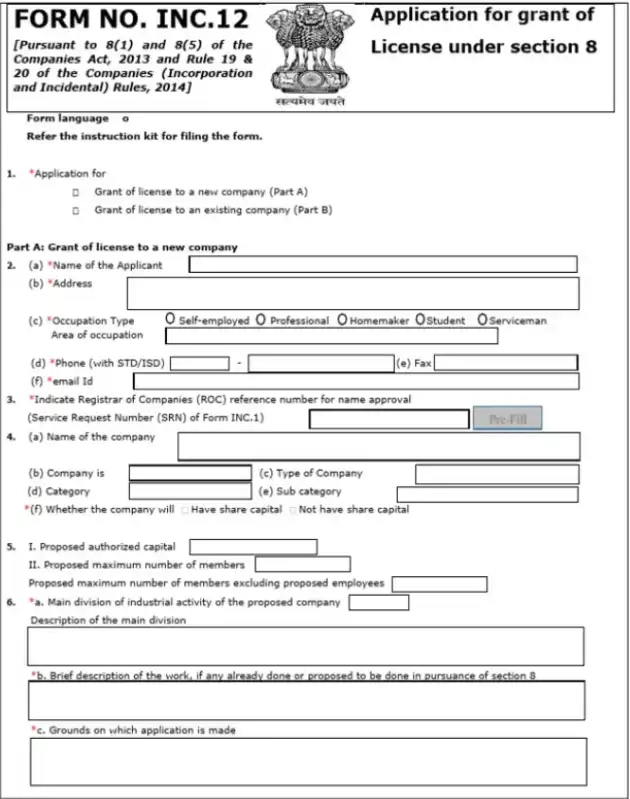
Form INC-12 (Form No. INC.12) is the official application form used to obtain a Section 8 license, issued by the Registrar of Companies (RoC) under the Ministry of Corporate Affairs (MCA). This license permits an organization to operate as a Section 8 company.
The form is governed by Section 8 of the Companies Act, 2013, and Rule 20 of the Companies (Incorporation) Rules, 2014. It applies only to existing companies seeking Section 8 status. The company must be active and hold a valid Corporate Identification Number (CIN).
An existing company applying for a Section 8 License or conversion must file Form INC‑12 along with a special resolution and the filing of MGT‑14. Include the amended MOA/AOA, and file INC‑27 if required. Disclose shareholder and management details and ensure profits are used solely for charitable purposes.
Through Form INC-12, the MCA formally verifies that an entity’s purpose, management, and financial intent meet Section 8 standards.
Who Can File Form INC‑12?
Only companies that meet specific eligibility criteria can file Form INC-12. Knowing who can apply helps prevent errors and rejections.
- Directors: A director of the company may file Form INC-12. The board must authorize the director through a board resolution.
- Authorized Signatory: The company may appoint an authorized signatory to file the form. The signatory must hold a valid Class 3 Digital Signature Certificate (DSC) and receive board approval.
- Chartered Accountant (CA), Company Secretary (CS), or Cost Accountant: A practicing CA, CS, or Cost Accountant must certify Form INC-12. The professional confirms the accuracy of the information and the attached documents. Many organizations also use online CA services to streamline this process and ensure timely, error-free certification.
Note: Form INC‑12 cannot be filed by OPCs, inactive companies, or those with unfiled returns or financial statements. Companies whose objectives do not meet Section 8 requirements are also ineligible. Only directors or authorized signatories can submit the form.
How to Fill eForm INC‑12? Step‑by‑Step Guide
eForm INC-12 is the official application for Section 8 status. The Registrar of Companies (RoC) reviews a company’s objectives, structure, and governance through this form.
Follow these steps carefully to fill out eForm INC-12:
1. Prepare Before Filing
- Ensure the company meets Section 8 eligibility (non-profit or charitable purposes only).
- Draft the MOA in INC‑13 format.
- Prepare the AOA aligned with Section 8 restrictions.
- Obtain Class 3 DSC for all directors and authorised signatories.
- Pass a board resolution approving the filing of eForm INC‑12.
2. Download and Open eForm INC‑12
- Log in to the MCA portal and download the latest eForm INC‑12.
- Open the form using the MCA-recommended PDF utility.
- Use the pre-fill option to auto-populate registered company details.
3. Enter Basic Applicant Details
- Enter:
- Proposed company name
- Registered office address
- Email and contact details
- Ensure all information matches MCA records exactly.
4. Specify Charitable Objects and Grounds for License
- Clearly describe the company’s charitable objectives.
- Ensure objectives fall under Section 8 purposes, such as:
- Education
- Healthcare
- Social welfare
- Environment protection
- Arts, culture, or sports
- Avoid vague statements.
- Explain why Section 8 status is required for your activities.
5. Provide Director and Management Details
- Enter all directors’ details:
- DIN
- PAN
- Designation
Enter all directors’ DIN, PAN, and designation. Confirm that no director is disqualified under the Companies Act, 2013, and that the minimum director requirements are met.
6. Attach Mandatory Supporting Documents
- Upload required documents in PDF format:
- MOA (INC‑13) and AOA
- Declaration by CA/CS/Cost Accountant (INC‑14)
- Director declarations (INC‑15)
- Estimated income and expenditure for 3 years
- List of promoters and directors
- Board resolution approving INC‑12 filing
- Audited financial statements (for existing companies)
- Statement of assets and liabilities (if applicable)
- Any sector-specific approvals or No Objection Certificate (NOC)
- List of key managerial personnel (if more than 4)
- Entrenched copy of AOA (if applicable)
7. Pay Government Fees
Pay the prescribed government filing fee for eForm INC‑12 when submitting the form. The standard fee for Section 8 license applications is ₹2,000. This fee is set under the Companies (Registration Offices and Fees) Rules, 2014, and applies regardless of whether the company has share capital.
Note: State-specific stamp duty and other statutory charges may apply in addition to this fee. These charges vary depending on the state and the company’s authorised capital. Planning fees, along with proper documentation, help avoid delays.
8. Verify and Digitally Sign the Form
- Review all fields and attachments.
- Digitally sign the form using a valid Class 3 DSC of a director or authorised signatory.
- Confirm the DSC is active, registered on the MCA portal, and linked to DIN/PAN correctly.
9. Submit the Form
- Upload the signed eForm INC‑12 on the MCA portal.
- Pay any remaining fees if not already paid.
- Save the Service Request Number (SRN) for tracking.
10. Track Application Status and Respond to Queries
- Track the application using the SRN on the MCA portal.
- Respond promptly to:
- Resubmission requests
- Queries from the RoC
- If required, publish a statutory notice in a vernacular and English newspaper in the district of your registered office. Include:
- Company name
- Objectives
- Application for Section 8 status
The RoC may consider objections for 30 days from the date of publication. Respond formally to any objections with clarifications or additional documents.
Note: Maintain copies of all notices and responses for record-keeping.
11. Receive Section 8 License Approval
- Once approved, the Section 8 license is issued by the Registrar of Companies (ROC).
- The license allows the company to operate legally as a non-profit.
- Complete any required post-approval compliances.
Once Form INC-12 is approved, the company officially becomes a Section 8 entity, and the authorities issue INC-16. The registered entity must ensure full Section 8 compliance. This includes maintaining proper accounts, filing annual returns, and ensuring all profits and donations are used for charitable objectives.
Key Differences Between INC‑12 and SPICe+ Forms
INC‑12 and SPICe+ have different purposes in company formation. SPICe+ is used for standard company incorporation. INC‑12 is used to obtain Section 8 status for non-profit companies. The table below shows the key differences to help you choose the right form.
| Feature | INC‑12 | SPICe+ (INC‑32) |
| Purpose | Section 8 license for non-profit companies | Standard company incorporation |
| Applicability | Only existing Section 8 companies | All types of companies |
| Function | Enables an existing company to obtain Section 8 status | Creates a regular company |
| Scope | Section 8 approval and compliance verification | Incorporation and initial registration |
| Outcome | Legally recognized Section 8 non-profit entity | Regular private or public company |
This comparison clarifies which form to use, ensuring your company follows the correct process for legal registration and Section 8 approval.
Form INC-12: Common Mistakes & Pitfalls (and How to Avoid Them)
Filing Form INC-12 can be complex. Several errors often delay approval or trigger rejections. Being aware of these common mistakes helps ensure a smooth process.
1. Missing Attachments: One of the most frequent issues is incomplete uploads. This includes missing MOA/AOA, INC-14/INC-15 declarations, or estimated income & expenditure statements.
Fix: Prepare a checklist of all required attachments before filing. Verify that each file is properly scanned, in PDF format, and clearly labeled.
2. Wrong Signatory: Sometimes forms are signed by individuals who are not DIN holders, Company Secretaries, or authorized signatories (with DSCs). This leads to DSC validation errors.
Fix: Cross-check the list of authorised signatories against board resolutions. Ensure the DSC used is valid and belongs to the appropriate person.
3. Invalid DIN/PAN: Incorrect or inactive DINs and PANs in director details can cause instant rejection.
Fix: Validate all DINs and PANs in advance via the MCA portal. Update or activate any inactive DINs before filing.
4. Poor Draft of MOA/AOA: MOA and AOA that do not clearly reflect the charitable or non-profit objectives can be challenged by the RoC.
Fix: Draft MOA/AOA carefully to align with Section 8 purposes. Include clear objectives and avoid vague statements.
5. Insufficient Justification of Charitable Objects: The grounds for application must explicitly explain why the company qualifies as a Section 8 entity.
Fix: Provide detailed reasoning. Support it with relevant clauses in the MOA/AOA and past financial projections.
