HSN Code Finder with GST Rate by Product Name or Number
Type a product name or a code and get the full classification, its chapter, and the GST rate in force after the 2025 revision.
Product or HSN codeFind the Right HSN Code With One Search
Stop jumping between product descriptions, HSN lists, and GST rate tables. RegisterKaro’s HSN Code Finder lets you search by product name, partial HSN code, or chapter and quickly identify the relevant classification and GST rate.
- Type a product name, description, or HSN number and find matching classifications.
- Check the applicable GST rate alongside the HSN code before preparing your invoice.
- Browse HSN chapters and related classifications when your product doesn't have an obvious code.
- Keep the complete HSN list with GST rates handy in Excel for accounting and compliance work.
- Use the correct classification as a reference when preparing invoices and HSN-wise GST reporting.
What is an HSN Code?
HSN is short for Harmonised System of Nomenclature, a global product-classification system created by the World Customs Organization (WCO) in 1988. An HSN code is a standard number that classifies a product for tax, customs, and trade in India. The code simply determines the GST rate on every good you sell. The first six digits of an HSN code are the same across all WCO members, which is why a product carries a comparable classification wherever it moves.
The WCO built HSN to give traders and governments one common system to identify goods. More than 200 countries and economies use the HSN code nomenclature today for customs tariffs, tax rates, and trade statistics.
India adopted HSN for indirect tax when GST was launched on 1 July 2017. Under GST, every taxable good maps to an HSN code, and that code links directly to a GST rate slab. India also uses an extended 8-digit version known as the ITC-HS code (Indian Trade Clarification based on the Harmonized System) for imports and exports under the Customs Tariff Act, 1975.
For example: A handkerchief sits in Chapter 62, under heading 6213, and narrows to tariff item 62139010 for one made of man-made fibre. Each extra pair of digits describes the product more precisely (as explained below). This way, you can identify an item from a broad category to its exact GST rate.
How an HSN Code is Structured
An HSN code becomes more specific as you move from left to right. Each additional digit narrows the classification from a broad product category to a specific tariff item.
| Read so far | Level | Scope | What it describes |
|---|---|---|---|
| 10063020 | Chapter | 2 digits | Cereals |
| 10063020 | Heading | 4 digits | Rice |
| 10063020 | Subheading | 6 digits | Semi-milled or wholly milled rice |
| 10063020 | Tariff line | 8 digits | Basmati rice |
The first six digits follow the internationally harmonised HS structure. India adds two more digits to create an 8-digit tariff classification for greater product-level detail.
For example, 10063020 → 100630 → 1006 → 10. Each shorter code represents a broader classification; the final digits add specificity.
HSN-wise Summary in GSTR-1
Table 12 of GSTR-1 summarizes your outward supplies by HSN/SAC code. The details reported here should align with the corresponding supplies reported elsewhere in GSTR-1, making accurate HSN classification and reconciliation important.
- HSN/SAC-wise summary
- A consolidated view of your outward supplies, grouped by HSN/SAC rather than listed invoice by invoice.
- Details reported
- Depending on the applicable fields, the summary includes HSN/SAC, description, UQC, quantity, taxable value, and the applicable tax amounts such as IGST, CGST, SGST/UTGST, and cess.
- Why reconciliation matters
- GSTN has introduced validations that compare the B2B and B2C values reported in Table 12 with corresponding supply details reported in other GSTR-1 tables. Currently, certain mismatch validations may appear as warnings, so businesses should review the figures before filing.
Classify the item correctly once and keep the same classification across your invoices, GSTR-1, and GST records. A mismatch between the HSN-wise summary and the underlying supply data can trigger validation warnings and create reconciliation work.
HSN summary of outward supplies
| HSN/SAC | Description | Unique Quantity Code (UQC) | Taxable value | Tax |
|---|---|---|---|---|
| 100630 | Rice, semi-milled or wholly milled2 tariff lines | KGS | ₹8,86,000 | ₹44,300 |
| 040221 | Milk powder, unsweetened | KGS | ₹3,18,500 | ₹15,925 |
| 610910 | T-shirts, of cotton | PCS | ₹2,74,700 | ₹13,735 |
| 847130 | Portable data-processing machines | PCS | ₹2,34,856 | ₹42,274 |
| Total | 4 HSN lines | — | ₹17,14,056 | ₹1,16,234 |
Turnover above ₹5 crore
Six digits on every invoice, B2B and B2C alike, and in the Table 12 summary.
Disclaimer: The GST rates and HSN codes listed above are compiled from the latest CBIC notifications and NIC's GST e-Invoice system master codes, to the best of our knowledge. Rates are subject to change based on the Government of India and GST Council updates. RegisterKaro is not liable for any discrepancies or decisions made based on this information. For the most accurate and updated "16th October 2020" of GST and cess rates, please visit the official CBIC website. Need help with GST registration or filing? Talk to a RegisterKaro expert.
HSN Code Finder with GST Rate
Find the HSN code for any product or service, with its current GST rate. Check by product name, enter a code, or browse all 99 chapters in the search bar below.
HSN Code Structure - 2, 4, 6, and 8 Digits Explained
The global standard for HSN code is 6 digits. India adds two more digits for finer customs and export classification. 2 digits give the chapter, 4 the heading, 6 the subheading, and 8 the India-specific tariff item.
Here is one real code broken apart, level by level:
| HSN digits | Level | What it identifies | Example (62139010) |
| 2-digit | Chapter | Broad category of goods | 62 - Articles of apparel & clothing accessories, not knitted |
| 4-digit | Heading | Specific group within the chapter | 6213 - Handkerchiefs |
| 6-digit | Subheading | Product-level code (global WCO standard) | 621390 - Handkerchiefs of other textile materials |
| 8-digit | Tariff item | India-specific code for imports & exports | 62139010 - Of man-made fibres |
HSN Code with GST Relation
The HSN code connects a product to its applied GST rate. Once you have the code, you can get the applied GST slab too. India adopts GST on HSN so that the same goods are taxed the same way in every state, whether it moves as CGST + SGST within a state or as IGST across state lines.
The HSN code digits for an item of a business depend on its turnover. The code determines the GST rate, which is mentioned in the invoice billed and even in the GST return filed.
Along with the invoice, HSN is also required as a reporting field. In GSTR-1, Table 12, every registered taxpayer files an HSN-wise summary of outward supplies, mentioning the code, description, UQC (Unit Quantity Code), quantity, taxable value, and tax. Similarly, GSTR-9 (annual return) asks for HSN-level data on inward and outward supplies above set thresholds.
HSN Code List with GST Rates (Chapter-wise)
India's HSN list is organized into 21 sections and 99 chapters. Each chapter contains related goods, and the specific code for that chapter sets the GST rate. Since the GST 2.0 reform, effective 22 September 2025, most goods fall into four working slabs: 0%, 5%, 18%, and 40%.
Current GST rate slabs (post 22 September 2025):
| Slab | Applies to | Examples |
| 0% (Nil) | Daily essentials and specified items | Fresh milk, eggs, unbranded cereals, most life-saving drugs, individual health & life insurance |
| 5% | Mass-consumption goods | Packaged food staples, footwear, and apparel within notified price limits, many medicines |
| 18% | Standard rate for most goods & services | Cement (2523), mobile phones (8517), TMT steel (7213), most machinery, professional services |
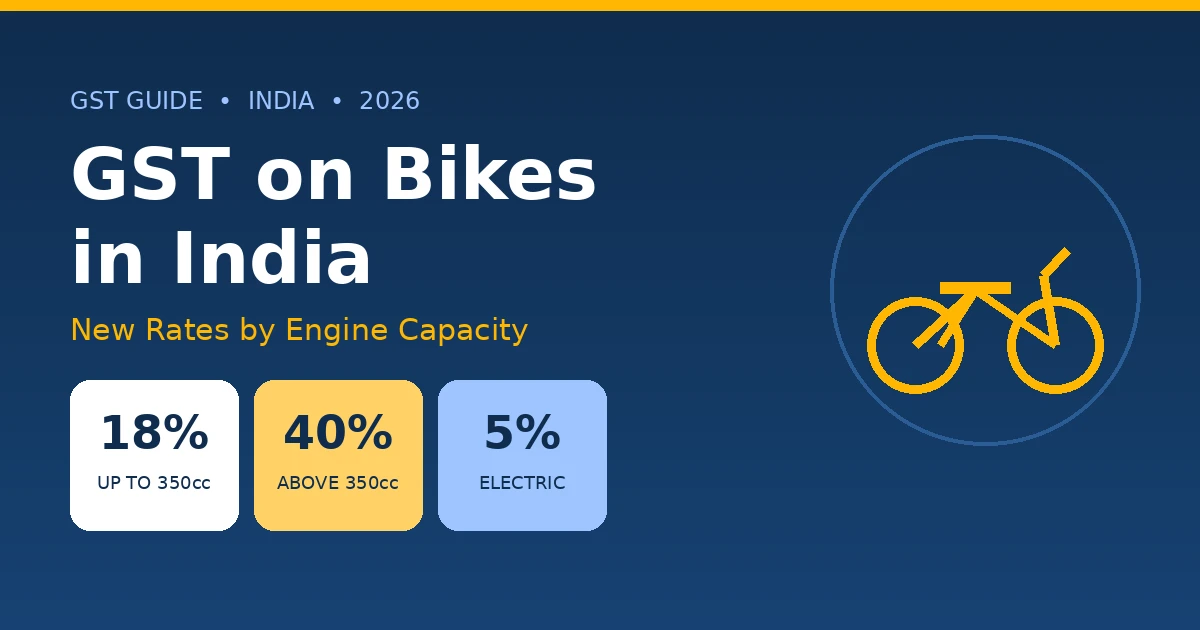
| 40% | Luxury & sin goods | Tobacco, pan masala, aerated drinks, large vehicles, and motorcycles above 350cc |
With the GST slab change, HSN code categorization also shifted; namely, three changes took place with the 22 September 2025 reform:
- Cement (2523) dropped from 28% to 18%;
- Raw timber (4403) rose from 5% to 18%; and
- Premiums on individual health and life insurance moved to nil.
This is why it is essential to first confirm the live rate against the finder or the Central Board of Indirect Taxes and Customs (CBIC) before invoicing an HSN code.
Important: GST rates also vary within a chapter, i.e., a chapter can hold items at 0%, 5%, 18%, and 40%. For example, the Cocoa & preparations group in Chapter 18 contains items belonging to both 5% and 18% GST rates. Our HSN Code finder returns the exact CBIC-notified rate for each specific code.
Use our GST calculator to split any rate into CGST and SGST once you have the HSN code.
Section-wise HSN Code List (Sections I–XXI)
The Harmonized System of Nomenclature divides all items into 99 chapters and 21 broad sections. The 2-digit chapter then covers the 4, 6, or 8-digit HSN code with different item categories.
Here is the full section map with the chapters each one holds:
| Section | Chapters | Covers |
| I | 01–05 | Live animals & animal products |
| II | 06–14 | Vegetable products |
| III | 15 | Animal & vegetable fats and oils |
| IV | 16–24 | Prepared food, beverages, and tobacco |
| V | 25–27 | Mineral products |
| VI | 28–38 | Chemical & allied products |
| VII | 39–40 | Plastics & rubber |
| VIII | 41–43 | Hides, skins, leather, furs |
| IX | 44–46 | Wood, cork, basketware |
| X | 47–49 | Pulp, paper, printed material |
| XI | 50–63 | Textiles & textile articles |
| XII | 64–67 | Footwear, headgear, and umbrellas |
| XIII | 68–70 | Stone, ceramics, glass |
| XIV | 71 | Pearls, precious metals, jewellery |
| XV | 72–83 | Base metals & articles |
| XVI | 84–85 | Machinery & electrical equipment |
| XVII | 86–89 | Vehicles, aircraft, vessels |
| XVIII | 90–92 | Instruments, clocks, musical instruments |
| XIX | 93 | Arms & ammunition |
| XX | 94–96 | Miscellaneous manufactured articles |
| XXI | 97 | Works of art, collectors' pieces, antiques |
Who Must Declare HSN Codes? Turnover Limits & Digit Rules
The HSN digit for any goods depends on the aggregate turnover reported by your business in the previous financial year. This rule comes from Notification 78/2020 – Central Tax (dated 15 October 2020), which took effect on 1 April 2021. The limits under the update replaced the earlier lower thresholds.
Different digits may apply for a B2B and a B2C business as described in the table below:
| Aggregate annual turnover | B2B invoices | B2C invoices |
| Up to ₹5 crore | 4-digit HSN (mandatory) | 4-digit HSN (optional) |
| Above ₹5 crore | 6-digit HSN (mandatory) | 6-digit HSN (mandatory) |
| Any turnover (exports & imports) | 8-digit HSN (mandatory) | 8-digit HSN (mandatory) |
The business invoices should contain these two aspects:
- Exporters and importers must always quote the full 8-digit ITC-HS code on shipping bills and Bills of Entry, regardless of turnover. This is done to ensure customs valuation and IGST reporting stay accurate.
- The same digit rule applies in GSTR-1, Table 12, not just on the invoice, so your filing has to match your billing.
What Changed Under Notification 78/2020?
Before 1 April 2021, businesses up to ₹1.5 crore were not required to showcase HSN, and those with a band of ₹1.5–5 crore used 2-digit HSN codes. That concession has now been removed. As of 2026, the 4-digit HSN code is the base code for almost every invoice, and the ₹5 crore limit is the threshold that decides whether 4 or 6 digits would apply.
If you are not yet registered or are unsure which bracket applies to you, start with GST registration and set your HSN digit level correctly from your first invoice.
HSN Code in a GST Invoice
On a GST invoice, the HSN (or SAC) code sits in the particular section, right beside the description, quantity, Unit Quantity Code (UQC), taxable value, and tax rate. It is a mandatory field to be added in the GST invoice once your turnover crosses the thresholds mentioned above. It should also appear in your GSTR-1 form and on any linked e-invoice or e-way bill.
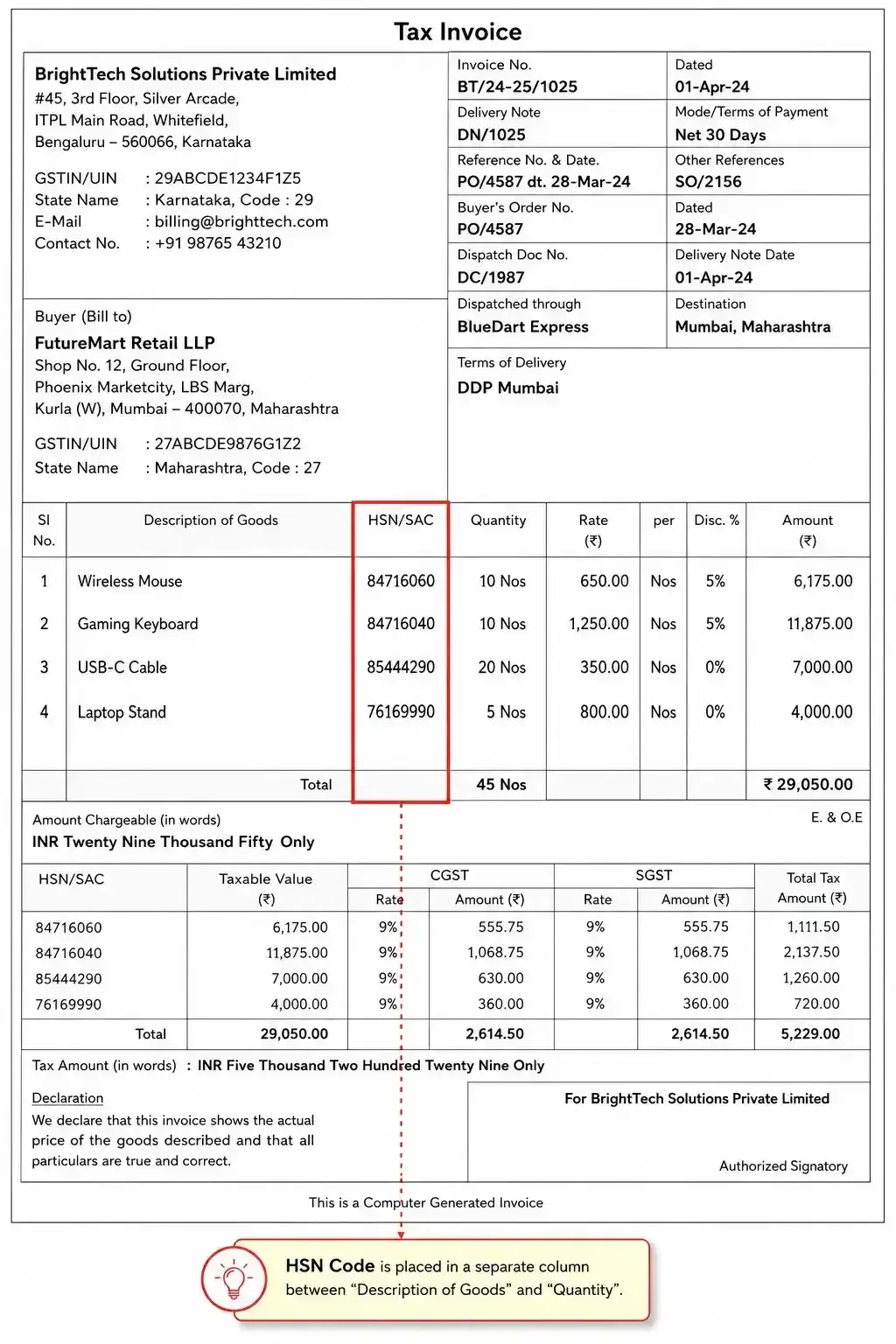
The placement of the HSN code in the invoice matters because it connects three fields at once:
- It fixes the rate,
- It feeds the HSN summary in Table 12, and
- It lets your buyer match the line for Input Tax Credit.
Be careful with the filing of the HSN code in the GST invoice and the rate charged, as the mismatch often leads to your ITC being questioned or rejected. For the full field-by-field layout, use our GST invoice generator tool.
How to Find the HSN Code for Your Product?
The fastest way to find your HSN code is to search by product name in our tool above (the search bar at the beginning). The results will give a list of digits where you can scroll to the 6- or 8-digit level till your turnover requirement is shown.
If you want to cross-check or use another method to find the HSN code, here are other options:
- Check the GST Portal
The official GST portal (services.gst.gov.in) and CBIC (cbic-gst.gov.in) publish the rate and classification notifications. Use these to confirm a code before a high-value or unusual supply.
- Browse by Chapter
When a product could fit more than one description, start from the chapter-wise list above and narrow down. This is the safest route for raw materials and multi-component goods.
- Check your Supplier's Invoice
Have a look at the vendor invoice or purchase order to see the code they used. However, avoid copying and trusting the code blindly, as the supplier may have misclassified the item. If you are not careful, then the liability for a wrong code on your invoice would be yours to pay.
For genuinely ambiguous items, the General Rules of Interpretation (GIR) decide classification, and you can seek a binding advance ruling from the GST authorities. When the stakes are high, confirm with a tax professional rather than blindly guessing.
HSN Code vs SAC Code - What is the Difference?
HSN codes classify goods, and SAC codes classify services. Both are part of the GST system and determine a tax rate for businesses, but they cover opposite sides of what one supplies.
- If you are a manufacturer, trader, wholesaler, retailer, importer, or exporter who sells physical products, then you are required to use HSN codes.
- If you are a consultant, IT firm, agency, or professional who supplies services, you use a 6-digit SAC. Construction services, for example, use SAC 9954.
| Parameter | HSN code | SAC code |
| Full form | Harmonised System of Nomenclature | Services Accounting Code |
| Classifies | Goods | Services |
| Digits | 4, 6 or 8 | Always 6 |
| Starts with | Chapter number (01–98) | Always 99 |
| Example | 8517 - mobile phones | 9954 - construction services |
| Maintained by | WCO (extended by India) | CBIC |
| Used by | Sellers of goods | Providers of services |
The easiest way to discriminate an HSN code from a SAC is the prefix: every SAC begins with 99, the chapter GST reserves for services. So 9954 is a construction service, 9971 a financial service, and so on. Picking the correct code (HSN or SAC) is what keeps your invoice valid and your buyer's input tax credit intact.
What Happens If You use the Wrong HSN Code?
Using the wrong HSN code exposes you to a penalty of up to ₹50,000 (₹25,000 under CGST + ₹25,000 under SGST) under Section 125 of the CGST Act. However, the indirect repercussions should also be considered. A wrong code often means a wrong GST rate, and that breaks the chain for everyone downstream.
Here’s what you may face if you show an incorrect HSN code:
- A wrong rate can deny or delay your buyer's ITC, because the value and rate on your invoice will not reconcile with what they claim.
- Under e-invoicing, an invalid or mismatched HSN can cause the Invoice Reference Number (IRN) to be rejected outright.
- For exporters, an inaccurate 8-digit ITC-HS code can hold up customs clearance and stall refund claims.
- Repeated mismatches also disturb the auto-population of GSTR-1 and invite scrutiny notices.
Let’s take a short example to understand the worst-case scenario:
Suppose you sell cement and quote HSN 2523 but bill it at the old 28% rate instead of the current 18%. You have over-collected tax, your buyer's ITC will mismatch, and a credit note plus a corrected return will follow. This is an avoidable rework that a quick check in the finder using a reliable HSN Code Finder tool can prevent. When you are unsure, classify conservatively, document your reasoning, and confirm the rate before issuing the invoice.
Benefits of Using RegisterKaro's Free HSN Code Finder
RegisterKaro's free HSN code finder makes GST classification for businesses and entrepreneurs simple, fast, and error-free. Here's why businesses across India prefer it:
- Search by Product Name or HSN Number
The finder offers complete flexibility. You can search using the product name, a partial HSN number, or browse by chapter. Whether you type "cotton saree" or enter "62", the tool delivers accurate HSN matches instantly.
- Verified HSN Codes with the Latest GST Rates
Every entry in the HSN code list with GST rate is mapped to the latest slab notified by CBIC. The data stays updated with changes announced in GST Council meetings. This ensures you apply the correct slab (NIL, 5%, 18%, or 40%) on every invoice.
- Free Download of the Full HSN Code List in Excel
You can download the complete HSN code list along with GST rates in Excel format, absolutely free. It serves as a handy reference for CAs, GST practitioners, and businesses managing large product catalogues.
With speed, accuracy, and a clean interface, RegisterKaro's HSN code finder makes GST compliance effortless for every business.
Frequently asked questions
Type your product name, like "cotton t-shirt" or "mobile phone", into RegisterKaro's HSN code finder. The tool instantly fetches matching 4-digit codes. You can click any result to view the 6 or 8-digit code along with the applicable GST rate, linked directly to CBIC-notified slabs.